HTML <form> Tag
The <form> tag creates a web form. It groups inputs, textareas, and other controls and submits them via the action and method attributes.
The <form> tag is used to add HTML forms to the web page for user input. Forms are used to pass the data submitted by the user to the server. The data is sent when pressing the "Submit" button. If there isn’t such button, the information is sent when the "Enter" key is pressed.
Syntax
The <form> tag comes in pairs. The content is written between the opening (<form>) and closing (</form>) tags.
The <form> element contains other HTML tags, which define the input method of data:
- The
<input>tag defines a user input field. - The
<textarea>tag defines a form field to create a multiline input area. - The
<button>tag is used to place a button inside a form. - The
<select>tag sets up a control for creating a drop-down list box. - The
<option>tag defines the items in the drop-down list set by the<select>tag. - The
<optgroup>tag groups related data in the drop-down list set by the<select>tag. - The
<fieldset>tag visually groups the elements inside the form set by the<form>tag. - The
<label>tag sets the text label for the<input>element. - The
<legend>tag defines the header for the<fieldset>element.
Example of the HTML <form> tag:
HTML <form> Tag Example
<!DOCTYPE html>
<html>
  <head>
    <title>Title of the document</title>
  </head>
  <body>
    <form action="/form/submit" method="POST" >
      <label for="fname">Name</label>
      <input type="text" name="FirstName" id="fname" value="Mary"/><br /><br />
      <label for="lname">Surname</label>
      <input type="text" name="LastName" id="lname" value="Thomson"/><br /><br />
      <input type="submit" value="Submit"/>
    </form>
  </body>
</html>Result
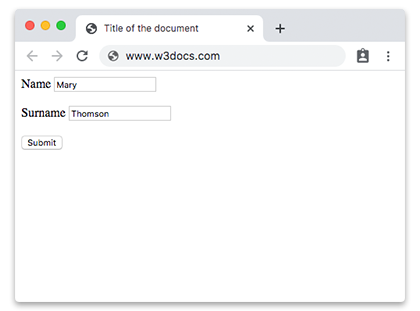
Example of the HTML <form> tag with the <input> and <label> tags:
<!DOCTYPE html>
<html>
  <head>
    <title>Title of the document</title>
  </head>
  <body>
    <form action="/form/submit" method="POST" >
      <label for="fname">Name</label>
      <input type="text" name="Name" id="fname" value="Mary"/><br /><br />
      <label for="number">Phone</label>
      <input type="number" name="Phone" id="number"/><br /><br />
      <label for="email">Email</label>
      <input type="email" placeholder="Enter Email" name="email" required /> <br /><br />
      <input type="submit" value="Submit"/>
    </form>
  </body>
</html>Example of the HTML <form> tag with the <textarea> tag:
The <label> for attribute is tied to the id of the <textarea> so that clicking the label focuses the field and screen readers announce it correctly.
<!DOCTYPE html>
<html>
  <head>
    <title>Title of the document</title>
  </head>
  <body>
    <h1>Form example</h1>
    <form action="/form/submit" method="POST" >
      <label for="message">Message</label><br />
      <textarea id="message" name="message" rows="3" cols="30" placeholder="Type some text here"></textarea><br />
      <input type="submit" value="Submit"/>
    </form>
  </body>
</html>GET vs POST: which method to use
The method attribute controls how the browser sends the form data. The two values behave very differently:
method="get" appends the form data to the action URL as a query string (?name=value&name=value). Use it when:
- The submission only reads or filters data (search forms, filters).
- You want the result to be bookmarkable or shareable — the data is visible in the URL.
Because the data lives in the URL, GET has real limitations: the URL length is capped by browsers and servers, the values are visible in the address bar and server logs, and it must never carry passwords or other sensitive data.
method="post" sends the form data in the body of the HTTP request, not the URL. Use it when:
- The submission changes something on the server (creating an account, posting a comment, making a payment).
- You are sending large amounts of data or files (POST has no practical size limit and is required for file uploads).
- The data is sensitive and should not appear in the URL.
POST submissions are not bookmarkable, and reloading the result page typically re-triggers the request. Read more in HTTP methods.
Uploading files
To let users upload files, the form must use method="post" together with enctype="multipart/form-data", and include an <input type="file">. The default application/x-www-form-urlencoded encoding cannot carry binary file data, so the upload will not work without it.
<!DOCTYPE html>
<html>
  <head>
    <title>Title of the document</title>
  </head>
  <body>
    <form action="/upload" method="post" enctype="multipart/form-data">
      <label for="avatar">Choose a profile picture:</label><br />
      <input type="file" id="avatar" name="avatar" accept="image/png, image/jpeg" /><br /><br />
      <input type="submit" value="Upload" />
    </form>
  </body>
</html>Note that the accept attribute (the list of allowed file types) belongs on the <input type="file"> element, not on the <form> tag.
Skipping validation with novalidate
By default, browsers validate constraints such as required, type="email", or pattern before submitting the form. Adding the boolean novalidate attribute on the <form> tells the browser to skip that built-in validation and submit anyway — useful, for example, when you handle validation yourself with JavaScript.
<!DOCTYPE html>
<html>
  <head>
    <title>Title of the document</title>
  </head>
  <body>
    <form action="/form/submit" method="post" novalidate>
      <label for="email">Email</label>
      <input type="email" id="email" name="email" required /><br /><br />
      <input type="submit" value="Submit" />
    </form>
  </body>
</html>Attributes
| Attribute | Value | Description |
|---|---|---|
| accept-charset | character_set | Specifies the character encodings the server accepts for the submitted form data. |
| action | URL | The URL where the form data is sent for processing — typically an API endpoint or a server route. Omit it (or set it to an empty string) to submit to the same page that contains the form. |
| autocomplete | on / off | Enables or disables browser auto-completion of form fields. The default is on. |
| enctype | application/x-www-form-urlencoded / multipart/form-data / text/plain | Determines how the form data is encoded before it is sent. The default is application/x-www-form-urlencoded. Use multipart/form-data when the form contains a file upload. Only applies when method is post. |
| method | get / post | Specifies the HTTP method used to submit the form. The default is get. See GET vs POST below. |
| name | text | Defines the form name, used to reference the form in scripts. |
| novalidate | novalidate | When present, the browser does not validate the form fields before submitting. |
| target | _blank / _self / _parent / _top / framename | Determines where to display the response received after submitting the form. |
The <form> tag also supports the Global attributes and the Event Attributes.