HTML <dfn> Tag
The HTML <dfn> tag marks the defining instance of a term. Learn how it differs from <i>/<em>, with title, <abbr> and id examples.
The HTML <dfn> tag marks the defining instance of a term — the place in your text where that term is being introduced and explained. Browsers render its content in italics by default, but the tag is about meaning, not appearance: it tells the browser, search engines, and assistive technology "this is where this word is defined."
Why use <dfn> instead of <i> or <em>?
It is tempting to reach for <i> or <em> to italicize a term, but those tags carry no information about what the text means:
<i>is purely stylistic — italic text with no special semantics.<em>marks stress emphasis (a change in spoken intonation), not a definition.<dfn>is semantic and machine-readable: it explicitly identifies the term being defined. Screen readers can announce it as a definition, and tools can build glossaries from it.
So when the italics exist because a term is being defined for the first time, use <dfn>. When you just want italics or emphasis, use <i> or <em>.
Syntax
The <dfn> tag comes in pairs — content is written between the opening <dfn> and closing </dfn> tags.
The surrounding <p> tag, the <dt>/<dd> pair, or the <section> tag acts as the definition context for the term: the term defined by <dfn> should be explained within that same block.
Basic example of the HTML <dfn> tag
<!DOCTYPE html>
<html>
  <head>
    <title>Title of the document</title>
  </head>
  <body>
    <p><dfn>HTML</dfn> (HyperText Markup Language) — the standardized markup language for documents on the World Wide Web. Most web pages contain a description of the markup in the HTML language.</p>
  </body>
</html>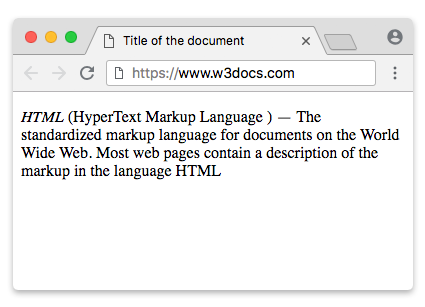
How the defined term is identified
The browser decides which word a <dfn> is defining using these rules, in order:
- If
<dfn>has atitleattribute, the value oftitleis the term being defined. The visible text can then be an abbreviation (often using<abbr>). - If
<dfn>has exactly one child — an<abbr>element with atitleattribute — and<dfn>has no other text content, then thetitleof the<abbr>is the term being defined. - Otherwise, the visible text content of
<dfn>is the term being defined.
Example with a title attribute
Here the title value is treated as the full term being defined, while the visible text stays short:
<!DOCTYPE html>
<html>
  <head>
    <title>Title of the document</title>
  </head>
  <body>
    <p>Mouse over to see the definition.</p>
    <dfn title="HyperText Markup Language">HTML</dfn>
  </body>
</html>The title tooltip appears only on mouse hover, so it is invisible to keyboard and touch users. Never put essential information only in title — pair the term with visible explanatory text, or use <abbr> so the expansion is available semantically.
Example with the <abbr> tag
Combining <dfn> with <abbr> is a common, accessible pattern: <dfn> marks the defining instance, and <abbr> supplies the full expansion via its title.
<!DOCTYPE html>
<html>
  <head>
    <title>Title of the document</title>
  </head>
  <body>
    <p>Mouse over to see the definition.</p>
    <dfn><abbr title="Cascading Style Sheets">CSS</abbr></dfn>
  </body>
</html>Linking back to a definition with an id
If you add an id to a <dfn>, you can link to it from anywhere on the page with an <a> element using a fragment (#). This lets readers jump straight to where a term is defined:
<!DOCTYPE html>
<html>
  <head>
    <title>Title of the document</title>
  </head>
  <body>
    <p>
      <dfn id="ajax-def">AJAX</dfn> is a technique for updating parts of a
      web page without reloading the whole page.
    </p>

    <p>Later on, we mention <a href="#ajax-def">AJAX</a> again — click the
    link to jump back to its definition.</p>
  </body>
</html>Attributes
| Attribute | Value | Description |
|---|---|---|
| title | text | Provides the term's full definition or expanded form. When present, it overrides the default term and is shown as a tooltip on hover. |
The <dfn> tag also supports the Global Attributes and the Event Attributes.
How to style an HTML <dfn> tag
dfn {
  color: #0056b3;
  font-weight: bold;
}