HTML <wbr> Tag
The HTML <wbr> tag marks a word-break opportunity: a spot where a long word or URL may wrap if needed. Learn its syntax, examples and how it differs from ­.
The HTML <wbr> (Word BReak opportunity) tag marks a spot inside text where the browser may insert a line break if the line would otherwise overflow. It does not force a break — it only adds the option to break there. If the word fits on the line, <wbr> renders nothing at all.
This is different from the <br> tag, which always forces a line break. With <wbr>, the browser breaks at that point only when it needs to wrap a long, unbreakable string such as a URL, file path, or a very long word.
The <wbr> tag is one of the HTML5 elements.
Why use <wbr>?
By default, browsers break lines at spaces and hyphens. A long, space-less string — a URL, a file path, a hash, or a coined long word — has no natural break point, so the browser does one of two unwanted things:
- it pushes the string past the edge of its container, causing horizontal overflow, or
- it wraps the string in an awkward, hard-to-read place.
Placing <wbr> at sensible spots tells the browser "here is a safe place to break this string if you run out of room." The breaks only appear when needed, so on a wide screen the string stays intact.
Wrapping a long URL — the most common use
A long URL with no spaces is the classic case for <wbr>. Add a <wbr> after slashes or dots so the link can wrap neatly inside a narrow column instead of overflowing:
<p style="width: 220px; border: 1px solid #ccc; padding: 8px;">
  Read it here:
  https://<wbr>www.w3docs.com<wbr>/learn-html<wbr>/html-wbr-tag
</p>On a wide screen the URL stays on one line, but inside the 220px container above it breaks only at the <wbr> points you allowed.
<wbr> for a long word
<wbr> also helps with a single enormously long word. Compare a paragraph with and without break opportunities:
<p>This is the longest word you can ever meet in the English language pneumonoultramicroscopicsilicovolcanoconiosis</p>

<p>This is the longest word you can ever meet in the English language pneumono<wbr>ultra<wbr>micro<wbr>scopic<wbr>silico<wbr>volcano<wbr>coniosis</p>The first paragraph may overflow its container; the second can wrap cleanly between syllables when space runs out.
<wbr> vs. ­ vs. CSS
<wbr> is one of several ways to control how text wraps. Each behaves differently, so pick the right tool:
| Technique | What it does | Shows a hyphen? |
|---|---|---|
<wbr> | Marks a break opportunity in markup. Breaks only if needed. | No |
­ (soft hyphen) | Marks a break opportunity. Breaks only if needed. | Yes — a hyphen appears at the break |
CSS overflow-wrap: break-word | Lets the browser break a long word anywhere to avoid overflow. | No |
CSS word-break: break-all | Forces breaks between any two characters. | No |
When to choose which:
- Use
<wbr>when you know the right break points (after each/in a URL, between syllables) and want no hyphen shown. - Use
­when you want the same control but a hyphen at the break — ideal for hyphenating real words. - Use CSS
overflow-wrap/word-breakwhen you can't (or don't want to) edit every string by hand and just need to stop overflow site-wide. These are usually the better choice for user-generated content where you don't control the text.
A hyphen at the line break point is not introduced by the <wbr> element. If you want a hyphen to appear only at the end of a wrapped line, use ­ (the soft-hyphen character entity) instead.
File-path example
Here <wbr> lets a Windows file path break after each backslash segment:
<p>You can find the file by going
  C:\user\docs\Letter.txt
</p>Without break opportunities the whole path drops to the next line. Adding <wbr> elements lets it wrap cleanly:
<p>You can find the file by going C:<wbr>\user<wbr>\docs<wbr>\Files<wbr>\Letter.txt</p>Syntax
The <wbr> tag is an empty element, so it has no closing tag. In XHTML you must self-close it as <wbr/>.
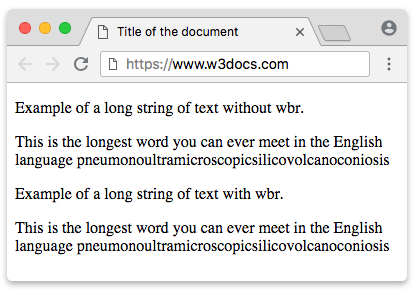
Full example of the HTML <wbr> tag
<!DOCTYPE html>
<html>
  <head>
    <title>Title of the document</title>
  </head>
  <body>
    <p>Example of a long string of text without wbr.</p>
    <p>This is the longest word you can ever meet in the English language pneumonoultramicroscopicsilicovolcanoconiosis</p>
    <p>Example of a long string of text with wbr.</p>
    <p>This is the longest word you can ever meet in the English language pneumono<wbr />ultra<wbr />micro<wbr />scopic<wbr />silico<wbr />volcano<wbr />coniosis</p>
  </body>
</html>Result
Attributes
The <wbr> element has no element-specific attributes. It supports only the Global attributes and the Event Attributes.