HTML Colors
Set HTML colors with color names, hex codes (#RRGGBB, #RGB, #RRGGBBAA), rgb()/rgba() and hsl()/hsla(). Examples, a color-name table and contrast tips.
Colors in HTML are applied with CSS, either inline through the style attribute or in a stylesheet. You never set a color on HTML alone — you set a CSS property such as color (text color), background-color, or border-color, and give it a color value. This page covers every color-value format you can use:
- Named colors — keywords like
red,tomato, orrebeccapurple. - Hexadecimal —
#RRGGBB, the shorthand#RGB, and the 8-digit#RRGGBBAA(with alpha). rgb()/rgba()— red, green, blue channels (plus optional opacity).hsl()/hsla()— hue, saturation, lightness (plus optional opacity).
All of these are interchangeable: #FF0000, red, rgb(255, 0, 0), and hsl(0, 100%, 50%) all describe the same pure red. For a deeper reference on the CSS side, see the CSS color and CSS background-color chapters.
Hex Color Codes
A hex color code is a hex triplet, which represents three separate values defining the levels of the component colors. It is specified with a hexadecimal (hex) notation for a mixture of Red, Green, and Blue color values. The lowest value that can be given to one of the light sources is 0 (hex 00). The highest value is 255 (hex FF).
Hex values are written as six-digit numbers, starting with a # sign. Letters used in a hexadecimal digit may be uppercase or lowercase. For example, to specify white color you can write #FFFFFF or #ffffff.
There are two further hex forms worth knowing:
- Shorthand
#RGB— when each channel uses a repeated pair, you can collapse it.#FF0000becomes#F00, and#FFCC00becomes#FC0. The browser expands each digit by doubling it. - 8-digit
#RRGGBBAA— adds a final pair for the alpha (opacity) channel, from00(fully transparent) toFF(fully opaque). For example,#1c87c980is the blue#1c87c9at roughly 50% opacity.
To add a color to a text element, use the style attribute (where the color property is your Hex code) or corresponding CSS properties such as color: or background-color:.
Example of the background-color property used with the "hex" value:
<!DOCTYPE html>
<html>
  <head>
    <title>Title of the document</title>
    <style>
      div {
        background-color: #1c87c9;
        color: #d5dce8;
        padding: 22px;
      }
    </style>
  </head>
  <body>
    <div>
      <p>This is a text in grey, and the background is blue</p>
    </div>
    <p style="color:#8ebf42;"> This is a text in green</p>
  </body>
</html>Result
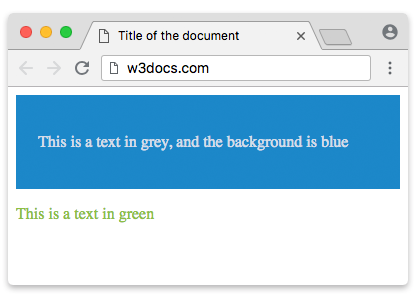
You can use our Color Picker tool to browse millions of colors and copy their Hex, RGB, and HSL values.
HTML Color Names
To color the text element using an HTML color name, put the name of the color (blue, for example) instead of Hex code from the previous step.
Example of the color property used with the "color name" value:
<!DOCTYPE html>
<html>
  <head>
    <title>Title of the document</title>
    <style>
      div {
        background-color: blue;
        color: white;
        padding: 22px;
      }
    </style>
  </head>
  <body>
    <div>
      <p>This is a text in grey, and the background is blue</p>
    </div>
    <p style="color:blue;"> This is a text in blue</p>
  </body>
</html>RGB Color Values
An rgb() value mixes red, green, and blue channels, each from 0 to 255 — exactly the same model as hex, but written in decimal. rgb(255, 0, 0) is red, rgb(0, 0, 0) is black, and rgb(255, 255, 255) is white.
To add a color to a text element, use the style attribute (where the color property is your RGB value) or corresponding CSS properties.
Example of the background-color property used with the "RGB" value:
<!DOCTYPE html>
<html>
  <head>
    <title>Title of the document</title>
    <style>
      div {
        background-color:rgb(25,25,112);
        color: rgb(169,169,169);
        padding: 22px;
      }
    </style>
  </head>
  <body>
    <div>
      <p>This is a text in grey, and the background is blue</p>
    </div>
    <p style="color:rgb(25,25,112);"> This is a text in blue</p>
  </body>
</html>RGBA: adding opacity
rgba() extends rgb() with a fourth value, the alpha channel, which controls opacity from 0 (fully transparent) to 1 (fully opaque). This is useful for tinted overlays or semi-transparent backgrounds where you want the layer beneath to show through.
<!DOCTYPE html>
<html>
  <head>
    <title>Title of the document</title>
    <style>
      div {
        background-color: rgba(25, 25, 112, 0.5);
        color: rgb(33, 33, 33);
        padding: 22px;
      }
    </style>
  </head>
  <body>
    <div>
      <p>This box uses a semi-transparent navy background</p>
    </div>
  </body>
</html>In modern CSS, rgb(25 25 112 / 50%) is the equivalent space-separated syntax, and the 8-digit hex #19197080 does the same job.
HSL and HSLA Color Values
hsl() describes a color the way many designers think about it — by hue, saturation, and lightness — which makes it easy to create a family of related shades by adjusting one value.
- Hue is an angle on the color wheel from
0to360:0(and360) is red,120is green,240is blue. - Saturation is a percentage:
0%is grey,100%is the most vivid version of the hue. - Lightness is a percentage:
0%is black,50%is the "normal" color,100%is white.
hsla() adds an alpha channel for opacity, just like rgba().
<!DOCTYPE html>
<html>
  <head>
    <title>Title of the document</title>
    <style>
      .solid {
        background-color: hsl(210, 79%, 46%);
        color: white;
        padding: 22px;
      }
      .faded {
        background-color: hsla(210, 79%, 46%, 0.4);
        padding: 22px;
      }
    </style>
  </head>
  <body>
    <div class="solid"><p>hsl background</p></div>
    <div class="faded"><p>hsla background with 40% opacity</p></div>
  </body>
</html>Because lightness and saturation are independent of hue, HSL is handy for generating hover or "darker/lighter" variants of a brand color: keep the hue, lower the lightness.
Color and accessibility
Color is also about readability. The Web Content Accessibility Guidelines (WCAG) require a contrast ratio of at least:
- 4.5:1 for normal body text against its background (AA level).
- 3:1 for large text (about 18pt / 24px, or 14pt / 19px bold) and for UI components and graphics.
Two consequences worth remembering:
- Never rely on color alone to convey information — for example, mark required form fields or error states with text or an icon as well, so colorblind users and screen-reader users are not left out.
- Check your combinations. A pale grey on white may look elegant but fail the 4.5:1 minimum. Use our Color Contrast Checker to test a foreground/background pair before shipping it.
The 216-color "web-safe" palette that older tutorials list (colors built only from the hex pairs
00,33,66,99,CC,FF) was a workaround for displays limited to 256 colors. Modern screens render millions of colors, so this palette is obsolete and you should pick whatever value fits your design.
List of HTML color names:
Here is a list of some of the standard HTML color names:
| Color Name | Hexadecimal Value |
|---|---|
| AliceBlue | #F0F8FF |
| AntiqueWhite | #FAEBD7 |
| Aqua | #00FFFF |
| Aquamarine | #7FFFD4 |
| Azure | #F0FFFF |
| Beige | #F5F5DC |
| Bisque | #FFE4C4 |
| Black | #000000 |
| BlanchedAlmond | #FFEBCD |
| Blue | #0000FF |
| BlueViolet | #8A2BE2 |
| Brown | #A52A2A |
| BurlyWood | #DEB887 |
| CadetBlue | #5F9EA0 |
| Chartreuse | #7FFF00 |
| Chocolate | #D2691E |
| Coral | #FF7F50 |
| CornflowerBlue | #6495ED |
| Cornsilk | #FFF8DC |
| Crimson | #DC143C |
| Cyan | #00FFFF |
| DarkBlue | #00008B |
| DarkCyan | #008B8B |
| DarkGoldenRod | #B8860B |
| DarkGray | #A9A9A9 |
| DarkGrey | #A9A9A9 |
| DarkGreen | #006400 |
| DarkKhaki | #BDB76B |
| DarkMagenta | #8B008B |
| DarkOliveGreen | #556B2F |
| DarkOrange | #FF8C00 |
| DarkOrchid | #9932CC |
| DarkRed | #8B0000 |
| DarkSalmon | #E9967A |
| DarkSeaGreen | #8FBC8F |
| DarkSlateBlue | #483D8B |
| DarkSlateGray | #2F4F4F |
| DarkSlateGrey | #2F4F4F |
| DarkTurquoise | #00CED1 |
| DarkViolet | #9400D3 |
| DeepPink | #FF1493 |
| DeepSkyBlue | #00BFFF |
| DimGray | #696969 |
| DimGrey | #696969 |
| DodgerBlue | #1E90FF |
| FireBrick | #B22222 |
| FloralWhite | #FFFAF0 |
| ForestGreen | #228B22 |
| Fuchsia | #FF00FF |
| Gainsboro | #DCDCDC |
| GhostWhite | #F8F8FF |
| Gold | #FFD700 |
| GoldenRod | #DAA520 |
| Gray | #808080 |
| Grey | #808080 |
| Green | #008000 |
| GreenYellow | #ADFF2F |
| HoneyDew | #F0FFF0 |
| HotPink | #FF69B4 |
| IndianRed | #CD5C5C |
| Indigo | #4B0082 |
| Ivory | #FFFFF0 |
| Khaki | #F0E68C |
| Lavender | #E6E6FA |
| LavenderBlush | #FFF0F5 |
| LawnGreen | #7CFC00 |
| LemonChiffon | #FFFACD |
| LightBlue | #ADD8E6 |
| LightCoral | #F08080 |
| LightCyan | #E0FFFF |
| LightGoldenRodYellow | #FAFAD2 |
| LightGray | #D3D3D3 |
| LightGrey | #D3D3D3 |
| LightGreen | #90EE90 |
| LightPink | #FFB6C1 |
| LightSalmon | #FFA07A |
| LightSeaGreen | #20B2AA |
| LightSkyBlue | #87CEFA |
| LightSlateGray | #778899 |
| LightSlateGrey | #778899 |
| LightSteelBlue | #B0C4DE |
| LightYellow | #FFFFE0 |
| Lime | #00FF00 |
| LimeGreen | #32CD32 |
| Linen | #FAF0E6 |
| Magenta | #FF00FF |
| Maroon | #800000 |
| MediumAquaMarine | #66CDAA |
| MediumBlue | #0000CD |
| MediumOrchid | #BA55D3 |
| MediumPurple | #9370DB |
| MediumSeaGreen | #3CB371 |
| MediumSlateBlue | #7B68EE |
| MediumSpringGreen | #00FA9A |
| MediumTurquoise | #48D1CC |
| MediumVioletRed | #C71585 |
| MidnightBlue | #191970 |
| MintCream | #F5FFFA |
| MistyRose | #FFE4E1 |
| Moccasin | #FFE4B5 |
| NavajoWhite | #FFDEAD |
| Navy | #000080 |
| OldLace | #FDF5E6 |
| Olive | #808000 |
| OliveDrab | #6B8E23 |
| Orange | #FFA500 |
| OrangeRed | #FF4500 |
| Orchid | #DA70D6 |
| PaleGoldenRod | #EEE8AA |
| PaleGreen | #98FB98 |
| PaleTurquoise | #AFEEEE |
| PaleVioletRed | #DB7093 |
| PapayaWhip | #FFEFD5 |
| PeachPuff | #FFDAB9 |
| Peru | #CD853F |
| Pink | #FFC0CB |
| Plum | #DDA0DD |
| PowderBlue | #B0E0E6 |
| Purple | #800080 |
| Red | #FF0000 |
| RosyBrown | #BC8F8F |
| RoyalBlue | #4169E1 |
| SaddleBrown | #8B4513 |
| Salmon | #FA8072 |
| SandyBrown | #F4A460 |
| SeaGreen | #2E8B57 |
| SeaShell | #FFF5EE |
| Sienna | #A0522D |
| Silver | #C0C0C0 |
| SkyBlue | #87CEEB |
| SlateBlue | #6A5ACD |
| SlateGray | #708090 |
| SlateGrey | #708090 |
| Snow | #FFFAFA |
| SpringGreen | #00FF7F |
| SteelBlue | #4682B4 |
| Tan | #D2B48C |
| Teal | #008080 |
| Thistle | #D8BFD8 |
| Tomato | #FF6347 |
| Turquoise | #40E0D0 |
| Violet | #EE82EE |
| Wheat | #F5DEB3 |
| White | #FFFFFF |
| WhiteSmoke | #F5F5F5 |
| Yellow | #FFFF00 |
| YellowGreen | #9ACD32 |
These color names can be used in HTML and CSS code to specify the color of text, background, borders, and other elements. To dig deeper on the CSS side, read the CSS color, CSS background-color, and CSS color names chapters.