HTML <legend> Tag
The <legend> tag sets the caption for a group of form controls defined by the <fieldset> tag. Placement rules, accessibility, attributes and examples.
The <legend> tag defines the caption for a group of form controls wrapped in a <fieldset> element. In the browser, the fieldset is drawn as a framed box, and the legend caption is rendered overlapping the top border of that frame. Grouping related controls inside a <form> with <fieldset> and a <legend> caption makes complex forms easier to scan and far more accessible.
This page covers the correct placement rules for <legend> , how assistive technology uses it, how to wire up accessible label/input pairs, and how to handle real-world cases such as a form split into multiple sections.
Why <legend> must be the first child of <fieldset>
The HTML specification requires the <legend> to be the first child of its <fieldset> . This is not just a style convention:
- Rendering depends on it. The browser positions the legend on the top border of the fieldset frame. If the legend is not first, it loses that special placement and the box renders incorrectly.
- The accessibility tree depends on it. Browsers map the first
<legend>
A <fieldset> may contain only one <legend> , and it must come before any controls. If you need a second caption, you need a second <fieldset> .
Accessibility: how screen readers use the legend
The combination of <fieldset> and <legend> is the standard way to label a group of controls (the classic example is a set of radio buttons that share one question).
When a screen reader moves focus to any control inside the fieldset, it announces the legend text as a prefix to that control's own label. For example, with a legend of Shipping address and a field labelled City, the screen reader reads roughly "Shipping address, City, edit text." This tells the user which section each field belongs to without them having to navigate out of the group. Bare text like Name: placed loosely next to an input is not a programmatic label, so it gives no such context — always pair every control with a real <label>.
Syntax
The <legend> tag comes in pairs. The caption text is written between the opening <legend> and closing </legend> tags, and it must be the first thing inside the <fieldset> .
Example of the HTML <legend> tag:
The example below models accessible markup: each control has an id, and each <label> points to it with a matching for attribute. Clicking a label then focuses its input, and screen readers read the legend plus the label together.
HTML <legend> Tag
<!DOCTYPE html>
<html>
  <head>
    <title>Title of the document</title>
  </head>
  <body>
    <form>
      <fieldset>
        <legend>Personal data:</legend>
        <label for="name">Name:</label>
        <input type="text" id="name" name="name" />
        <br>
        <br>
        <label for="email">E-mail:</label>
        <input type="email" id="email" name="email" />
        <br>
        <br>
        <label for="dob">Date of birth:</label>
        <input type="date" id="dob" name="dob" />
        <br>
        <br>
        <label for="pob">Place of birth:</label>
        <input type="text" id="pob" name="pob" />
      </fieldset>
    </form>
  </body>
</html>Result
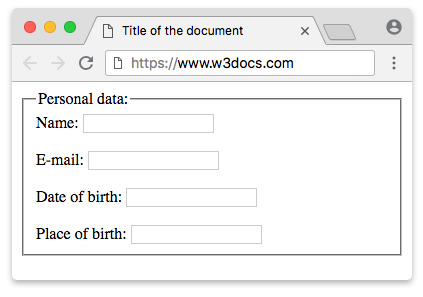
Example of the HTML <legend> tag with CSS:
Example of the <legend> tag with CSS properties:
<!DOCTYPE html>
<html>
  <head>
    <title>Title of the document</title>
    <style>
      form {
        width: 55%;
      }
      fieldset {
        padding: 25px;
      }
      label {
        display: inline-block;
        width: 95px;
        text-align: right;
      }
      legend {
        display: block;
        padding: 15px;
        margin-bottom: 10px;
        background-color: #cccccc;
        color: #777777;
      }
    </style>
  </head>
  <body>
    <form>
      <fieldset>
        <legend>Personal data:</legend>
        <label for="name">Name:</label>
        <input type="text" id="name" name="name" />
        <br>
        <br>
        <label for="email">E-mail:</label>
        <input type="email" id="email" name="email" />
        <br>
        <br>
        <label for="dob">Date of birth:</label>
        <input type="date" id="dob" name="dob" />
        <br>
        <br>
        <label for="pob">Place of birth:</label>
        <input type="text" id="pob" name="pob" />
      </fieldset>
    </form>
  </body>
</html>Example with multiple fieldsets and legends:
Real forms are usually split into several groups — for instance, a checkout form with separate shipping and billing sections. Each group gets its own <fieldset> and its own <legend> . A screen reader then prefixes every field with the right section name, so the user always knows whether they are editing the shipping or the billing address.
Form with shipping and billing groups
<!DOCTYPE html>
<html>
  <head>
    <title>Title of the document</title>
  </head>
  <body>
    <form>
      <fieldset>
        <legend>Shipping address</legend>
        <label for="ship-name">Full name:</label>
        <input type="text" id="ship-name" name="ship-name" />
        <br>
        <br>
        <label for="ship-city">City:</label>
        <input type="text" id="ship-city" name="ship-city" />
      </fieldset>
      <fieldset>
        <legend>Billing address</legend>
        <label for="bill-name">Full name:</label>
        <input type="text" id="bill-name" name="bill-name" />
        <br>
        <br>
        <label for="bill-city">City:</label>
        <input type="text" id="bill-city" name="bill-city" />
      </fieldset>
    </form>
  </body>
</html>A fieldset and legend are also the recommended way to label a set of radio buttons, where the legend asks the question and each radio has its own label:
<form>
  <fieldset>
    <legend>Choose a shipping speed</legend>
    <label for="standard">Standard (5–7 days)</label>
    <input type="radio" id="standard" name="speed" value="standard" />
    <br>
    <label for="express">Express (1–2 days)</label>
    <input type="radio" id="express" name="speed" value="express" />
  </fieldset>
</form>Attributes
| Attribute | Value | Description |
|---|---|---|
| align | left right center justify | Defined the horizontal alignment of the caption against the fieldset. Deprecated — removed from HTML5; use CSS instead. |
The <legend> tag supports the Global Attributes and the Event Attributes.
Replacing the deprecated align attribute
The old align="center" attribute no longer works reliably and should not be used. The CSS equivalent is text-align on the <legend> itself:
/* Old, deprecated: <legend align="center"> */
/* Modern replacement: */
legend {
  text-align: center;
}Positioning quirks to know about:
- By default the legend sits over the top border of the fieldset, near the left edge. Browsers reserve the legend a special position in the layout, so it does not behave like a normal block-level box.
text-alignmoves the caption horizontally within the space the browser gives it — results vary between browsers, so test your target browsers.- For precise control you can override the default placement with
positionand offsets, or usepadding/marginto nudge the text. Settingwidthon the legend lets you align it the wayalign="justify"once implied.
How to style an HTML <legend> Tag
You can style the <legend> element using standard CSS properties such as padding, margin, background-color, text-align, and font-weight, as demonstrated in the CSS example above.