HTML Tags for Text Formatting
HTML text formatting tags explained: semantic tags like strong and em vs. presentational tags like b and i, why the difference matters, and examples.
HTML provides a set of inline elements for formatting text. They fall into two groups, and understanding the difference between them is the most important thing on this page.
- Semantic (logical) tags describe what the text means — that a word is important, emphasized, a defined term, or an abbreviation. Examples:
<strong>,<em>,<mark>,<abbr>. - Presentational (physical) tags describe how the text should look — bold, italic, underlined — without saying anything about its meaning. Examples:
<b>,<i>,<u>,<small>.
Why the distinction matters
Two elements can look identical in the browser yet carry very different meaning:
- Screen readers and accessibility. A screen reader can change its tone of voice for
<strong>and<em>, signalling importance and emphasis to a blind user. It does not do this for<b>and<i>, which are silent, purely visual. - SEO. Search engines give weight to semantic markup. Wrapping a key phrase in
<strong>tells crawlers it matters;<b>only changes the font. - Maintainability. Meaning stays correct when your CSS changes. If you later decide important text should be red instead of bold,
<strong>still means "important" and you just restyle it.
A good rule of thumb: reach for the semantic tag first. Use a presentational tag only when you specifically want a visual effect that has no underlying meaning.
Let’s look at each formatting tag in detail.
The <h1>-<h6> Tags
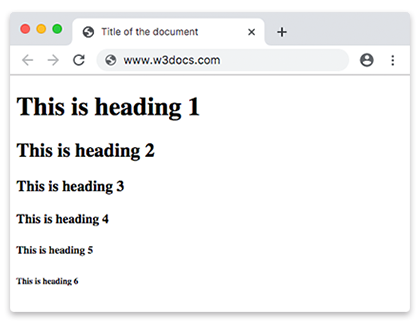
The <h1>-<h6> tags are used to define HTML headings. There are 6 levels of headings in HTML, the <h1> defines the most and the <h6> least important headings.
Example of the HTML <h1>-<h6> tags:
<!DOCTYPE html>
<html>
  <head>
    <title>Title of the document</title>
  </head>
  <body>
    <h1>This is heading 1</h1>
    <h2>This is heading 2</h2>
    <h3>This is heading 3</h3>
    <h4>This is heading 4</h4>
    <h5>This is heading 5</h5>
    <h6>This is heading 6</h6>
  </body>
</html>Result
The <b> and <strong> Tags
Both render as bold by default, but they mean different things in HTML5.
- The
<strong>tag is a semantic tag that marks text as having strong importance, seriousness, or urgency — content the reader should not miss. - The
<b>tag is a presentational tag that marks text as stylistically offset from the surrounding prose without conveying extra importance — for example a product name, a keyword in an index, or the opening sentence of an article.
Which one? If the bold styling exists to signal importance, use <strong>. If you just want bold for a typographic convention with no added meaning, use <b> (or, better, style the text with CSS).
Example of the HTML <b> and <strong> tags:
<!DOCTYPE html>
<html>
<head>
<title>Title of the document</title>
</head>
<body>
<p>We use the <strong> tag to highlight the importance <strong> of this part of the text</strong>.</p>
<p>The <b> tag is a physical tag that stands for <b>bold text</b>.</p>
</body>
</html>The <i> and <em> Tags
Both render as italic by default, but they have distinct meanings in HTML5.
- The
<em>tag is a semantic tag that marks stress emphasis — the kind that changes the meaning of a sentence ("I love HTML" vs. "I love HTML"). A screen reader can pronounce it with extra stress. - The
<i>tag is a presentational tag for text in an alternate voice or mood: a technical term, a foreign-language phrase, a thought, a ship name, or other content traditionally set in italics — without implying emphasis.
Which one? If you are emphasizing a word so it would be read aloud with stress, use <em>. For an italic typographic convention with no emphasis, use <i>.
Example of the HTML <i> and <em> tags:
<!DOCTYPE html>
<html>
  <body>
    <p>This is a paragraph</p>
    <p>The important part of the text is defined <em> in italic</em>.</p>
    <p><i>Lorem ipsum</i>, or lipsum as it is sometimes known, is dummy text used in laying out print, graphic or web designs. </p>
  </body>
</html>The <pre> Tag
The <pre> tag is used to define preformatted text. The browsers render the enclosed text with white spaces and line breaks.
Example of the HTML <pre> tag:
<!DOCTYPE html>
<html>
  <head>
    <title>Title of the document</title>
  </head>
  <body>
    <pre>Spaces
               and line breaks
               within this element
        are shown as typed.
    </pre>
  </body>
</html>The <mark> Tag
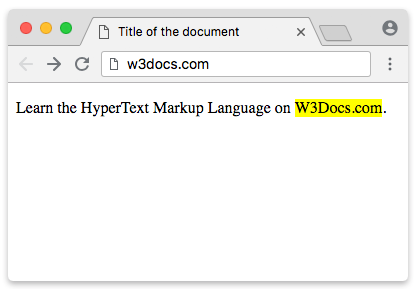
The <mark> tag is used to present a part of text in one document as marked or highlighted for reference purposes.
Example of the HTML <mark> tag:
<!DOCTYPE html>
<html>
  <head>
    <title>Title of the document</title>
  </head>
  <body>
    <p>Learn the HyperText Markup Language on <mark>W3Docs.com</mark>.</p>
  </body>
</html>Result
The <small> Tag
The <small> tag decreases the text font size by one size smaller than a document's base font size (from medium to small, or from x-large to large). The tag usually contains the items of secondary importance such as copyright notices, side comments, or legal notices.
Example of the HTML <small> tag:
<!DOCTYPE html>
<html>
  <head>
    <title>Usage of the SMALL tag</title>
  </head>
  <body>
    <p>The interest rate is only 10%*</p>
    <small>*  per day</small> /
  </body>
</html>The <del> and <s> Tags
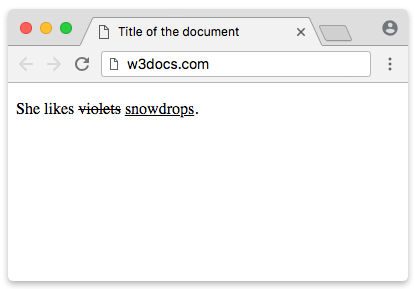
The <del> tag specifies a part of the text that was deleted from the document. Browsers display this text as a strikethrough.
Example of the HTML <del> tag:
<!DOCTYPE html>
<html>
  <head>
    <title>Title of the document</title>
  </head>
  <body>
     <p> She likes <del>violets</del> snowdrops․</p>
  </body>
</html>The <s> tag marks text that is no longer accurate or relevant — for example an old price next to a discounted one. (Note: <s> is not meant for deletions in an edited document; use <del> for that.)
Example of the HTML <s> tag:
<!DOCTYPE html>
<html>
  <head>
    <title>Title of the document</title>
  </head>
  <body>
    <p><s>I am studying in high school.</s></p>
    <p>I am studying in a university.</p>
  </body>
</html>The content of both tags is displayed as strikethrough. However, despite the visual similarity, these tags cannot replace each other: <del> means "removed in an edit", while <s> means "no longer accurate".
The <ins> and <u> Tags
The <ins> tag defines text that has been inserted (added) into the document, usually as the counterpart to <del>. The content is displayed as underlined by default.
Example of the HTML <ins> tag:
<!DOCTYPE html>
<html>
  <head>
    <title>Title of the document</title>
  </head>
  <body>
    <p>She likes <del>violets</del> <ins>snowdrops</ins>․</p>
  </body>
</html>Result
In HTML5 the <u> tag represents an unarticulated, non-textual annotation — text marked with a styling (an underline by default) that carries a meaning not spelled out in the text itself. Typical uses are flagging a misspelled word or marking proper nouns in Chinese text. Avoid <u> for plain decoration, since users may mistake an underline for a link; use CSS text-decoration instead.
Example of the HTML <u> tag:
<!DOCTYPE html>
<html>
<head>
<title>Title of the document</title>
</head>
<body>
<p>Here we used <u>the <u> tag</u>.</p>
</body>
</html>The <sub> and <sup> Tags
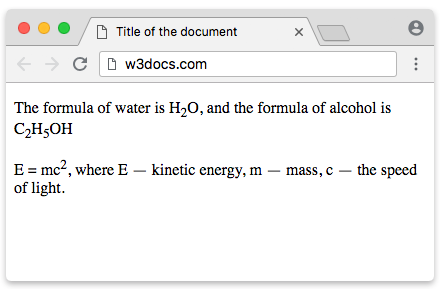
The <sub> defines subscript texts. Subscript text is under the baseline of other symbols of the line and has smaller font. The <sup> tag defines superscript, that is set slightly above the normal line of type and is relatively smaller than the rest of the text. The baseline passes through upper or lower edge of the symbols.
Example of the HTML <sub> and <sup> tags:
<!DOCTYPE html>
<html>
  <head>
    <title>Title of the document</title>
  </head>
  <body>
    <p>The formula of water is H<sub>2</sub>O,  and the formula of alcohol is C<sub>2</sub>H<sub>5</sub>OH </p>
    <p>E = mc<sup>2</sup>, where E — rest energy, m — mass, c — the speed of light. </p>
  </body>
</html>Result
The <dfn> Tag
The <dfn> tag marks the defining instance of a term — the place in the text where the term is being defined, not every place it appears. It is a semantic tag; browsers happen to render it in italics by default, but that styling is incidental and can be changed with CSS.
Example of the HTML <dfn> tag:
<!DOCTYPE html>
<html>
  <head>
    <title>Title of the document</title>
  </head>
  <body>
    <p><dfn>HTML</dfn> (HyperText Markup Language ) — The standardized markup language for documents on the World Wide Web. Most web pages contain a description of the markup in the language HTML</p>
  </body>
</html>More Semantic Text Elements
HTML has several other inline tags that add meaning to specific kinds of text. They are not for styling — each describes what the text is:
<abbr>— an abbreviation or acronym, e.g.<abbr title="HyperText Markup Language">HTML</abbr>. Thetitleprovides the full expansion on hover.<cite>— the title of a cited work (a book, film, article, etc.).<q>— a short inline quotation; the browser adds quotation marks automatically.<code>— a fragment of computer code, shown in a monospace font.<kbd>— keyboard input the user should type, e.g. Ctrl + C.<samp>— sample output from a program or system.<var>— a variable in a mathematical expression or programming context.
Example of semantic text elements:
<!DOCTYPE html>
<html>
  <body>
    <p>The <abbr title="HyperText Markup Language">HTML</abbr> spec is huge.</p>
    <p>As stated in <cite>The HTML Handbook</cite>:
       <q>Use the right element for the job.</q></p>
    <p>Press <kbd>Ctrl</kbd> + <kbd>S</kbd> to run <code>document.title</code>.</p>
    <p>The program printed <samp>Hello, world!</samp> where <var>x</var> = 5.</p>
  </body>
</html>Obsolete Tags — Do Not Use
A handful of old formatting tags have been removed from the HTML standard. They may still render in browsers, but you should never use them — replace presentation with CSS and meaning with semantic tags:
| Obsolete tag | What it did | Use instead |
|---|---|---|
<font> | Set color, size, face | CSS color, font-size, font-family |
<center> | Centered content | CSS text-align: center or margin: auto |
<tt> | Teletype / monospace text | <code>, <kbd>, <samp>, or CSS font-family: monospace |
<strike> | Strikethrough text | <del> / <s>, or CSS text-decoration: line-through |
<big> | Larger text | CSS font-size |
Structural Tags: <p>, <br> and <hr>
The next three tags are not text-formatting tags — they structure the flow of content rather than style words inline — but they are closely related and worth covering here.
The <p> tag defines the paragraph. Browsers automatically add 1em margin before and after each paragraph.
Example of the HTML <p> tag:
<!DOCTYPE html>
<html>
  <head>
    <title>Title of the document</title>
  </head>
  <body>
    <p>The first paragraph</p>
    <p>The second paragraph</p>
  </body>
</html>The <br> tag inserts a single line break. Unlike the <p> tag an empty indent is not added before the line.
Example of the HTML <br> tag:
<!DOCTYPE html>
<html>
<head>
<title>Title of the document.</title>
</head>
<body>
<h1>How to use the <br /> tag</h1>
<p> We can insert the <br /> tag inside the paragraph, <br /> to transfer a part of the text to another line if necessary.</p>
</body>
</html>In HTML5 the <hr> tag defines a thematic change between paragraph level elements in an HTML page. In previous versions of HTML it was used to draw a horizontal line on the page visually separating the content. In HTML5 the element has semantic meaning.
Example of the HTML <hr> tag:
<!DOCTYPE html>
<html>
  <head>
    <title>Title of the document</title>
  </head>
  <body>
    <h1>Football</h1>
    <p>A team sport involving kicking a ball to score a goal. </p>
    <hr />
    <h1>Basketball</h1>
    <p>A game that is played between two teams of five players.</p>
  </body>
</html>