HTML <section> Tag
The <section> tag groups thematic page content. Learn when to use section vs article vs div, the heading rule, and the region landmark.
The HTML <section> element is one of the HTML5 semantic elements. It groups together a chunk of related content that forms a thematic part of the page — a part that, ideally, would show up as an entry in the document outline (a news block, a "Contact us" area, a chapter of a long article, etc.).
This page explains what <section> means, how to decide between <section>, <article>, and <div>, why a section almost always needs a heading, and the accessibility rule that turns a section into a navigable landmark.
When to use <section> vs <article> vs <div>
These three elements look interchangeable but carry very different meaning. Pick by intent, not by appearance:
<section>— a thematic grouping of content that belongs in the page outline and has its own heading. Use it when the content is "a distinct part of this page" but is not meaningful on its own once removed from the page. Examples: an Introduction block, a Pricing block, a Reviews block on a product page.<article>— a self-contained, independently distributable composition. Use it when the content would still make sense if you pulled it out and published it elsewhere (a syndicated feed, an RSS entry, a search result). Examples: a blog post, a news story, a single user comment, a product card.<div>— no semantic meaning at all; a generic box that exists only as a styling or scripting hook. Reach for<div>when you just need a wrapper for layout (a flex/grid container, a column) and there is no thematic content to label.
A quick test: if you can give the block a meaningful heading, it is probably a <section>. If the block could stand alone as its own page or feed item, it is an <article>. If you are only adding it to attach CSS or a class, it is a <div>.
Don’t use <section> as a generic wrapper for layout or styling. If a block of markup has no thematic meaning and no heading, use a <div> instead.
The heading requirement
HTML expects every <section> to be identified, and the normal way to do that is with a heading (<h1>–<h6>). A section without a heading has no clear topic and produces a confusing, "untitled" entry in assistive-technology document outlines.
Use the heading level that fits the nesting depth: an <h2> for a top-level section under the page's <h1>, an <h3> for a section nested one level deeper, and so on. Keep the hierarchy logical rather than skipping levels — see HTML Headings for the rules.
<h1>Web technologies</h1>

<section>
  <h2>HTML</h2>
  <p>HTML is the standard markup language for creating web pages.</p>
</section>

<section>
  <h2>CSS</h2>
  <p>CSS describes how HTML elements should be presented.</p>
</section><section> and accessibility: the region landmark
A <section> is not automatically a landmark that screen-reader users can jump to. It only becomes a navigable region landmark when it has an accessible name. You give it one in two ways:
aria-labelledbypointing at theidof its heading (preferred — the visible heading and the accessible name stay in sync), oraria-labelwith a literal string (when there is no visible heading text to reference).
Without a name, the section is just a grouping for the outline; with a name, it shows up in the screen reader's landmarks list.
<section aria-labelledby="pricing-heading">
  <h2 id="pricing-heading">Pricing</h2>
  <p>Choose the plan that fits your team.</p>
</section>

<!-- No visible heading? Name it directly: -->
<section aria-label="Search results">
  <p>3 results found.</p>
</section>This is why <section> differs from regions like <main>, <aside>, <header>, and <footer>: those expose landmark roles on their own, while <section> requires a name to do so.
Syntax
The <section> tag comes in pairs. The content is written between the opening (<section>) and closing (</section>) tags.
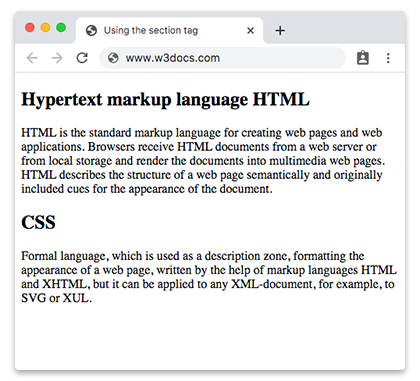
Example of the HTML <section> tag:
<!DOCTYPE html>
<html>
  <head>
    <title>Using the section tag</title>
  </head>
  <body>
    <section>
      <h2>Hypertext markup language HTML</h2>
      <p>HTML is the standard markup language for creating web pages and web applications. Browsers receive HTML documents from a web server or from local storage and render the documents into multimedia web pages. HTML describes the structure of a web page semantically and originally included cues for the appearance of the document.</p>
    </section>
    <section>
      <h2>CSS</h2>
      <p>Formal language, which is used as a description zone, formatting the appearance of a web page, written by the help of markup languages HTML and XHTML, but it can be applied to any XML-document, for example, to SVG or XUL.</p>
    </section>
  </body>
</html>Result
Example of a <section> nested inside an <article>:
A long, self-contained piece of content is an <article>; the chapters within it are <section> elements. Each section carries its own heading and its own distinct content.
<!DOCTYPE html>
<html>
  <head>
    <title>Title of the document</title>
  </head>
  <body>
    <article>
      <h1>A short guide to web technologies</h1>
      <p>Modern web pages are built from three core technologies that work together.</p>

      <section>
        <h2>HTML: structure</h2>
        <p>HTML is the standard markup language for web pages. It describes the structure of a document — headings, paragraphs, links and media — so browsers can render it as a page.</p>
      </section>

      <section>
        <h2>CSS: presentation</h2>
        <p>CSS controls how the structured content looks: colors, spacing, typography and responsive layout across different screen sizes.</p>
      </section>

      <section>
        <h2>JavaScript: behavior</h2>
        <p>JavaScript adds interactivity, letting the page respond to user actions, update content dynamically and communicate with servers.</p>
      </section>
    </article>
  </body>
</html>Attributes
The <section> tag supports the Global Attributes and the Event Attributes.
How to style an HTML <section> Tag
section {
  background-color: #f9f9f9;
  padding: 20px;
  border: 1px solid #ddd;
}