HTML <font> Tag
The obsolete <font> tag set text size, typeface, and color. Learn why it was removed in HTML5 and how to replace it with CSS color, font-family, and font-size.
The <font> tag was used to control the size, color, and typeface of text through its size, color, and face attributes. This page explains why you should never use it in new code, how to read legacy <font> markup, and exactly how to replace each attribute with modern CSS.
The <font> tag is obsolete. It was removed from the HTML5 standard and is a deprecated HTML tag. Do not use it. Style text with CSS instead.
Why <font> Is Obsolete
<font> was deprecated because it mixes presentation (how text looks) with content (the text itself). Modern web development separates these concerns: HTML describes structure and meaning, while CSS describes appearance. That separation keeps documents smaller, makes a site's look easy to change in one place, and improves accessibility and maintainability.
Practical consequences of using <font> today:
- The standard provides no default rendering for
<font>. Browsers may still display its legacy effects for backward compatibility, but this behavior is not guaranteed and can change or be ignored. - Repeating
<font>on every element bloats your markup. A single CSS rule can style hundreds of elements at once. - It cannot be controlled responsively, themed, or overridden cleanly the way CSS classes can.
If you find <font> in an existing codebase, treat it as something to migrate away, not to extend.
Legacy Syntax
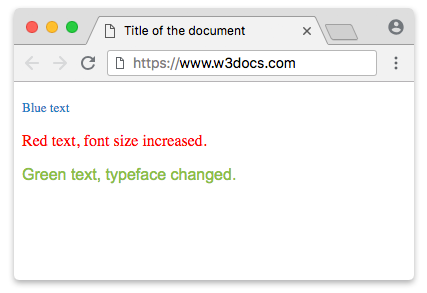
The <font> tag came in pairs — content went between the opening <font> and closing </font> tags.
<!DOCTYPE html>
<html>
  <head>
    <title>Title of the document</title>
  </head>
  <body>
    <p>
      <font size="2" color="#1c87c9">Blue text</font>
    </p>
    <p>
      <font size="3" color="red">Red text, font size increased.</font>
    </p>
    <p>
      <font face="arial" color="#8ebf42">Green text, typeface changed.</font>
    </p>
  </body>
</html>Result
The size Attribute and its 1 to 7 Scale
Unlike CSS, the <font> size attribute did not take pixels or other units. It accepted a number from 1 to 7, where 1 is the smallest and 7 the largest, with 3 being the default. Values could also be relative, e.g. size="+2" or size="-1", adjusting relative to the base size.
This fixed scale roughly mapped to the following CSS font-size values:
<font size> | Approximate CSS font-size |
|---|---|
| 1 | x-small (~10px) |
| 2 | small (~13px) |
| 3 | medium (~16px, default) |
| 4 | large (~18px) |
| 5 | x-large (~24px) |
| 6 | xx-large (~32px) |
| 7 | ~48px |
These are rough equivalents — exact pixel sizes depend on the browser and the user's base font size. With CSS you are no longer limited to seven steps; you can set any size in px, em, rem, %, or a keyword.
Attribute to CSS Mapping
Every <font> attribute has a direct, better CSS replacement:
<font> attribute | CSS property | Example |
|---|---|---|
color | color | color: #1c87c9; |
face | font-family | font-family: Arial, sans-serif; |
size | font-size | font-size: 18px; |
The Modern, CSS Way
The canonical approach is to keep your HTML clean and put styling in a <style> block (or an external stylesheet) using class selectors. This way one rule can style every matching element, and changing the design later means editing CSS in one place.
<!DOCTYPE html>
<html>
  <head>
    <title>Title of the document</title>
    <style>
      .blue-text {
        color: #1c87c9;
        font-size: 16px;
      }
      .red-text {
        color: red;
        font-size: 18px;
      }
      .green-text {
        color: #8ebf42;
        font-size: 18px;
        font-family: Arial, sans-serif;
      }
    </style>
  </head>
  <body>
    <p class="blue-text">Blue text.</p>
    <p class="red-text">Red text, font size increased.</p>
    <p class="green-text">Green text, typeface changed.</p>
  </body>
</html>Migrating Legacy <font> Code
To convert old <font> markup to modern HTML and CSS:
- Remove the
<font>wrapper and keep its inner content inside a semantic element such as<p>,<span>, or a heading. - Translate each attribute to its CSS property using the mapping table above (
color→color,face→font-family,size→font-size). - Convert the
sizenumber to a real CSS size with the 1–7 table — for example,size="5"becomesfont-size: 24px;(orx-large). - Group repeated styling into a class in a
<style>block or external stylesheet so it can be reused, instead of styling each element individually.
For example, <font size="5" color="red" face="arial">Sale!</font> becomes:
<style>
  .sale {
    font-size: 24px;
    color: red;
    font-family: Arial, sans-serif;
  }
</style>
<span class="sale">Sale!</span>Attributes
| Attribute | Value | Description |
|---|---|---|
| color | rgb (x, x, x) #xxxxxx colorname | Sets the color of the text. Use CSS color instead. |
| face | font_family | Sets the typeface. Use CSS font-family instead. |
| size | number (1–7) | Sets the size of the text. Use CSS font-size instead. |
Related Resources
- Deprecated HTML tags — the full list of obsolete elements to avoid.
- HTML
<basefont>tag — another obsolete font element and its CSS replacement. - CSS
font-family, CSSfont-size, and CSScolor— the modern way to style text.