CSS text-decoration-style Property
Use the text-decoration-style CSS property to specify the style of the text decoration. See property values and practice with examples.
The CSS text-decoration-style property sets the line style of decorations added by text-decoration-line — the underline, overline, or line-through. The available styles are solid, double, dotted, dashed, and wavy.
On its own this property does nothing visible: a line style only shows up when there is a line to style. So you almost always pair it with text-decoration-line (or the text-decoration shorthand, which can set the line, style, and color at once).
This page covers the syntax, every value with a runnable example, and where each style is most useful.
When to use it
wavyis the most common non-default choice — it mimics the red squiggle that spell-checkers draw, so it reads as "this needs attention." It is also the look browsers use for spelling/grammar errors.dottedanddashedmake a softer, lighter underline than a solid rule, handy for de-emphasized links or footnotes.doubledraws two thin parallel lines, useful for headings or to signal something stronger than a normal underline.solidis the default — you only need to write it to override an inherited or shorthand style.
Because the property is not inherited and not animatable, set it on the element whose decoration you want to style; you cannot transition between styles.
The text-decoration-style property is one of the CSS3 properties.
| Initial Value | solid |
|---|---|
| Applies to | All elements. It also applies to ::first-letter and ::first-line. |
| Inherited | No. |
| Animatable | No. |
| Version | CSS3 |
| DOM Syntax | object.style.textDecorationStyle = "dotted"; |
Syntax
CSS text-decoration-style values
text-decoration-style: solid | double | dotted | dashed | wavy | initial | inherit;Example of the text-decoration-style property:
text-decoration-style example
<!DOCTYPE html>
<html>
  <head>
    <title>Title of the document</title>
    <style>
      div {
        text-decoration-line: underline;
        text-decoration-style: solid;
        text-decoration-color: #1c87c9;
      }
    </style>
  </head>
  <body>
    <h2>Text-decoration-style property example</h2>
    <div>Lorem Ipsum is simply dummy text of the printing and typesetting industry.</div>
  </body>
</html>Result
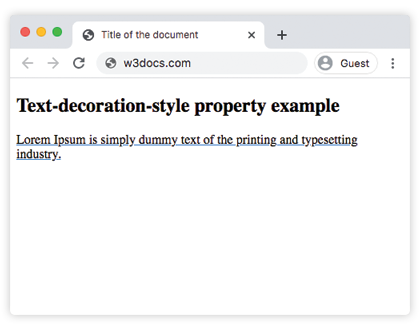
Example of the text-decoration-style property with the "wavy" value:
text-decoration-style wavy code example
<!DOCTYPE html>
<html>
  <head>
    <title>Title of the document</title>
    <style>
      div {
        text-decoration-line: underline;
        text-decoration-style: wavy;
        text-decoration-color: #1c87c9;
      }
    </style>
  </head>
  <body>
    <h2>Text-decoration-style property example</h2>
    <div>Lorem Ipsum is simply dummy text of the printing and typesetting industry.</div>
  </body>
</html>Example of the text-decoration-style property with the "dotted" value:
text-decoration-style dotted code example
<!DOCTYPE html>
<html>
  <head>
    <title>Title of the document</title>
    <style>
      div {
        text-decoration-line: overline;
        text-decoration-style: dotted;
        text-decoration-color: #1c87c9;
      }
    </style>
  </head>
  <body>
    <h2>Text-decoration-style property example</h2>
    <div>Lorem Ipsum is simply dummy text of the printing and typesetting industry.</div>
  </body>
</html>Example of the text-decoration-style property with the "dashed" value:
text-decoration-style dashed code example
<!DOCTYPE html>
<html>
  <head>
    <title>Title of the document</title>
    <style>
      div {
        text-decoration-line: overline;
        text-decoration-style: dashed;
        text-decoration-color: #1c87c9;
      }
    </style>
  </head>
  <body>
    <h2>Text-decoration-style property example</h2>
    <div>
      Lorem Ipsum is simply dummy text of the printing and typesetting industry.
    </div>
  </body>
</html>Example of the text-decoration-style property with the "double" value:
text-decoration-style double code example
<!DOCTYPE html>
<html>
  <head>
    <title>Title of the document</title>
    <style>
      div {
        text-decoration-line: overline underline;
        text-decoration-style: double;
        text-decoration-color: #1c87c9;
      }
    </style>
  </head>
  <body>
    <h2>Text-decoration-style property example</h2>
    <div>
      Lorem Ipsum is simply dummy text of the printing and typesetting industry.
    </div>
  </body>
</html>Example of the text-decoration-style property with all the values:
text-decoration-style all values example
<!DOCTYPE html>
<html>
  <head>
    <title>Title of the document</title>
    <style>
      div {
        margin: 20px 0;
      }
      div.t1 {
        text-decoration-line: overline underline;
        text-decoration-style: solid;
      }
      div.t2 {
        text-decoration-line: line-through;
        text-decoration-style: wavy;
      }
      div.t3 {
        text-decoration-line: overline underline;
        text-decoration-style: double;
      }
      div.t4 {
        text-decoration-line: overline;
        text-decoration-style: dashed;
      }
      div.t5 {
        text-decoration-line: line-through;
        text-decoration-style: dotted;
      }
    </style>
  </head>
  <body>
    <h2>Text-decoration-style property example</h2>
    <div class="t1">
      Lorem Ipsum is simply dummy text of the printing and typesetting industry.
    </div>
    <div class="t2">
      Lorem Ipsum is simply dummy text of the printing and typesetting industry.
    </div>
    <div class="t3">
      Lorem Ipsum is simply dummy text of the printing and typesetting industry.
    </div>
    <div class="t4">
      Lorem Ipsum is simply dummy text of the printing and typesetting industry.
    </div>
    <div class="t5">
      Lorem Ipsum is simply dummy text of the printing and typesetting industry.
    </div>
  </body>
</html>Values
| Value | Description | Play it |
|---|---|---|
| solid | Defines a single line. This is the default value of this property. | Play it » |
| double | Defines double line. | Play it » |
| dotted | Defines a dotted line. | Play it » |
| dashed | Defines a dashed line. | Play it » |
| wavy | Defines a wavy line. | Play it » |
| initial | Sets the property to its default value. | Play it » |
| inherit | Inherits the property from its parent element. |
Browser support
text-decoration-style is supported in all modern browsers (Chrome, Edge, Firefox, Safari, and Opera). The wavy style in particular renders consistently across them. There is no vendor-prefix or fallback needed today; in browsers that did not support the property, the decoration simply fell back to a solid line, so it has always degraded gracefully.
Related properties
- text-decoration-line — chooses which line(s) appear (underline, overline, line-through).
- text-decoration-color — sets the color of the decoration.
- text-decoration — the shorthand that sets line, style, and color in one declaration.