CSS font-variant Property
The CSS font-variant property allows setting the text as normal or small-caps from a font-family. Try font-variant property examples!
The CSS font-variant property controls the use of alternate glyphs in a font — most commonly small caps. Small caps render lowercase letters as uppercase letters drawn at roughly the height of the original lowercase letters, giving titles, abbreviations, and acronyms a refined, even appearance without shouting in full caps.
In its classic form (CSS 1), font-variant takes one of two values: normal (the default) or small-caps. With small-caps, lowercase letters are converted to uppercase glyphs that are displayed a little smaller than regular uppercase letters, while letters that were already uppercase keep their normal size.
When to use it
font-variant: small-caps is useful when you want emphasis that reads as elegant rather than loud:
- Acronyms and abbreviations inside running text (e.g. "html", "css") so they don't dominate the line with full-height capitals.
- Drop-cap or lead-in styling on the first line of an article, often combined with ::first-line.
- Headings, bylines, and figure captions in editorial or print-style layouts.
Because the value is inherited, setting it on a container applies it to all descendant text unless a child overrides it.
The font-variant property can also be set as part of a font shorthand declaration, alongside font-style, font-weight, font-size, and font-family.
In CSS Fonts Module Level 4, font-variant became a shorthand for a family of longhand properties: font-variant-caps, font-variant-numeric, font-variant-alternates, font-variant-ligatures, and font-variant-east-asian. This lets it accept many more values (such as all-small-caps, petite-caps, oldstyle-nums, and slashed-zero). The classic normal and small-caps values still work everywhere; support for the newer values depends on both the browser and whether the chosen font actually contains those glyphs.
| Initial Value | normal |
|---|---|
| Applies to | All elements. It also applies to ::first-letter and ::first-line. |
| Inherited | Yes. |
| Animatable | No. |
| Version | CSS1 |
| DOM Syntax | object.style.fontVariant = "normal"; <br>(Note: fontVariant is the camelCase JavaScript property name for font-variant.) |
Syntax
Syntax of CSS font-variant Property
font-variant: normal | small-caps | all-small-caps | titling-caps | initial | inherit;Example of the font-variant property:
Example of CSS font-variant Property with small-caps
<!DOCTYPE html>
<html>
  <head>
    <title>Title of the document</title>
    <style>
      .smallcaps {
        font-variant: small-caps;
      }
    </style>
  </head>
  <body>
    <h2>Font-variant property example</h2>
    <p>Here we used a normal text as you can see.</p>
    <p class="smallcaps">However, this text uses small-caps.</p>
  </body>
</html>Result
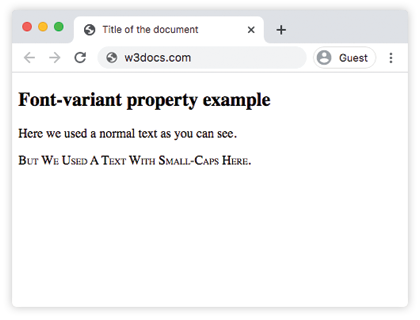
A second example: all-small-caps
The all-small-caps value (from the Level 4 shorthand) renders every letter as small caps, including ones that were already uppercase — handy for headings where you want a uniform small-caps look.
<!DOCTYPE html>
<html>
  <head>
    <title>Title of the document</title>
    <style>
      .small {
        font-variant: small-caps;
      }
      .all {
        font-variant: all-small-caps;
      }
    </style>
  </head>
  <body>
    <p class="small">The Quick Brown Fox</p>
    <p class="all">The Quick Brown Fox</p>
  </body>
</html>With small-caps, the capital letters in "The", "Quick", "Brown", and "Fox" stay full height; with all-small-caps, they are reduced to small-caps height too.
Values
| Value | Description | Play it |
|---|---|---|
| normal | Text characters are rendered normally. This is the default value. | Play it » |
| small-caps | Converts lowercase letters to uppercase glyphs displayed at a smaller size; existing capitals keep their full size. | Play it » |
| all-small-caps | Converts both lowercase and uppercase letters to small-caps (Level 4). | Play it » |
| petite-caps | Like small-caps but using petite-caps glyphs, when the font provides them (Level 4). | Play it » |
| initial | Sets the property to its default value (normal). | Play it » |
| inherit | Inherits the property value from the parent element. |
Related properties
- font — the shorthand that can include
font-variant. - font-style — normal, italic, or oblique text.
- font-weight — boldness of the text.
- text-transform — force
uppercase/lowercase/capitalize(changes the characters, unlike small-caps which only changes glyph shape). - letter-spacing — pairs well with small caps to improve legibility of acronyms.