CSS word-wrap Property
Use the word-spacing CSS property to break even unbreakable word to fit the container. Read about property values and try examples.
The word-wrap property breaks long, otherwise-unbreakable words so they fit inside their container instead of overflowing past its edge.
Normally a browser only breaks text at "soft wrap opportunities" — spaces, hyphens, and similar characters. A single long string with no such opportunity (a URL, a hash, a chemical name, a long ID) has nowhere to wrap, so it spills out of a narrow box and can break your layout. word-wrap lets the browser break inside such a word as a last resort.
When you would use it
Reach for word-wrap whenever user-generated or unpredictable text can be longer than its container:
- URLs and file paths shown inside a fixed-width card or sidebar.
- Email addresses, usernames, or tokens in a narrow column.
- Long unbroken strings in tables, chat bubbles, or comment threads.
- Any responsive layout where you can't guarantee where text wraps.
It only matters for words that cannot otherwise wrap. Normal prose already breaks at spaces, so the property has no visible effect there.
word-wrap vs. overflow-wrap
word-wrap is the original Microsoft name for what the CSS spec later standardised as overflow-wrap. The two are aliases — they do exactly the same thing and take the same values. Browsers map word-wrap to overflow-wrap internally.
Use overflow-wrap in new code for standards compliance; keep word-wrap if you need to support very old browsers, since some legacy engines only recognise the older name.
Don't confuse word-wrap with word-break. word-wrap/overflow-wrap only breaks a word when it would otherwise overflow — normal words stay intact. word-break: break-all is more aggressive: it breaks words at any character, even when they would fit. Choose word-wrap when you want clean wrapping that only kicks in for emergencies.
word-wrap is one of the CSS3 properties, and it only takes effect when the white-space property allows wrapping (for example, it has no effect under white-space: nowrap).
| Initial Value | normal |
|---|---|
| Applies to | All elements. |
| Inherited | Yes. |
| Animatable | No. |
| Version | CSS3 |
| DOM Syntax | object.style.wordWrap = "break-word"; |
Syntax
CSS word-wrap values
word-wrap: normal | break-word | initial | inherit;Example of the word-wrap property with the "normal" value:
CSS word-wrap code example
<!DOCTYPE html>
<html>
  <head>
    <title>Title of the document</title>
    <style>
      div {
        width: 120px;
        border: 1px solid #666;
        word-wrap: normal;
      }
    </style>
  </head>
  <body>
    <h2>Word-wrap property example</h2>
    <div>
      Lorem Ipsum is
      <strong>simplysimplysimplysimplysimplysimply</strong>
       dummy text of the printing and typesetting
      <strong>industryindustryindustryindustryindustry</strong>.
    </div>
  </body>
</html>Result
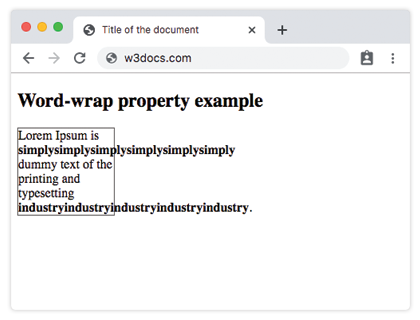
With normal, the long simply... and industry... strings have no break opportunity, so they punch out past the 120px box.
Example of the word-wrap property with the "break-word" value:
CSS word-wrap break-word example
<!DOCTYPE html>
<html>
  <head>
    <title>Title of the document</title>
    <style>
      div {
        width: 120px;
        border: 1px solid #666;
        word-wrap: break-word;
      }
    </style>
  </head>
  <body>
    <h2>Word-wrap property example</h2>
    <div>
      Lorem Ipsum is
      <strong>simplysimplysimplysimplysimplysimply</strong>
      dummy text of the printing and typesetting
      <strong>industryindustryindustryindustryindustry</strong>.
    </div>
  </body>
</html>Now break-word lets the browser split those long strings mid-word at the box edge, so the content stays neatly inside its 120px container.
Values
| Value | Description |
|---|---|
| normal | Breaks words only at allowed break points. This is the default value. |
| break-word | Allows breaking unbreakable words if they exceed the container width. |
| initial | Sets the property to its default value. |
| inherit | Inherits the property from its parent element. |
Related properties
- overflow-wrap — the standardised name for the same behaviour; prefer it in new code.
- word-break — more aggressive breaking that can split words even when they fit.
- white-space — controls whether text wraps at all;
word-wraponly applies when wrapping is allowed. - word-spacing — adjusts the gap between words (unrelated to breaking, but easy to confuse by name).