CSS flex-basis Property
The CSS flex-basis property defines the initial main size of the flexible item. When the property is not included, its value is set to 0%.
The flex-basis property specifies the initial main size of a flexible item — the size it gets before any free space is distributed by flex-grow or removed by flex-shrink. When this property is not specified, its initial value is auto.
The flex-basis property is one of the CSS3 properties and only takes effect on the children of a flex container (an element with display: flex or display: inline-flex). If the parent is not a flex container, flex-basis has no effect.
Why use flex-basis?
In a flexbox layout the size of an item is calculated in two stages:
- The browser reads the item's
flex-basisto set a starting size along the main axis. - It then grows or shrinks each item from that starting size to fill (or fit inside) the container, according to
flex-growandflex-shrink.
Reach for flex-basis when you want to set the ideal size of an item but still let it flex. For example, flex-basis: 200px says "aim for 200px, then grow/shrink from there," whereas width: 200px is a hard size that flexbox is more reluctant to override.
flex-basis vs. width
When flex-basis is set to a length or percentage, it takes precedence over width (or height, if flex-direction is column) for determining the item's initial main size. The key difference: flex-basis always applies along the main axis, so it follows flex-direction. With flex-direction: row it controls width; with flex-direction: column it controls height. A plain width always controls horizontal size regardless of direction.
When flex-basis: auto is used, the item falls back to its width/height (or its content size if those are not set).
Note: The
flexshorthand setsflex-basistogether withflex-growandflex-shrink. If you writeflex, it takes precedence over a standaloneflex-basisdeclaration — so putflex-basisafterflex, or use the shorthand directly to avoid surprises.
| Initial Value | auto |
|---|---|
| Applies to | Flex items, including in-flow pseudo-elements. |
| Inherited | No. |
| Animatable | Yes. Items are animatable. |
| Version | CSS3 |
| DOM Syntax | object.style.flexBasis = "100px"; |
Syntax
Syntax of CSS flex-basis Property
flex-basis: length | percentage | auto | initial | inherit | min-content | max-content | fit-content | content;Basic example
Example of CSS flex-basis Property
<!DOCTYPE html>
<html>
  <head>
    <title>Title of the document</title>
    <style>
      .box {
        width: 300px;
        height: 80px;
        border: 1px solid #666;
        display: flex;
      }
      .box div {
        flex-grow: 0;
        flex-shrink: 0;
        flex-basis: 40px;
      }
      .box div:nth-of-type(2) {
        flex-basis: 140px;
      }
    </style>
  </head>
  <body>
    <h2>Flex-basis property example</h2>
    <div class="box">
      <div style="background-color: #eeeeee;">40px</div>
      <div style="background-color: #1c87c9;">140px</div>
      <div style="background-color: #8ebf42;">40px</div>
      <div style="background-color: #cccccc;">40px</div>
      <div style="background-color: #666666;">40px</div>
    </div>
  </body>
</html>Result
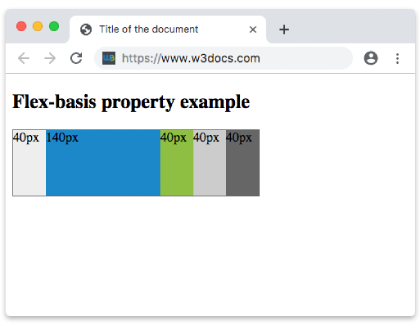
Example with all values
Example of the flex-basis property with all the values:
<!DOCTYPE html>
<html>
  <head>
    <title>Title of the document</title>
    <style>
      .box {
        height: 70px;
        display: flex;
      }
      .box div {
        flex-grow: 0;
        flex-shrink: 0;
        flex-basis: 60px;
        padding: 15px;
      }
      .box div:first-child {
        background-color: #40c3da;
      }
      .box div:nth-of-type(2) {
        flex-basis: 40%;
        background-color: lightgreen;
      }
      .box div:nth-of-type(3) {
        flex-basis: auto;
        background-color: yellow;
      }
      .box div:nth-of-type(4) {
        flex-basis: initial;
        background-color: orange;
      }
      .box div:nth-of-type(5) {
        flex-basis: inherit;
        background-color: pink;
      }
    </style>
  </head>
  <body>
    <h2>Flex-basis property example</h2>
    <div class="box">
      <div>
        number 60px
      </div>
      <div>
        percentage 40%
      </div>
      <div>
        auto
      </div>
      <div>
        initial
      </div>
      <div>
        inherit
      </div>
    </div>
  </body>
</html>Example with pixel values
Example of the flex-basis property specified in pixels:
<!DOCTYPE html>
<html>
  <head>
    <title>Title of the document</title>
    <style>
      .box {
        width: 460px;
        height: 70px;
        display: flex;
      }
      .box div {
        flex-grow: 0;
        flex-shrink: 0;
        flex-basis: 70px;
        padding: 15px;
      }
      .box div:first-child {
        background-color: #40c3da;
      }
      .box div:nth-of-type(2) {
        flex-basis: 100px;
        background-color: lightgreen;
      }
      .box div:nth-of-type(3) {
        background-color: #1c87c9;
      }
      .box div:nth-of-type(4) {
        flex-basis: 150px;
        background-color: orange;
      }
      .box div:nth-of-type(5) {
        background-color: #8ebf42;
      }
    </style>
  </head>
  <body>
    <h2>Flex-basis property example</h2>
    <div class="box">
      <div>
        70px
      </div>
      <div>
        100px
      </div>
      <div>
        70px
      </div>
      <div>
        150px
      </div>
      <div>
        70px
      </div>
    </div>
  </body>
</html>Values
| Value | Description | Play it |
|---|---|---|
| length | percentage | An absolute length (px, em, rem) or a percentage of the flex container's main size. Negative values are invalid. | Play it » |
| auto | The default value. The item uses its own width/height (or content size if those are unset) as the basis. | Play it » |
| initial | Resets the property to its default value (auto). | Play it » |
| inherit | Inherits the value from the parent element. | |
| min-content | Sizes the item to its smallest possible content width (the longest unbreakable word or element). | Play it » |
| max-content | Sizes the item to its largest content width, with no line wrapping. | Play it » |
| fit-content | Clamps the size between min-content and max-content, like the fit-content() function. | Play it » |
| content | Sizes the item based on its content, ignoring any set width/height. Limited browser support. | Play it » |
Common pitfalls
flex-basisdoes nothing outside a flex container. The parent must havedisplay: flexordisplay: inline-flex.- A
flex-basisof0(or0%) plusflex-grow: 1distributes space proportionally by grow factor only, ignoring content size — this is how many "equal columns" layouts work. - Percentages resolve against the container's main size, not the viewport. If the container has no definite size on the main axis, a percentage
flex-basismay behave likeauto. - The
flexshorthand overridesflex-basis. Writingflex: 1resets the basis to0%, which can override an earlierflex-basisdeclaration.
Related properties
flex— the shorthand forflex-grow,flex-shrink, andflex-basis.flex-grow— how much an item grows past its basis.flex-shrink— how much an item shrinks below its basis.- The Ultimate Guide to Flexbox — the full flexbox model in one place.