CSS place-items Property
The place-items property is a shorthand for setting the align-items and justify-items CSS properties. See property values and try examples.
The CSS place-items property is a shorthand that sets two alignment properties at once:
- align-items — alignment along the block axis (in a default layout, the vertical/column direction).
- justify-items — alignment along the inline axis (in a default layout, the horizontal/row direction).
Instead of writing both properties, you write a single place-items declaration. This is most useful with Grid layouts, where it controls how each item is positioned inside its own grid cell (the alignment defaults applied to every item, equivalent to setting place-self on each one).
This page covers the syntax, the one- and two-value forms, every value with what it actually does, and the layouts where place-items has no effect.
When does place-items apply?
place-items only does something in layouts that have a notion of "items":
- Grid layouts — the main use case. It aligns each item within its grid area.
- Absolutely positioned boxes — it aligns the box within its containing block.
It is ignored in the following cases, which is a common source of confusion:
- Flexbox layouts —
justify-items(and therefore the inline half ofplace-items) does nothing in Flexbox. Use justify-content andalign-itemsdirectly instead. - Standard block-level boxes.
- Table cells.
place-items behaves differently depending on the layout context — the same value can mean different things in Grid versus absolute positioning. The Values table below spells out each case.
| Initial Value | normal legacy |
|---|---|
| Applies to | All elements. |
| Inherited | No. |
| Animatable | No. |
| Version | CSS3 |
| DOM Syntax | object.style.placeItems = "normal"; |
Syntax
place-items: <align-items> <justify-items>?;The accepted keywords are:
place-items: auto | normal | start | end | self-start | self-end | center | left | right | baseline | first baseline | last baseline | stretch | initial | inherit;There are two forms:
- One value — it sets both axes.
place-items: center;means "center vertically and center horizontally." - Two values — the first sets align-items (block axis), the second sets justify-items (inline axis). For example,
place-items: start end;means "top vertically, right horizontally."
The CSS Grid spec separates the two values with a space (place-items: start end), not a slash. You may still see a slash in older material; a single value is the safest, most-supported form.
Example — single value (start)
A single keyword aligns items on both axes at once. Here start pushes the item to the top-left corner of its grid cell:
<!DOCTYPE html>
<html>
  <head>
    <title>Title of the document</title>
    <style>
      #container {
        height: 150px;
        width: 150px;
        place-items: start;
        background-color: #ccc;
        display: grid;
      }
      div > div {
        box-sizing: border-box;
        border: 1px solid #666;
        width: 50px;
        display: flex;
        align-items: center;
        justify-content: center;
      }
      #box1 {
        background-color: #1c87c9;
        min-height: 50px;
      }
    </style>
  </head>
  <body>
    <h2>Place-items property example</h2>
    <h3>place-items: start</h3>
    <div id="container">
      <div id="box1">1</div>
    </div>
  </body>
</html>Result
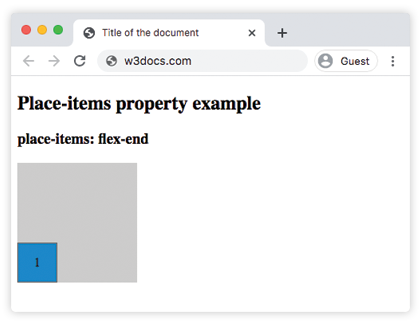
Example — two values (end start)
With two keywords you control each axis independently. Here end start sends the item to the bottom (block axis) and the left (inline axis):
<!DOCTYPE html>
<html>
  <head>
    <title>Title of the document</title>
    <style>
      #container {
        height: 150px;
        width: 150px;
        place-items: end start;
        background-color: #ccc;
        display: grid;
      }
      div > div {
        box-sizing: border-box;
        border: 1px solid #666;
        width: 50px;
        display: flex;
        align-items: center;
        justify-content: center;
      }
      #box1 {
        background-color: #8ebf42;
        min-height: 50px;
      }
    </style>
  </head>
  <body>
    <h2>place-items: end start</h2>
    <div id="container">
      <div id="box1">1</div>
    </div>
  </body>
</html>Example — center value
A single center keyword centers every item both vertically and horizontally inside its grid cell:
<!DOCTYPE html>
<html>
  <head>
    <title>Title of the document </title>
    <style>
      #container {
        height: 200px;
        width: 230px;
        place-items: center;
        background-color: #ccc;
        display: grid;
      }
      .grid {
        display: grid;
      }
      div > div {
        box-sizing: border-box;
        border: 3px solid #ccc;
        width: 50px;
        display: flex;
        align-items: center;
        justify-content: center;
      }
      #box1 {
        background-color: #666;
        min-height: 40px;
      }
      #box2 {
        background-color: #1c87c9;
        min-height: 50px;
      }
      #box3 {
        background-color: #fff;
        min-height: 40px;
      }
      #box4 {
        background-color: #ff0000;
        min-height: 60px;
      }
      #box5 {
        background-color: #eee;
        min-height: 70px;
      }
      #box6 {
        background-color: #8ebf42;
        min-height: 50px;
      }
    </style>
  </head>
  <body>
    <h2>Place-items property example</h2>
    <div id="container" class="grid">
      <div id="box1">1</div>
      <div id="box2">2</div>
      <div id="box3">3</div>
      <div id="box4">4</div>
      <div id="box5">5</div>
      <div id="box6">6</div>
    </div>
  </body>
</html>Values
| Value | Description |
|---|---|
| auto | If the box has no parent, or is absolutely positioned, the "auto" value represents "normal". |
| normal | The effect of this value depends on the layout mode: - In block-level layouts "normal" value behaves like "start". - In absolutely-positioned layouts, this value behaves like "start" on replaced absolutely-positioned boxes, and as stretch on all other absolutely-positioned boxes. - In table cell layouts, this property is ignored. - In flexbox layouts, this property is ignored. - In grid layouts, this value behaves like "stretch", except for boxes with an aspect ratio or an intrinsic sizes where it behaves like "start". |
| start | Aligns the item to the starting edge of its grid area (top on the block axis, left on the inline axis in a left-to-right layout). |
| end | Aligns the item to the ending edge of its grid area (bottom on the block axis, right on the inline axis in a left-to-right layout). |
| self-start | Item is allowed to place itself on the container edge based on its own starting side. |
| self-end | Item is allowed to place itself on the container edge based on its own ending side. |
| center | Items are positioned next to each other toward the center of the container. |
| left | Items are placed next to each other toward the left side of the container. If the property’s axis is not parallel with the inline axis, this value behaves like "end". |
| right | Items are placed next to each other toward the right side of the container. If the property’s axis is not parallel with the inline axis, this value behaves like a "start". |
| baseline | Aligns all elements within a group by matching up their alignment baselines. |
| first baseline | Aligns the first baseline of the element with the first baseline of the row. |
| last baseline | Aligns the last baseline of the element with the last baseline of the row. |
| stretch | Stretch the element to both edges of the container vertically and horizontally to fit the container. |
| initial | It makes the property use its default value. |
| inherit | It inherits the property from its parents element. |
Related properties
- align-items — the block-axis half of this shorthand.
- justify-items — the inline-axis half of this shorthand.
- grid — the layout where
place-itemsis most useful. - justify-content — what to reach for instead in Flexbox.