CSS text-indent Property
Use the text-indent CSS property to set the indentation of the first line of the text. Read about property values and see examples.
The CSS text-indent property sets the amount of empty space before the first line of a text block — the classic "paragraph indent" you see in printed books. It only affects the first line of each block-level element; every line after it stays flush with the box edge.
By default the indentation is added at the start of the line, which follows the writing direction set by the direction property — at the left edge for left-to-right text, and at the right edge for right-to-left text. A negative value pulls the first line in the opposite direction (to the left in LTR text), which is how you create a hanging indent.
Why and when to use it
- Typographic paragraph indents. Indenting the first line is the traditional way to separate paragraphs without blank lines between them — common in long-form articles and book-like layouts.
- Hanging indents. A negative
text-indentcombined with matchingpadding-leftkeeps the first line out and wraps the rest in — useful for bibliographies and definition lists. - Hiding text accessibly. The old
text-indent: -9999pxtrick pushed text off-screen while keeping it readable to screen readers and search engines (mostly replaced today by visually-hidden utility classes).
text-indent is inherited, so a value set on a parent flows down to child block containers unless overridden.
The "each-line" and "hanging" values are experimental.
| Initial Value | 0 |
|---|---|
| Applies to | Block containers. |
| Inherited | Yes. |
| Animatable | Yes. Text-indent is animatable. |
| Version | CSS1 |
| DOM Syntax | object.style.textIndent = "100px"; |
Syntax
Syntax of CSS text-indent Property
text-indent: length | percentage | each-line | hanging | initial | inherit;Example of the text-indent property:
Example of CSS text-indent Property with px value
<!DOCTYPE html>
<html>
  <head>
    <title>Title of the document</title>
    <style>
      p {
        text-indent: 100px;
      }
    </style>
  </head>
  <body>
    <h2>Text-indent property example</h2>
    <p>
      This is same text with text-indent property. This is same text with text-indent property. This is same text with text-indent property. This is same text with text-indent property. This is same text with text-indent property. This is same text with text-indent property.
    </p>
  </body>
</html>Result
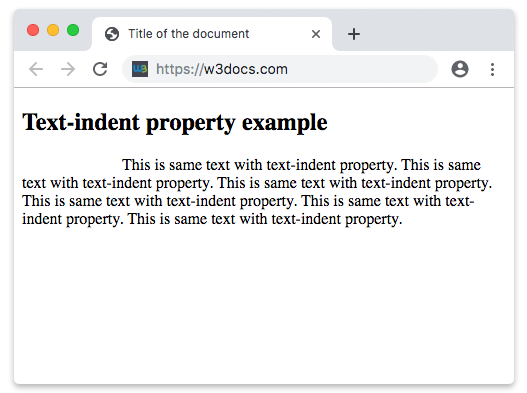
Example of the text-indent property specified in "pt", "em", "%" and "cm":
Example of CSS text-indent Property with pt, cm, % and em values
<!DOCTYPE html>
<html>
  <head>
    <title>Title of the document</title>
    <style>
      div.a {
        text-indent: 20pt;
      }
      div.b {
        text-indent: -5em;
      }
      div.c {
        text-indent: 70%;
      }
      div.d {
        text-indent: 4em;
      }
      div.e {
        text-indent: 5cm;
      }
    </style>
  </head>
  <body>
    <h2>Text-indent property example</h2>
    <h3>text-indent: 20pt</h3>
    <div class="a">
      Lorem Ipsum is simply dummy text of the printing and typesetting industry. Lorem Ipsum has been the industry's standard dummy text ever since the 1500s, when an unknown printer took a galley of type and scrambled it to make a type specimen book.
    </div>
    <h3>text-indent: -5em</h3>
    <div class="b">
      Lorem Ipsum is dummy text of the printing and typesetting industry. Lorem Ipsum has been the industry's standard dummy text ever since the 1500s when an unknown printer took a galley of type and scrambled it to make a type specimen book.
    </div>
    <h3>text-indent: 70%</h3>
    <div class="c">
      Lorem Ipsum is dummied text of the printing and typesetting industry. Lorem Ipsum has been the industry's standard dummy text ever since the 1500s when an unknown printer took a galley of type and scrambled it to make a type specimen book.
    </div>
    <h3>text-indent: 4em</h3>
    <div class="d">
      Lorem Ipsum is dummied text of the printing and typesetting industry. Lorem Ipsum has been the industry's standard dummy text ever since the 1500s when an unknown printer took a galley of type and scrambled it to make a type specimen book.
    </div>
    <h3>text-indent: 5cm</h3>
    <div class="e">
      Lorem Ipsum is dummied text of the printing and typesetting industry. Lorem Ipsum has been the industry's standard dummy text ever since the 1500s when an unknown printer took a galley of type and scrambled it to make a type specimen book.
    </div>
  </body>
</html>Creating a hanging indent
A negative text-indent paired with a matching padding-left indents every line except the first — the standard pattern for references and citations:
<!DOCTYPE html>
<html>
  <head>
    <title>Title of the document</title>
    <style>
      p.reference {
        text-indent: -2em;
        padding-left: 2em;
      }
    </style>
  </head>
  <body>
    <p class="reference">
      Knuth, Donald E. The Art of Computer Programming. Reading,
      Massachusetts: Addison-Wesley, 1968. This long entry wraps onto
      several lines so you can see the hanging indent in action.
    </p>
  </body>
</html>Percentage values
When you pass a percentage, the indentation is calculated from the width of the containing block, not the font size. So text-indent: 10% on a 600px-wide container produces a 60px indent. Because the value is relative, the indent grows and shrinks as the layout resizes, which keeps it proportional on responsive pages.
Values
| Value | Description | Play it |
|---|---|---|
| length | Specifies the indentation in px, pt, cm, em, etc. The default value is 0. Negative values are allowed. | Play it » |
| percentage | Specifies the indentation in percentage of the width of the containing block. | Play it » |
| each-line | Indentation affects the first line as well as each line after a forced line break, but does not affect lines after a soft wrap break.This value is an experimental technology. | |
| hanging | Inverts which lines are indented. First line is not indented.This value is an experimental technology. | |
| initial | Makes the property use its default value. | Play it » |
| inherit | Inherits the property from its parents element. |
Practice
Related properties
For finer control over the spacing and flow of your text, see these related chapters:
- text-align — horizontal alignment of the text within its block.
- line-height — vertical spacing between lines.
- letter-spacing and word-spacing — spacing between characters and words.
- white-space — how whitespace and line breaks are handled.
- direction — the writing direction that decides which edge
text-indentstarts from.