CSS grid-column Property
Master the CSS grid-column shorthand: place grid items by line number, span count, negative index, or named lines. Includes live examples.
The CSS grid-column property is a shorthand that places a grid item along the horizontal (inline) axis. It sets where the item starts and where it ends, which together determine its column position and how many columns it spans. It combines the two longhands:
- grid-column-start — the column line where the item begins.
- grid-column-end — the column line where the item ends.
A grid is divided by grid lines, and grid-column works by referring to those lines rather than to the cells between them. In a four-column grid there are five vertical lines, numbered 1 through 5 from left to right (or −5 through −1 counting from the right).
Note:
grid-columnonly controls placement along columns. To position an item across rows, use grid-row. To place an item by both row and column at once, use grid-area.
| Initial value | auto / auto |
| Applies to | Grid items |
| Inherited | No |
| Animatable | Yes |
| Specification | CSS Grid Layout Level 1 |
| DOM syntax | object.style.gridColumn = "1 / span 3" |
Syntax
/* Two explicit line numbers */
grid-column: <start-line> / <end-line>;

/* Start line + span count */
grid-column: <start-line> / span <number>;

/* Span by named line */
grid-column: span <name>;

/* Single value (sets start; end defaults to auto) */
grid-column: <start-line>;

/* Global keywords */
grid-column: initial | inherit | unset | revert;Value forms
There are four common ways to write grid-column:
| Form | Example | What it does |
|---|---|---|
| Two line numbers | 2 / 4 | Starts at line 2, ends at line 4 (spans columns 2–3) |
| Start + span count | 2 / span 2 | Starts at line 2, spans 2 columns forward |
| Negative line number | 1 / -1 | Spans from the first to the very last line (full width) |
| Named lines | content-start / content-end | Uses names from grid-template-columns |
| Single value | 3 | Sets grid-column-start: 3; end is auto (one column) |
When you write only one value (no /), only grid-column-start is set; grid-column-end defaults to auto, placing the item in a single column track.
How grid lines are numbered
Grid lines are counted from 1 at the start edge (left in LTR layouts). You can also use negative numbers to count from the end edge, so −1 always refers to the last line regardless of how many columns exist.
Column tracks:  [  1  ][  2  ][  3  ][  4  ]
Line numbers:  1       2      3      4       5
Negative: -5 -4 -3 -2 -1This means grid-column: 1 / -1 always makes an item stretch the full width of the explicit grid, regardless of column count.
Examples
Placing an item with explicit line numbers
Box 6 is placed between column lines 2 and 4, so it spans columns 2 and 3.
<!DOCTYPE html>
<html>
  <head>
    <title>Title of the document</title>
    <style>
      .grid-container {
        display: grid;
        grid-template-columns: auto auto auto auto;
        gap: 10px;
        background-color: #ccc;
        padding: 10px;
      }
      .grid-container > div {
        background-color: #666;
        text-align: center;
        padding: 20px 0;
        font-size: 20px;
      }
      .box6 {
        grid-column: 2 / 4;
      }
    </style>
  </head>
  <body>
    <h2>Grid-column property example</h2>
    <div class="grid-container">
      <div class="box1">1</div>
      <div class="box2">2</div>
      <div class="box3">3</div>
      <div class="box4">4</div>
      <div class="box5">5</div>
      <div class="box6">6</div>
      <div class="box7">7</div>
    </div>
  </body>
</html>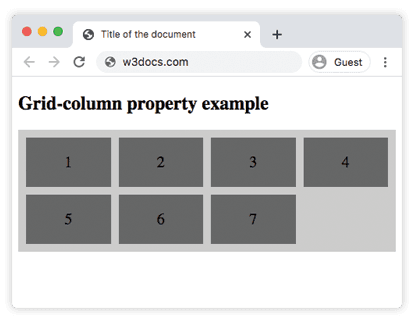
Placing the first item with 1 / 3
Box 1 is placed at grid-column: 1 / 3, which occupies the first two column tracks.
<!DOCTYPE html>
<html>
  <head>
    <title>Title of the document</title>
    <style>
      .grid-container {
        display: grid;
        grid-template-columns: auto auto auto auto;
        gap: 10px;
        background-color: #ccc;
        padding: 10px;
      }
      .grid-container > div {
        background-color: #888;
        text-align: center;
        padding: 20px 0;
        font-size: 30px;
      }
      .box1 {
        grid-column: 1 / 3;
      }
    </style>
  </head>
  <body>
    <h2>Grid-column property example</h2>
    <div class="grid-container">
      <div class="box1">1</div>
      <div class="box2">2</div>
      <div class="box3">3</div>
      <div class="box4">4</div>
      <div class="box5">5</div>
      <div class="box6">6</div>
      <div class="box7">7</div>
    </div>
  </body>
</html>Using span and a full-width item with 1 / -1
The span keyword is useful when you know how many columns to cover but not the ending line number. A negative end line (-1) always reaches the last column line, making the item stretch the full width of the explicit grid.
<!DOCTYPE html>
<html>
  <head>
    <title>Title of the document</title>
    <style>
      .grid-container {
        display: grid;
        grid-template-columns: auto auto auto auto;
        gap: 10px;
        background-color: #ccc;
        padding: 10px;
      }
      .grid-container > div {
        background-color: #4caf50;
        color: #fff;
        text-align: center;
        padding: 20px 0;
        font-size: 20px;
      }
      .featured {
        grid-column: 1 / span 2; /* starts at line 1, covers 2 columns */
      }
      .full-width {
        grid-column: 1 / -1; /* spans the whole explicit grid */
      }
    </style>
  </head>
  <body>
    <h2>span and full-width example</h2>
    <div class="grid-container">
      <div class="featured">Featured (2 cols)</div>
      <div>B</div>
      <div>C</div>
      <div>D</div>
      <div class="full-width">Full width (1 / -1)</div>
    </div>
  </body>
</html>Placing items with named lines
You can name grid lines in grid-template-columns using square-bracket syntax, then reference those names in grid-column. This makes layouts more readable and resilient to column-count changes.
<!DOCTYPE html>
<html>
  <head>
    <title>Named grid lines</title>
    <style>
      .grid-container {
        display: grid;
        /* Names the lines around the middle two columns */
        grid-template-columns:
          [full-start] 1fr
          [content-start] 2fr 2fr
          [content-end] 1fr
          [full-end];
        gap: 10px;
        background-color: #eee;
        padding: 10px;
      }
      .grid-container > div {
        background-color: #5c6bc0;
        color: #fff;
        text-align: center;
        padding: 20px 0;
        font-size: 18px;
      }
      .sidebar {
        grid-column: full-start / content-start; /* first column only */
      }
      .main {
        grid-column: content-start / content-end; /* middle two columns */
      }
      .aside {
        grid-column: content-end / full-end; /* last column only */
      }
    </style>
  </head>
  <body>
    <h2>Named lines example</h2>
    <div class="grid-container">
      <div class="sidebar">Sidebar</div>
      <div class="main">Main content</div>
      <div class="aside">Aside</div>
    </div>
  </body>
</html>Values
| Value | Description |
|---|---|
<line-number> | An integer line number (positive counts from start, negative from end). |
<line-name> | A custom name defined in grid-template-columns. |
span <number> | Spans the given number of column tracks. |
span <name> | Spans to the next line with the given name. |
auto | The browser places the item automatically (default). |
initial | Resets to the default value (auto / auto). |
inherit | Inherits the computed value from the parent element. |
unset | Acts as inherit if the property is inheritable, otherwise as initial. |
Common gotchas
1 / -1only spans the explicit grid. If items are placed in the implicit grid (extra rows/columns the browser creates automatically), a negative end line does not extend into those tracks. Define the full grid withgrid-template-columnsfirst.spanwithout a start line. Writinggrid-column: span 3sets onlygrid-column-end: span 3; the start isauto, so the browser picks it. This is valid but placement depends on auto-flow order.- Named-line lookup. When you reference a name that does not exist in the template, the browser treats it as
auto. Always double-check the name ingrid-template-columns. - Single-value shorthand.
grid-column: 3sets the start to line 3 and the end toauto— not line 4. The item occupies exactly one column track unless the auto-placed end happens to span more.
Related properties
- grid-column-start and grid-column-end — the two longhands
grid-columnbundles together. - grid-row — the vertical-axis equivalent; same syntax, applied to rows.
- grid-area — set row and column placement in a single declaration.
- grid-template-columns — defines the column tracks and named lines that
grid-columntargets. - grid-template-rows — defines row tracks and named lines for grid-row.
- grid-auto-columns — controls the size of implicitly created column tracks.
- grid — the all-in-one grid shorthand.