CSS margin-top Property
The margin-top CSS property is used for setting the top margin of the element. See property values and examples.
The margin-top property sets the size of the top margin of an element — the transparent space above its box, between the element's top edge and the element above it. It is the vertical counterpart of margin-bottom and one of the four sides controlled together by the margin shorthand.
This page explains the values margin-top accepts, the two behaviors that surprise people most — vertical margin collapsing and percentages resolving against width — and shows runnable examples for each value.
This property has no effect on non-replaced inline elements such as <span>. To add vertical space around them, make them inline-block or block first.
Vertical margin collapsing
When the bottom margin of one block touches the top margin of the next, the two collapse into a single margin equal to the larger of the two — not their sum. So a paragraph with margin-bottom: 30px followed by one with margin-top: 20px ends up with 30px of space between them, not 50px.
Collapsing happens only between vertical margins (top and bottom). Left and right margins never collapse. It is also prevented by anything between the two margins — a border, padding, an inline element, or a block formatting context such as a flex/grid container or overflow other than visible.
Negative values are allowed. A negative margin-top pulls the element upward, overlapping or tightening the gap with the element above it.
| Initial Value | 0 |
|---|---|
| Applies to | All elements. It also applies to ::first-letter. |
| Inherited | No. |
| Animatable | Yes. Top margin of the element is animatable. |
| Version | CSS2 |
| DOM Syntax | object.style.marginTop = "50px"; |
Syntax
Syntax of CSS margin-top Property
margin-top: length | auto | initial | inherit;Example of the margin-top property:
Example of CSS margin-top Property with px value
<!DOCTYPE html>
<html>
  <head>
    <title>Title of the document</title>
    <style>
      .margin-top {
        margin-top: 100px;
      }
    </style>
  </head>
  <body>
    <h2>Margin-top property example</h2>
    <p>No specified margin.</p>
    <p class="margin-top"> 100px margin is specified top for this text.</p>
  </body>
</html>Result
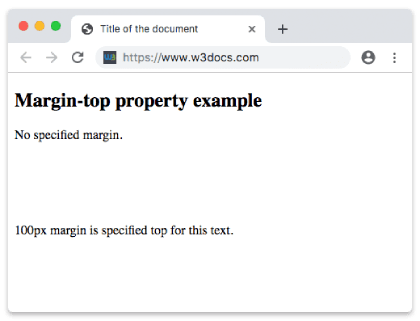
Example of the margin-top property specified in "em":
Example of CSS margin-top Property with em value
<!DOCTYPE html>
<html>
  <head>
    <title>Title of the document</title>
    <style>
      p.example {
        margin-top: 5em;
      }
    </style>
  </head>
  <body>
    <h2>Margin-top property example</h2>
    <p>Lorem Ipsum is simply dummy text of the printing and typesetting industry.</p>
    <p class="example">Lorem Ipsum is simply dummy text of the printing and typesetting industry.</p>
    <p>Lorem Ipsum is simply dummy text of the printing and typesetting industry.</p>
  </body>
</html>Example of the margin-top property specified in "%"
A percentage margin-top resolves against the width of the containing block — not its height. This is easy to miss: margin-top: 10% inside a 600px-wide parent is 60px, and it changes when the parent gets wider, even though the margin is vertical.
<!DOCTYPE html>
<html>
  <head>
    <title>Title of the document</title>
    <style>
      .margin-top {
        margin-top: 10%;
        background-color: lightblue;
      }
    </style>
  </head>
  <body>
    <h2>Margin-top property example</h2>
    <p>No specified margin.</p>
    <p class="margin-top"> 10% margin is specified top for this text.</p>
  </body>
</html>Example of the margin-top property with the "initial" value:
<!DOCTYPE html>
<html>
  <head>
    <title>Title of the document</title>
    <style>
      .margin-top {
        margin-top: initial;
        background-color: lightgreen;
      }
    </style>
  </head>
  <body>
    <h2>Margin-top property example</h2>
    <p>No specified margin.</p>
    <p class="margin-top"> Margin top is specified for this text.</p>
  </body>
</html>Example of the margin-top property with the "inherit" value:
<!DOCTYPE html>
<html>
  <head>
    <title>Title of the document</title>
    <style>
      div {
        margin-top: 50px;
      }
      .margin-top {
        margin-top: inherit;
        background-color: lime;
      }
    </style>
  </head>
  <body>
    <h2>Margin-top property example</h2>
    <div>
      Here is some text.
      <p class="margin-top"> Margin top is specified for this text.</p>
    </div>
  </body>
</html>Values
| Value | Description | Play it |
|---|---|---|
| length | A fixed top margin in px, em, pt, cm, etc. May be negative. Default is 0. | Play it » |
| % | A top margin set as a percentage of the width of the containing block. | Play it » |
| auto | The browser computes the value. For a top margin this resolves to 0 (unlike horizontal auto, which can center an element). | Play it » |
| initial | Resets the property to its default value (0). | Play it » |
| inherit | Inherits the computed value from the parent element. |
auto is only useful for centering with margin-left/margin-right. On a top margin it has no centering effect and behaves like 0.
When to use margin-top vs. padding-top
Reach for margin-top to create space outside an element, pushing it away from its neighbors — and remember those margins can collapse with the element above. Use padding-top when you need space inside the box, between the border and the content; padding never collapses and is included in any visible background.
Related properties
margin— the shorthand that sets all four margins at once.margin-bottom,margin-right,margin-left— the other three sides.box-sizing— controls how width/height relate to padding and border in the box model.