
The padding-left CSS property sets the padding space on the left side of an element.
Negative values are not valid.
This property doesn't have any effect on inline elements, like <span>.
| Initial Value | 0 |
| Applies to | All elements, an exception is made when the display property is set to table-row-group, table-header-group, table-footer-group, table-row, table-column-group and table-column. It also applies to ::first-letter. |
| Inherited | No. |
| Animatable | Yes. Padding space is animatable. |
| Version | CSS1 |
| DOM Syntax | object.style.paddingLeft = "40px"; |
Syntax
padding-left: length | initial | inherit;Example of the padding-left property:
<!DOCTYPE html>
<html>
  <head>
    <title>Title of the document</title>
    <style>
      p {
        border: 2px solid #000;
        color: #1c87c9;
        padding-left: 100px;
      }
    </style>
  </head>
  <body>
    <h2>Padding-left property example</h2>
    <p>Lorem Ipsum is simply dummy text of the printing and typesetting industry.</p>
  </body>
</html>Result
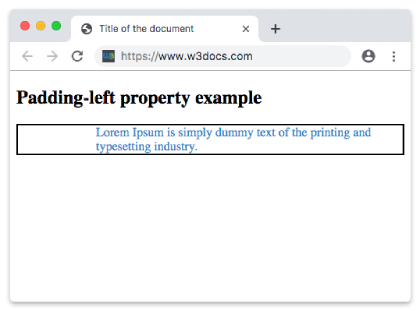
Example of the padding-left property defined as "3cm":
<!DOCTYPE html>
<html>
  <head>
    <title>Title of the document</title>
    <style>
      p {
        border: 2px solid #000;
        color: #1c87c9;
        padding-left: 3cm;
      }
    </style>
  </head>
  <body>
    <h2>Padding-left property example</h2>
    <p>Lorem Ipsum is simply dummy text of the printing and typesetting industry.</p>
  </body>
</html>Example of the padding-left property with the "percentage" value:
<!DOCTYPE html>
<html>
  <head>
    <title>Title of the document</title>
    <style>
      p {
        border: 3px solid #cccccc;
        color: deepskyblue;
        padding: 20px;
        padding-left: 15%;
      }
    </style>
  </head>
  <body>
    <h2>Padding-left property example</h2>
    <p>Lorem Ipsum is simply dummy text of the printing and typesetting industry.</p>
  </body>
</html>Values
| Value | Description | Play it |
|---|---|---|
| length | It sets the left padding in px, pt, cm, etc. Its default value is 0px. | Play it » |
| % | It sets left padding in percent of the width of the containing element. | Play it » |
| initial | Makes the property use its default value. | Play it » |
| inherit | Inherits the property from its parents element. |
Browser support

|

|

|

|
|---|---|---|---|
| 1.0+ | 1.0+ | 1.0+ | 3.5+ |
Practice Your Knowledge
What is the correct usage of padding-left in CSS according to the content on the page?

Correct!

Incorrect!
Quiz Time: Test Your Skills!
Ready to challenge what you've learned? Dive into our interactive quizzes for a deeper understanding and a fun way to reinforce your knowledge.