CSS outline Property
An outline is a line that is drawn outside the borders. It is the same on all sides. The outline property is a shorthand for:
The outline-color property does not work if it is used alone, because the default outline-style is none. Outlines do not take up space and do not affect the element's layout dimensions.
Outlines vs. Borders
An outline and a border are similar, but there are many differences. Unlike borders, outlines are strictly rectangular and cannot be rounded via the border-radius property. The outline property draws a single line outside the element's border edge. The outlines do not take up space because they are outside of an element’s content.
| Initial Value | medium none currentcolor |
|---|---|
| Applies to | All elements. It also applies to ::first-letter. |
| Inherited | No. |
| Animatable | Yes. Outline of the element is animatable. |
| Version | CSS2 |
| DOM Syntax | object.style.outline = "#eee dashed 10px"; |
Syntax
CSS outline
outline: outline-width | outline-style | outline-color | outline-offset | initial | inherit;Example of the outline property:
CSS outline code example
<!DOCTYPE html>
<html>
  <head>
    <title>Title of the document</title>
    <style>
      p.dotted {
        outline: dotted;
      }
      p.dashed {
        outline: dashed;
      }
    </style>
  </head>
  <body>
    <h2>Outline property example</h2>
    <p class="dotted">Lorem Ipsum is simply dummy text of the printing... </p>
    <p class="dashed">Lorem Ipsum is simply dummy text of the printing...</p>
  </body>
</html>Result
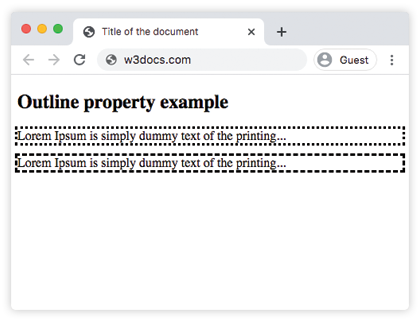
In the given example, the outline-style of the first element is dotted, and that of the second element is dashed.
In the following example, the first element does not have a border, the second one has. Notice that the outline of the second element is outside of its border:
Example of the outline property with an element having a border:
CSS outline and border together, example
<!DOCTYPE html>
<html>
  <head>
    <title>Title of the document</title>
    <style>
      div.ex1 {
        outline-style: solid;
        outline-width: thick;
      }
      div.ex2 {
        border: 1px solid #fc7f01;
        outline-style: solid;
        outline-width: thick;
      }
    </style>
  </head>
  <body>
    <h2>Outline property example</h2>
    <div class="ex1">Lorem Ipsum is simply dummy text of the printing...</div>
    <br />
    <div class="ex2">Lorem Ipsum is simply dummy text of the printing...</div>
  </body>
</html>In the following example, the outline is outside of the second element’s border.
Example of the outline-color property with the outline-style property:
CSS outline, color code example
<!DOCTYPE html>
<html>
  <head>
    <title>Title of the document</title>
    <style>
      div.blue {
        outline-style: solid;
        outline-color: #1c87c9;
      }
      div.green {
        border: 1px solid black;
        outline-style: solid;
        outline-color: #8ebf42;
      }
    </style>
  </head>
  <body>
    <h2>Outline property example</h2>
    <div class="blue">Lorem Ipsum is simply dummy text of the printing...</div>
    <br />
    <div class="green">Lorem Ipsum is simply dummy text of the printing...</div>
  </body>
</html>Values
| Value | Description |
|---|---|
| outline-width | Defines the width of the outline. |
| outline-style | Defines the style of the outline. |
| outline-color | Sets the color of the outline. |
| outline-offset | Offsets the outline from the border edge. |
| initial | Makes the property use its default value. |
| inherit | Inherits the property from its parents element. |
Practice
What can be stated as true regarding CSS Outline property?