What is Git
On this page, you will find the definition and the importance of Git, read about the performance, security and flexibility of Git as a version control system.
This chapter explains what Git is, why it became the standard for tracking source code, and how its design choices — distributed history, content-addressed storage, and cheap branching — translate into everyday benefits for developers and teams. By the end you will understand where Git fits, see the handful of commands that get you started, and know which related chapters to read next.
Definition
Git is a version control system (VCS) that records changes to a set of files over time so you can recall any earlier version, see who changed what, and work on the same project in parallel without overwriting each other. It is the most widely used VCS in software development.
Git was created in 2005 by Linus Torvalds, the author of the Linux kernel, to manage Linux's own source code after the project lost access to its previous tool. Today it powers projects of every size, from a single script to the Linux kernel itself.
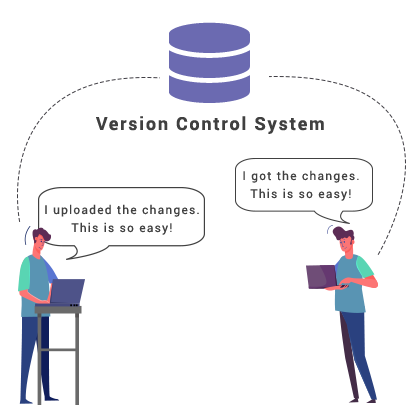
The defining trait of Git is that it is distributed. Instead of keeping the project history on one central server, every developer clones a full copy of the repository — complete history included — onto their own machine. You can commit, branch, view history, and search the log entirely offline; you only need the network to share work with others.
Distributed vs. centralized. In a centralized VCS (such as Subversion), there is one authoritative server and committing requires a network connection. In a distributed VCS like Git, every clone is a complete backup, most operations are local and therefore fast, and there is no single point of failure.
Importance of Git
Git is a fast, efficient distributed VCS that handles projects of any size, from small scripts to very large codebases. A few reasons it matters in day-to-day work:
- Cheap local branching. Creating a branch is nearly instant because Git only writes a small pointer, so experimenting in isolation is the norm rather than the exception. See git branch.
- A convenient staging area. Git lets you assemble exactly which changes go into the next commit before you record it, which keeps each commit focused. See git add.
- Multiple workflows. The same tool supports a solo developer and a 100-person team. See Git workflows.
- Free and open source. There is no licence cost, and the source is open for inspection and contribution.
- Non-linear development. Many lines of work can proceed in parallel and be merged together later, so developers and teams work separately without disrupting one another.
Performance of Git
Git is built for speed, and most of that speed comes from the fact that operations run against the local repository instead of a remote server. Branching, merging, committing, and comparing past versions are all optimized to feel instantaneous even on large histories.
A key design decision is that Git tracks content, not files. When you commit, Git stores a snapshot of every file's content; if a file is unchanged between commits, Git stores a pointer to the identical content it already has rather than a new copy. Because storage is keyed on content, Git can detect when a file was merely renamed, split, or rearranged. On disk, repository objects use a mix of delta encoding (storing differences between similar objects) and zlib compression, which keeps even long histories compact.
Security of Git
The main priority of Git is the integrity of the managed source code. Every object in a repository — file contents, directories, commits, and tags — is identified by a cryptographic hash of its content. Because each commit's hash also incorporates the hash of its parent, the entire history is chained together: changing any past content would change every hash that follows it, making silent tampering detectable.
Git historically used SHA-1 for these hashes and is transitioning toward SHA-256 to strengthen that guarantee. On top of integrity, you can also verify who made a commit by signing commits and tags with a GPG or SSH key, so reviewers can confirm a change came from a trusted author.
Flexibility of Git
One of the advantages provided by Git is its flexibility in several aspects:
- Track changes – Every commit carries an author, a timestamp, and a message, so you always have a readable record of what changed and why.
- Backup and restore – Because every clone holds the full history, each developer's machine is effectively a backup, and any past state can be restored.
- Collaboration – Teams can work on the same project at once and combine their work through merging.
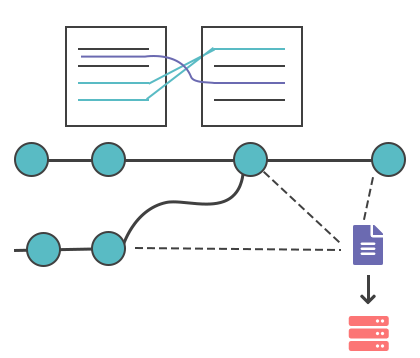
- Branching and merging – Work happens on a branch, and once it is reviewed and approved, it is merged back into the main branch. The history shows who changed each file and exactly which lines differ.
- Deployment – Git does not deploy code itself, but it tracks exact versions and integrates seamlessly with CI/CD pipelines that build and ship those versions.
Version Control With Git
Nowadays, Git is the most preferred version control system because it has almost everything that developers need to get more effective results. The main reasons for this are listed below:
- Git is so popular, that majority of developers can work on it, even before graduating colleges or universities. Besides, Git is considered to be the basis of version control systems, because the developers, who have already learned to work on it, can easily possess other ones.
- Due to its prevalence, many major software tools and services are incorporated in Git.
- There are lots of books, tutorials, and even specialized websites, that can help the developers to learn Git.
- As Git is open-source software, the developers have the opportunity to use it without paying any charge.
The main reason Git is being criticized is the difficulty of learning it. Particularly, some terms used in Git can have other definitions than in other VCS. However, it is worth learning, as the ability to use Git is an excellent advantage for teams and individual developers and is one of the keys of their future success.
The most popular Git solutions
Several third-party platforms manage Git repositories and are widely used for fast and effective software development. The most popular Git-based hosting services are GitHub, Bitbucket, and GitLab.
GitHub is a git-based repository host originally launched in 2008 by Tom Preston-Werner, Chris Wanstrath, and PJ Hyatt. It is the largest repository hosting platform with more than 38 million projects. It permits to host and review code, manage projects and build software.
Bitbucket was launched in 2008 by an Australian startup and originally supported only Mercurial projects. In 2010 Bitbucket was bought by Atlassian, and from 2011, it started to support Git hosting, which is now its main focus. It provides free unlimited private repos, Jira and Trello integration and built-in continuous delivery.
GitLab started as a project by Dmitriy Zaporozhets and Valery Sizov in 2011, which aim was providing an alternative to the available repository management solutions. The company was, however, only incorporated in 2014. It provides continuous integration and delivery, agile development, Auto DevOps, etc..
Basic Git Commands
Once Git is installed, a few core commands cover the everyday workflow:
git init– Creates a new Git repository in the current directory.git clone <url>– Downloads an existing repository, with full history, from a remote server.git add <file>– Stages changes so they will be included in the next commit.git commit -m "message"– Records the staged changes as a new snapshot with a descriptive message.git status– Shows which files are changed, staged, or untracked.git push– Uploads local commits to a remote repository.
A first repository, end to end
The sequence below starts a new project, records a first commit, and inspects the result. Run these in an empty folder to follow along:
# 1. Start tracking the current folder
git init

# 2. Create a file and stage it for the next commit
echo "# My Project" > README.md
git add README.md

# 3. Record the snapshot
git commit -m "Add project README"

# 4. See the history you just created
git log --onelineThe git log --oneline output is one line per commit — a short hash followed by the message:
a1b2c3d (HEAD -> main) Add project READMEFrom here you would add a remote and git push to share the work, or create a branch to start a new feature. The git log chapter goes deeper into reading history.