git bisect
Learn the git bisect command to binary-search your commit history and find the exact commit that introduced a bug. Includes automation with run.
The git bisect command helps you find the exact commit that introduced a bug by performing a binary search through your history. You tell Git one commit where the code worked ("good") and one where it is broken ("bad"), and Git repeatedly checks out the midpoint for you to test, halving the suspect range each time until a single culprit remains.
This chapter covers how to run a bisect session manually, how to read the progress Git prints after each answer, how to automate the whole search with a test command, how to skip untestable commits, and how to recover if you make a mistake.
Definition
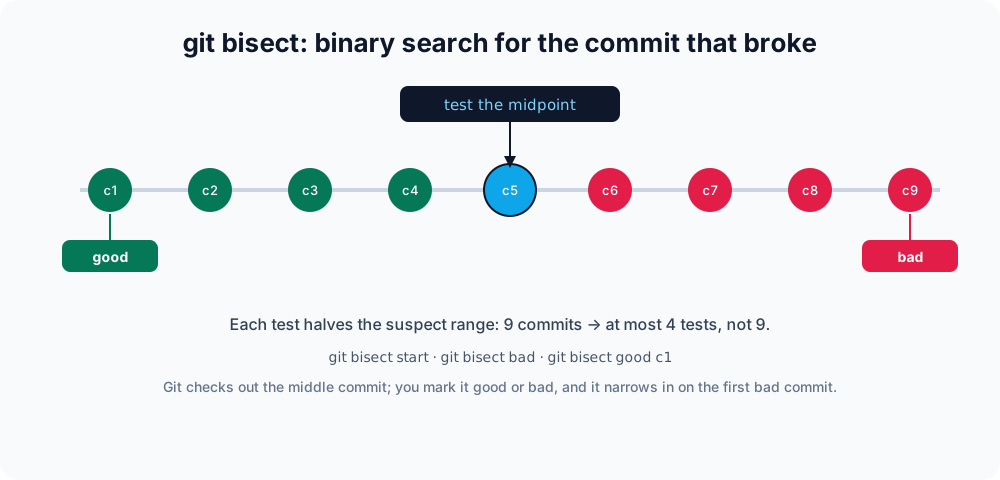
Why binary search
If a bug appeared somewhere in the last 1,000 commits, checking them one by one would be exhausting. Binary search needs only about ten tests to pinpoint the offender, because each answer cuts the remaining candidates in half — roughly log2(N) steps for N commits. git bisect automates the bookkeeping so you only have to answer "does it work here?"
Starting a bisect session
Begin the session, then mark the current broken state and a known-good past commit:
git bisect start
git bisect bad                 # the current commit is broken
git bisect good v1.4.0 # this tag was known to workGit checks out a commit halfway between them. You build and test that revision, then report the result:
git bisect good     # this commit works — bug is newer
# or
git bisect bad # this commit is broken — bug is here or olderAfter each answer Git prints how much of the range is left and checks out the next midpoint for you:
Bisecting: 7 revisions left to test after this (roughly 3 steps)
[a1b2c3d4...] Refactor the parserRepeat the test-and-mark loop until Git announces the first bad commit:
a1b2c3d4 is the first bad commit
commit a1b2c3d4...
Refactor the parserReading the result with git bisect log
At any point you can review the answers you have given so far. This is also handy for keeping a record of the session:
git bisect logIf you suspect you marked a commit wrong, reset and replay a corrected log instead of starting over:
git bisect log > bisect-run.txt   # edit out the mistaken line
git bisect reset
git bisect replay bisect-run.txtEnding the session
When Git reports the culprit, return to where you started:
git bisect resetThis restores HEAD to the branch you were on before bisecting.
Automating with git bisect run
If you can express the test as a script or command that exits 0 for good and non-zero for bad, Git will run the entire search unattended:
git bisect start HEAD v1.4.0
git bisect run npm testGit checks out each midpoint, runs the command, interprets the exit code, and stops on the first failing commit — no manual marking required.
The command can be any executable: a one-liner, a shell script, or a binary. Exit code 0 means good, any code between 1 and 127 (except 125) means bad. The special exit code 125 tells Git the commit cannot be tested and is the same as running git bisect skip — use it when the build itself is broken at that revision:
#!/bin/sh
# test.sh — skip commits that don't even compile
make || exit 125
./run-the-failing-case # exits non-zero when the bug is presentgit bisect start HEAD v1.4.0
git bisect run ./test.shgit bisect run command should be idempotent and self-contained. If your test leaves build artifacts or modified files behind, add a cleanup step so the next checkout starts clean — otherwise a stale binary can make a good commit look bad.Skipping commits you cannot test
Sometimes the checked-out commit is broken for an unrelated reason — it won't compile, or a dependency is missing — so you genuinely cannot say "good" or "bad". Tell Git to set it aside:
git bisect skipGit picks a nearby commit instead and continues narrowing the range. If too many commits in a region are skipped, Git may report a range of candidates rather than a single commit.
Common options
| Command | Description |
|---|---|
git bisect start | Begins a bisect session. |
git bisect bad [<commit>] | Marks a commit as broken (defaults to current). |
git bisect good [<commit>] | Marks a commit as working. |
git bisect skip | Skips a commit that cannot be tested (for example, it does not build). |
git bisect run <cmd> | Automates the search using a test command's exit code. |
git bisect log | Prints the good/bad answers given so far. |
git bisect replay <file> | Re-runs a saved bisect log. |
git bisect reset | Ends the session and restores the original HEAD. |
Related commands
Once bisect points to the culprit, these commands help you inspect and act on it:
- git show — view the exact changes the bad commit introduced.
- git blame — see which commit last touched a specific line.
- git log — browse the history bisect searched through.
- git revert — undo the bad commit without rewriting history.
- git checkout — how Git moves
HEAD, which bisect uses internally.