git worktree
Learn the git worktree command to check out several branches at once from a single repository, without re-cloning. Includes commands and examples.
What git worktree does
The git worktree command lets you check out more than one branch at the same time from a single repository. Each worktree is a separate working directory with its own checked-out branch and its own index, but they all share the same .git object store, history, refs, and configuration. It is the clean way to work on two branches in parallel without cloning the repository twice.
The directory you cloned into is your main worktree; every directory you create with git worktree add is a linked worktree. Linked worktrees are cheap: they store only a small .git file (not a folder) that points back to the shared repository, so they cost almost nothing on disk compared with a second clone.
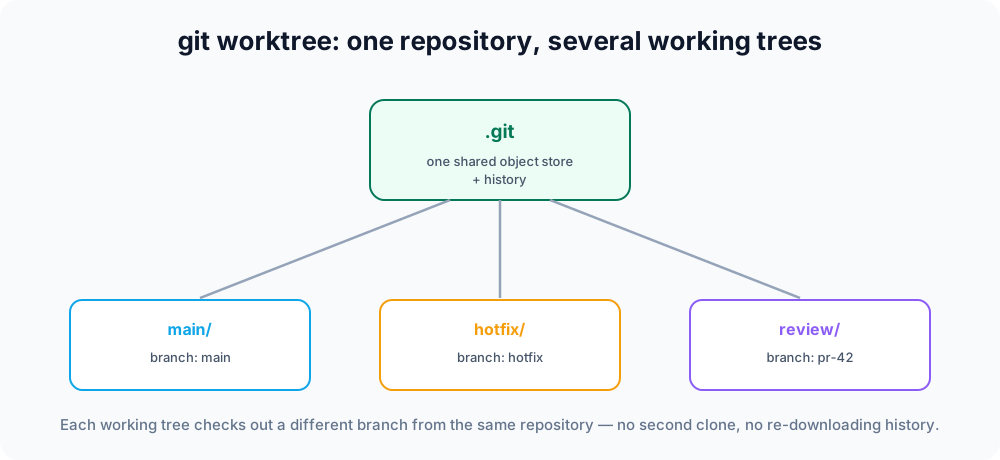
This page covers when to reach for a worktree, how to add, list, move, and remove worktrees, the rules Git enforces, and the common gotchas.
The problem it solves
Imagine you are deep in a feature branch when an urgent bug report arrives. Normally you would have to stash your work, switch branches, fix the bug, switch back, and unstash — disruptive and error-prone. With worktrees, you simply create a second working directory checked out to the hotfix branch, fix the bug there, and leave your feature work completely untouched. When the build needs the two states side by side — for example to compare behavior or run two long test suites at once — worktrees shine where stashing cannot help.
Adding a worktree
Point git worktree add at a path and a branch. To check out an existing branch into a sibling directory:
git worktree add ../hotfix hotfixThis creates ../hotfix with the hotfix branch checked out:
Preparing worktree (checking out 'hotfix')
HEAD is now at 1a2b3c4 Add login formTo create a brand-new branch at the same time, use -b. The last argument is the start point the new branch is based on:
git worktree add -b experiment ../experiment mainYou now have two independent working directories backed by one repository. If you omit the branch entirely, Git creates a branch named after the final path component:
git worktree add ../docs # creates and checks out a branch named "docs"To inspect a commit without putting a branch there — handy for testing an old release — add it in detached HEAD state:
git worktree add --detach ../v1-check v1.0.0See Detached HEAD for what that state means.
Listing worktrees
See every working tree attached to the repository:
git worktree listThe output shows each path, the commit it is on, and the branch (or (detached HEAD)):
/home/dev/project          1a2b3c4 [main]
/home/dev/hotfix           9f8e7d6 [hotfix]
/home/dev/v1-check 0011223 (detached HEAD)Add --porcelain for a stable, script-friendly format.
Moving and removing worktrees
To relocate a linked worktree, let Git update its bookkeeping for you instead of using the shell mv:
git worktree move ../hotfix ../urgent-fixWhen you are done with one, remove it (this deletes its directory):
git worktree remove ../urgent-fixGit refuses to remove a worktree that has uncommitted changes or untracked files, so you do not lose work by accident. Once you are sure, override that check with --force:
git worktree remove --force ../urgent-fixIf you deleted a worktree's folder manually with rm -rf, the repository still holds a stale administrative record. Tidy it up with:
git worktree pruneLocking a worktree
If a worktree lives on a removable drive or network share, lock it so prune never removes its bookkeeping while the drive is unmounted:
git worktree lock ../usb-backup --reason "external disk"
git worktree unlock ../usb-backupCommand summary
| Command | Description |
|---|---|
git worktree add <path> <branch> | Create a worktree at <path> checked out to an existing <branch>. |
git worktree add -b <new> <path> <start> | Create a new branch from <start> and check it out in a new worktree. |
git worktree add --detach <path> <commit> | Add a worktree in detached HEAD at <commit>. |
git worktree list [--porcelain] | List all worktrees attached to the repository. |
git worktree move <from> <to> | Move a linked worktree to a new path. |
git worktree remove [--force] <path> | Remove a worktree and its directory. |
git worktree lock / unlock | Prevent or allow automatic pruning of a worktree. |
git worktree prune | Clean up records for worktrees whose folders were deleted. |
Rules and gotchas
- One branch, one worktree. A branch can only be checked out in one worktree at a time. If you try to add a worktree for a branch already checked out elsewhere, Git refuses with
fatal: '<branch>' is already used by worktree at .... This guarantees two directories can never fight over the same branch pointer. Use--detach, or a new branch with-b, if you need the same commit in two places. - Local changes are not shared. Each worktree has its own working files, index, and stash. Commits, branches, tags, and remotes are shared because they live in the common
.gitstore. - Removing the main worktree. You cannot
git worktree removethe original (main) worktree — only linked ones. - Bare repositories are a great host for worktrees: clone with
git clone --bare, then add every working branch as its own worktree, keeping the repo data separate from any checkout.
Related commands
- git branch — create and manage the branches you check out into worktrees.
- git switch — move between branches inside a single working directory.
- git stash — the older, single-directory alternative to a quick worktree.