Detached HEAD
Understand the Git detached HEAD state — what it means, why it happens, how to keep work you do in it, and how to get back to a branch.
Definition
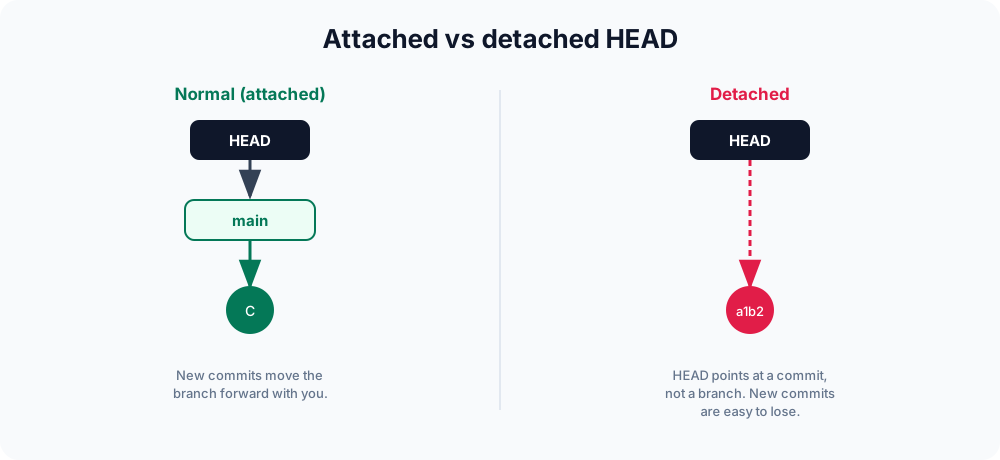
A detached HEAD is when HEAD points directly at a commit instead of at a branch. Normally HEAD references a branch name (like main), and that branch points to the latest commit — so committing moves the branch forward with you. In a detached HEAD state, that chain is broken: HEAD sits on a specific commit with no branch to carry your new commits along.
How HEAD normally works
HEAD is a reference that tells Git "where you are right now." In the usual "attached" state, the references form a chain: HEAD → branch → commit. HEAD does not point at a commit directly — it points at a branch name, and that branch points at the latest commit.
When you make a new commit, Git advances the branch pointer to the new commit, and because HEAD points at the branch, it follows automatically. Your history stays anchored to a named branch.
You can see this chain yourself. The file .git/HEAD holds a symbolic reference:
cat .git/HEAD
# ref: refs/heads/main <- attached: HEAD points at a branchWhat detaches HEAD
HEAD detaches whenever you check out something that is not a branch — most often a specific commit, a tag, or a remote-tracking reference:
git checkout a1b2c3d      # a commit hash
git checkout v1.0.0       # a tag
git checkout origin/main  # a remote-tracking ref
git switch --detach main # explicitly detach at main's tipGit warns you when this happens. The message looks like this:
Note: switching to 'a1b2c3d'.

You are in 'detached HEAD' state. You can look around, make experimental
changes and commit them, and you can discard any commits you make in this
state without impacting any branches by switching back to a branch.After detaching, .git/HEAD no longer points at a branch — it holds a raw commit hash:
cat .git/HEAD
# a1b2c3d4e5f6... <- detached: HEAD points at a commit directlyThe
git checkoutcommand does double duty (switching branches and moving HEAD around). The newer git switch and git checkout chapters explain why Git split these jobs apart.
When a detached HEAD is useful
A detached HEAD is not an error — it is a normal tool. You deliberately use one when you want to look at or build history without touching any branch:
- Inspect an old version — check out a commit or tag to read the code as it was at that point in time.
- Build or test an old release — check out
v1.0.0, run the build, then return to your branch. - Bisect a bug —
git bisectchecks out commits in a detached HEAD as it searches for the commit that introduced a bug. - Try a throwaway experiment — make a few experimental commits, decide they were a dead end, and walk away without leaving a branch behind.
Why it matters
Looking around in a detached HEAD is perfectly safe — that is the whole point of it. The danger appears only when you commit there. Because no branch is tracking your work, those new commits are reachable only through HEAD itself. The moment you switch to another branch, HEAD moves on and nothing points at the commits you made. They become "dangling": still in the repository for a while, but with no reference holding them, and eventually removed by garbage collection.
The fix is simple — give those commits a name before you leave.
Keeping work you did in a detached HEAD
If you made commits in a detached HEAD and want to keep them, create a branch before moving away. This anchors the commits to a name:
git switch -c my-rescued-workYour detached commits now live on the new branch, safe and reachable. The equivalent with the older command is git checkout -b my-rescued-work.
A full walkthrough
Here is the whole cycle — detach, commit, then save the work:
git checkout a1b2c3d          # detach HEAD onto an old commit
# ... edit files ...
git commit -am "Experiment"   # commit lives only on HEAD now
git switch -c experiment      # name it -> commit is now safe on a branch
git log --oneline experiment # the new commit is reachable by nameOnce the branch exists you can merge it, rebase it, or delete it like any other branch.
Getting back to normal
To leave a detached HEAD without keeping any new commits, just switch to a branch:
git switch mainIf you committed in the detached state, forgot to branch, and have already switched away, do not panic — git reflog records every position HEAD has visited, including commits no branch points at. Find the lost commit's hash there and recover it onto a new branch:
git reflog
# a1b2c3d HEAD@{1}: commit: Experiment   <- your lost commit
# 8120552 HEAD@{2}: checkout: moving from main to 8120552
git switch -c recovered a1b2c3dReflog entries expire (90 days by default for reachable history, 30 for unreachable), so recover sooner rather than later.
Related topics
- git switch — the modern, safer way to move between branches.
- git checkout — the original command that can both switch branches and detach
HEAD. - git branch — create the branch that rescues detached work.
- git reflog — recover commits after you have already left a detached HEAD.
- git tag — checking out a tag is a common way to land in a detached HEAD.