Forking workflow
Learn the forking workflow used in open source — fork, clone, push, and open a pull request to contribute without write access to the main repo.
Overview
The forking workflow is the standard model for open-source projects and any setting where contributors are not trusted with direct push access to the main repository. Instead of pushing to a shared repo, each contributor works in their own server-side copy — a fork — and proposes changes back through a pull request. It is how millions of contributions reach projects on GitHub and GitLab every day.
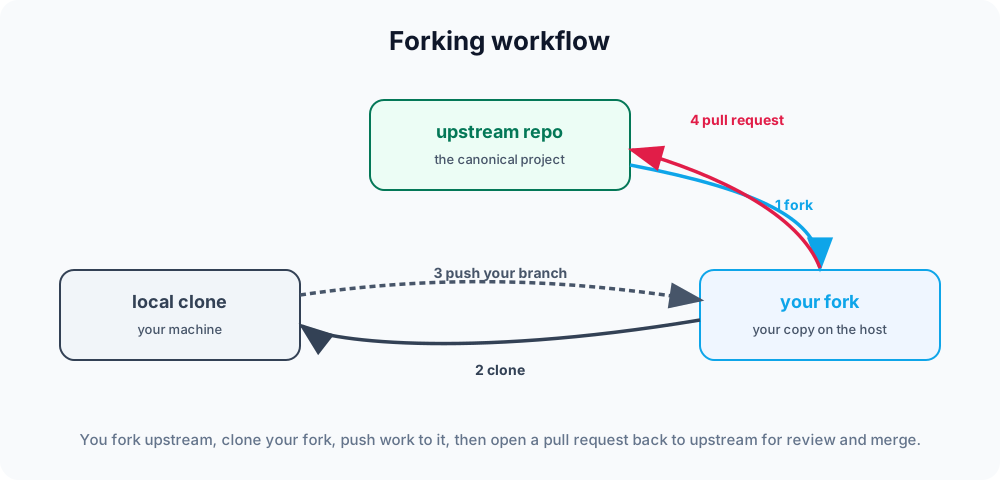
This page explains what a fork is, how it differs from a shared-repository workflow, the exact commands to clone, configure remotes, push, and open a pull request, and — most importantly — how to keep your fork in sync so your contributions stay easy to merge.
The key difference
In the feature branch workflow, everyone pushes branches to one shared repository. The forking workflow adds a layer: there are now two server-side repositories — the official upstream repo, which you cannot write to, and your fork, which you fully control. You push to your fork and ask upstream to pull from it.
This is sometimes called a triangular workflow because of how the three copies relate:
        upstream (official repo, read-only to you)
          ▲   │
   pull   │   │ fork (one click, server-side)
  request │   ▼
        your fork (origin) ──clone──▶ your laptop
◀──push──You fetch from upstream, push to origin (your fork), and the pull request is the bridge that asks a maintainer to pull your branch from your fork into upstream.
Step by step
1. Fork the upstream repository on the hosting platform. This creates your-fork under your account — a complete server-side copy.
2. Clone your fork to your machine:
git clone https://github.com/you/project.git
cd project3. Add upstream as a remote so you can pull in the project's latest changes:
git remote add upstream https://github.com/original/project.gitYour clone now has two remotes. Verify them with git remote -v:
origin    https://github.com/you/project.git (fetch)
origin    https://github.com/you/project.git (push)
upstream  https://github.com/original/project.git (fetch)
upstream https://github.com/original/project.git (push)origin points at your fork (where you push); upstream points at the official repo (where you fetch). See git remote for managing these.
4. Create a branch and work. Always branch off an up-to-date main — never commit directly to your fork's main, so it stays a clean mirror of upstream:
git switch -c fix/typo-in-docs
# ...make changes and commit...
git push -u origin fix/typo-in-docsThe -u (--set-upstream) flag links your local branch to the one on your fork, so later you can just run git push.
5. Open a pull request from your fork's branch to upstream's main branch. On the web UI this is a button; with GitHub's CLI you can do it from the terminal:
gh pr create --base main --head you:fix/typo-in-docsMaintainers review it, request changes if needed, and merge when satisfied. If they ask for edits, commit and git push again — the open pull request updates automatically.
Staying in sync with upstream
The project keeps moving while you work, so refresh your fork from upstream before starting new branches. Use git fetch to download upstream's commits, then git merge (or rebase) them in:
git switch main
git fetch upstream
git merge upstream/main      # fast-forward main onto upstream
git push origin main # update your fork's main on the serverBecause you never commit to main yourself, this merge is always a clean fast-forward — no conflicts. You can enforce that with git merge --ff-only upstream/main, which fails loudly if main has diverged.
Updating a feature branch in progress
If your branch falls behind while a review drags on, bring upstream's new commits into it. Rebasing keeps a linear history that maintainers usually prefer:
git fetch upstream
git switch fix/typo-in-docs
git rebase upstream/main
git push --force-with-lease # rewrite your fork's branch safely--force-with-lease refuses to overwrite the remote if someone else pushed in the meantime, which makes it far safer than a plain --force. If you would rather avoid rewriting history, run git merge upstream/main instead. See git rebase and merge conflicts for handling the details.
Why it works
The forking model lets a project accept contributions from anyone while keeping the official repository locked down — only maintainers can merge. Contributors need no special permissions, review happens in the open on each pull request, and the upstream history stays clean. For untrusted, large-scale collaboration, it is the safest of the common Git workflows.
Use it when contributors are not trusted with push access (most open source). When everyone is on the same team and trusted, the simpler feature branch workflow or Gitflow avoids the extra fork. Compare them side by side in Git workflows.