Git hooks
Learn Git hooks — scripts that run automatically at points in the Git lifecycle to lint, test, and validate. Includes a pre-commit example.
What are Git hooks
Git hooks are scripts that Git runs automatically when certain events happen — committing, merging, pushing, and more. They let you plug custom actions into the Git lifecycle: run a linter before each commit, validate a commit message's format, or block a push if the tests fail. Hooks are how teams enforce quality gates locally, before bad code ever leaves a machine.
This page covers where hooks live, the difference between client- and server-side hooks, the most useful hooks with working examples, how a hook aborts an operation, how to bypass a hook, and how to share hooks across a team.
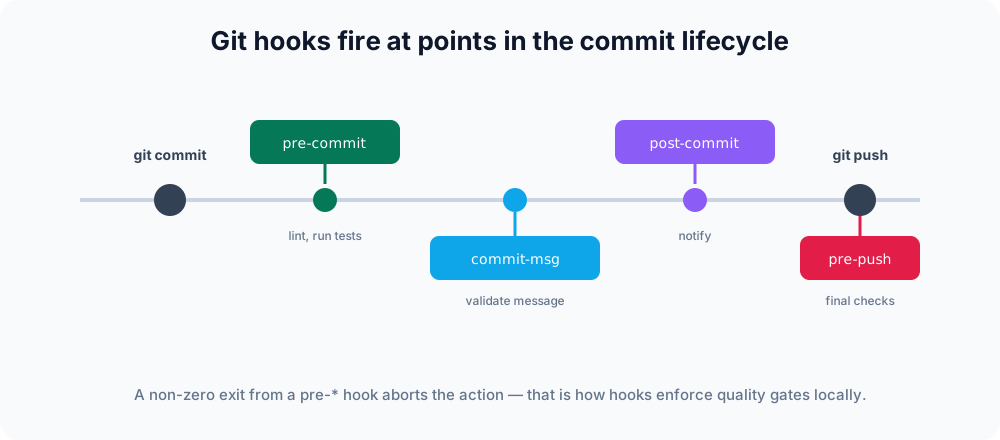
Where hooks live
Every repository has a .git/hooks directory containing sample scripts with a .sample suffix. To activate a hook, add an executable script with the hook's exact name and no extension:
ls .git/hooks
# pre-commit.sample commit-msg.sample pre-push.sample ...Remove the .sample suffix (or create the file fresh) and make it executable:
chmod +x .git/hooks/pre-commitA hook can be written in any language, as long as the file is executable and starts with an appropriate shebang line (#!/bin/sh, #!/usr/bin/env python3, #!/usr/bin/env node, and so on). Git only cares that the file is named exactly after a known hook, is executable, and returns an exit code.
Client-side vs server-side hooks
- Client-side hooks run on your machine around local operations like committing and pushing. They are great for linting and testing.
- Server-side hooks (such as
pre-receiveandpost-receive) run on the remote repository when it receives a push — useful for enforcing policies centrally.
The most commonly used hooks are client-side:
| Hook | Fires | Typical use |
|---|---|---|
pre-commit | Before a commit is created | Lint and test staged files; abort on failure. |
prepare-commit-msg | Before the message editor opens | Insert a template or ticket number. |
commit-msg | After the message is written | Enforce a message convention. |
post-commit | After a commit completes | Send a notification; no effect on the commit. |
pre-push | Before a push is sent | Run the full test suite as a final gate. |
How a hook aborts an operation
The whole control mechanism is the exit code. For a "pre-" hook (pre-commit, pre-push, commit-msg, …):
- Exit
0→ the hook approved the operation, and Git continues. - Exit non-zero → Git cancels the operation. The commit is not created, or the push is not sent.
"Post-" hooks (post-commit, post-merge, …) run after the action has already completed, so their exit code is ignored — they cannot undo anything. Use them for notifications, not for validation.
A pre-commit example
This pre-commit hook runs the project linter and blocks the commit if it reports problems. Because sh aborts on the failing command thanks to set -e, no extra $? check is needed:
#!/bin/sh
set -e
echo "Running lint..."
npm run lintIf npm run lint exits non-zero, set -e propagates that code and the commit is aborted. If you prefer a custom message, check the result explicitly:
#!/bin/sh
if ! npm run lint; then
  echo "Lint failed — commit aborted. Fix the issues and try again."
  exit 1
fiSave this as .git/hooks/pre-commit and run chmod +x .git/hooks/pre-commit.
A commit-msg example
The commit-msg hook receives one argument: the path to a temporary file holding the proposed message. Read that file, validate it, and exit non-zero to reject. This example enforces a Conventional Commits style prefix:
#!/bin/sh
# $1 is the path to the file containing the commit message
message=$(head -n1 "$1")
pattern='^(feat|fix|docs|style|refactor|test|chore): .+'

if ! echo "$message" | grep -Eq "$pattern"; then
  echo "Commit message must start with feat:, fix:, docs:, etc."
  exit 1
fiBypassing a hook
A hook is a safety net, not a wall. When you genuinely need to skip the pre-commit and commit-msg hooks for one operation, use --no-verify:
git commit --no-verify -m "WIP: skip checks"
git push --no-verifyUse this sparingly — bypassing the linter is how broken code slips into history.
Sharing hooks with a team
Because .git/hooks is not committed, hooks do not travel with a clone. Teams solve this by storing hooks in a tracked directory and pointing Git at it:
git config core.hooksPath .githooksNow Git looks in the tracked .githooks/ directory instead of .git/hooks. Commit your scripts there, mark them executable, and every teammate gets them after running the same git config command (or after a setup script does it for them). See Git config for more on storing per-repository settings.
Tools like Husky automate exactly this for JavaScript projects, wiring up shared hooks during install. For policies you cannot let anyone bypass with --no-verify, enforce them with server-side hooks or your hosting platform's branch protection instead, since client-side hooks always live on the developer's machine.
Related topics
- git commit — the command pre-commit and commit-msg hooks wrap around.
- Signing commits — verify authorship, often paired with hooks.
- Git config — where
core.hooksPathand other settings are stored. - Git alias — shortcuts for the commands your hooks run.