git rebase -i (interactive)
Learn interactive rebase with git rebase -i to squash, reword, edit, drop, and reorder commits before sharing them. Includes a command reference.
What interactive rebase is
Interactive rebase, run with git rebase -i, lets you rewrite a series of commits before you share them. It opens an editable "todo list" of commits where you decide, line by line, what happens to each one — keep it, reword its message, fold it into another, split it, reorder it, or drop it. It builds on plain git rebase but puts you in control of every step.
This page covers how to start an interactive rebase, every command you can put in the todo list, the most common workflows (squashing, rewording, reordering, dropping, and splitting commits), how to recover when something goes wrong, and the one rule that keeps it safe.
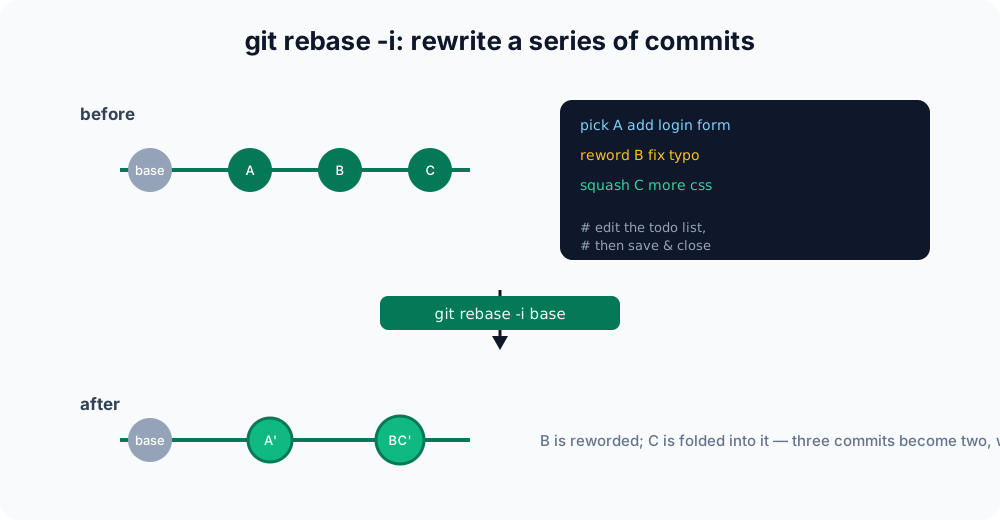
A commit is a saved snapshot of your work; HEAD is a pointer to the commit you are currently on. "Rewriting history" means producing new commits to replace existing ones — Git never edits a commit in place, so every rewritten commit gets a brand-new hash.
Starting an interactive rebase
Point the command at the commit before the first one you want to edit — the rebase will replay everything that comes after it. To revisit the last three commits:
git rebase -i HEAD~3HEAD~3 means "three commits back from HEAD". You can also name an explicit commit (git rebase -i a1b2c3d) or, on a branch, rebase everything since it forked from another branch (git rebase -i main).
Git opens your configured editor with one line per commit, oldest at the top (the reverse of git log):
pick a1b2c3d add login form
pick b2c3d4e fix typo
pick c3d4e5f more css tweaksBelow the list, Git includes a commented-out cheat sheet of every command. You change the word at the start of each line to choose an action, optionally reorder the lines, then save and close. Git replays the commits from the top down according to your instructions. If you save the file unchanged (or delete every line), the rebase does nothing and stops.
The todo-list commands
Each line begins with a command. These are the ones you reach for most often:
| Command | Short | Effect |
|---|---|---|
pick | p | Use the commit as-is. |
reword | r | Use the commit but edit its message. |
edit | e | Pause at the commit so you can change its content (amend, split, or add files). |
squash | s | Combine into the previous commit, merging both messages. |
fixup | f | Like squash, but discard this commit's message. |
drop | d | Remove the commit entirely (deleting its line does the same). |
exec | x | Run a shell command (e.g. tests) at that point in the rebase. |
There is no reorder command — you reorder commits simply by moving the lines up or down in the todo list. Lines are applied top to bottom, so the order you leave is the order Git creates.
Squashing commits together
A common cleanup is folding several small commits into one. Mark the first as pick and the rest as squash (or fixup to drop their messages):
pick a1b2c3d add login form
squash b2c3d4e fix typo
fixup c3d4e5f more css tweakssquash/fixup always merge upward, into the line above. When you save, Git combines the three into a single commit. Because b2c3d4e was squashed, Git opens a second editor showing both commit messages so you can write one clean message; the fixup of c3d4e5f contributes its changes but drops its message silently.
If all you want is to fold tiny "oops" commits into an earlier one, look at git commit --fixup (see git commit --amend and git rebase -i --autosquash), which marks the lines for you automatically.
Rewording a commit message
To fix a typo or clarify a message without touching the code, mark the line reword:
pick a1b2c3d add login form
reword b2c3d4e fix tpyo
pick c3d4e5f more css tweaksGit replays a1b2c3d as-is, then pauses and opens an editor with the old message of b2c3d4e so you can rewrite it, then continues. The commit's changes are untouched — only the message (and its hash) changes.
Reordering and dropping commits
To change the order, move the lines. To delete a commit, mark it drop or delete the line. This todo list reorders the css tweak before the typo fix and drops the typo commit entirely:
pick a1b2c3d add login form
pick c3d4e5f more css tweaks
drop b2c3d4e fix typoDropping or reordering can cause conflicts if a later commit depended on the one you removed or moved — Git will pause and let you resolve them.
Splitting a commit
To break one large commit into several, mark it edit. Git pauses on that commit with it already applied; you then undo the commit while keeping the changes, and re-commit in smaller pieces:
# rebase pauses on the commit marked 'edit'
git reset HEAD~          # move the commit's changes back to the working tree
git add login.js
git commit -m "add login form markup"
git add styles.css
git commit -m "style the login form"
git rebase --continue # resume the rest of the rebasegit reset HEAD~ undoes the last commit but leaves its changes in your files (see git reset), so you can stage and commit them as separate, smaller commits.
Finishing or bailing out
If a step causes a conflict, Git pauses so you can resolve it. Edit the conflicted files, stage the fixes with git add, then continue:
git rebase --continueIf you decide a particular commit shouldn't be applied at all while paused on a conflict, use git rebase --skip. To abandon the whole rebase and return exactly to where you started:
git rebase --abortEven after a rebase finishes, the original commits are not lost immediately — they stay reachable through git reflog for a while, which is the safety net if you rebase and regret it.
A word of caution
Interactive rebase rewrites history — the resulting commits have new hashes. That is perfect for tidying up your own branch before opening a pull request, but never rebase commits that others have already pulled. Rewriting shared history forces everyone else to reconcile divergent copies, and pushing the result requires a force push (git push --force-with-lease). The golden rule: rebase locally, merge publicly.
If you only need to change the very last commit, you usually don't need a full rebase — git commit --amend is simpler. To copy a single commit from elsewhere onto your branch, see git cherry-pick.
A full squash walkthrough
Here is a complete sequence you can run in an empty folder to see squashing in action. It builds four commits, then folds the last three into one:
git init -b main demo && cd demo
git config user.email [email protected]
git config user.name You

echo "init"  > base && git add base && git commit -m "initial commit"
echo "a"     > f    && git add f    && git commit -m "add login form"
echo -e "a\nb" > f  && git add f    && git commit -m "fix typo"
echo -e "a\nb\nc" > f && git add f  && git commit -m "more css tweaks"

git log --oneline      # four commits
git rebase -i HEAD~3   # mark line 2 'squash', line 3 'fixup', save
git log --oneline # now: "initial commit" + one combined commitAfter the rebase, git log --oneline shows just two commits — the initial commit and a single combined commit — and the file f still contains all three lines (a, b, c). The work is identical; only the commit history is tidier.