git restore
Learn the git restore command to discard working-tree changes and unstage files. See how --staged and --source work, with clear examples.
What git restore does
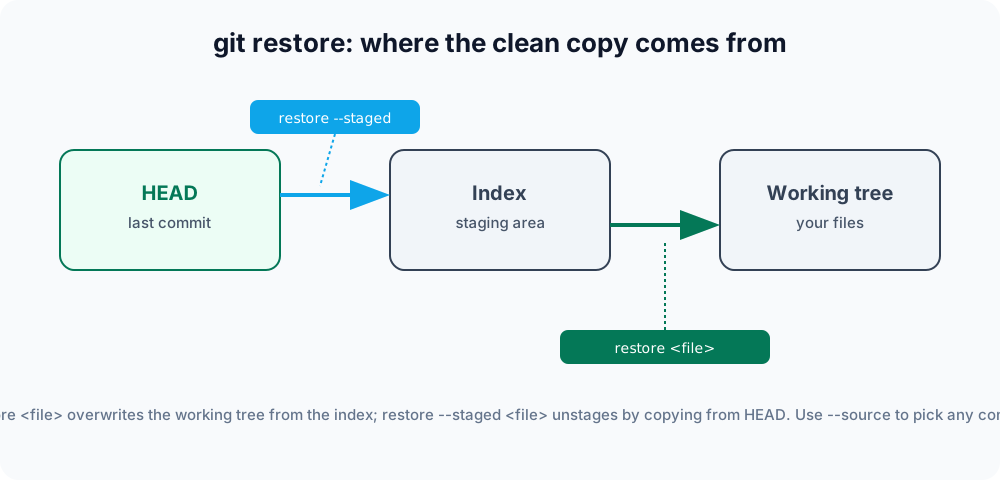
The git restore command copies a clean version of a file into your working tree, your staging area, or both. Introduced in Git 2.23 alongside git switch, it took over the file-level duties that used to be buried inside the overloaded git checkout command. Its job is to answer one question: where should the good copy of this file come from, and where should it land?
To use it well, it helps to know Git's "three trees": the working tree (the files you edit on disk), the index (also called the staging area — what git add writes to and what the next commit will capture), and HEAD (the snapshot of your last commit). git restore always moves content from a source into a destination among these. Two flags control that:
--source=<rev>— where the clean copy comes from. Defaults to the index, or toHEADwhen--stagedis used.--stagedand/or--worktree— where the copy is written. Defaults to--worktree.
This page covers the everyday uses: throwing away edits, unstaging, restoring from an older commit, recovering a deleted file, and how restore differs from reset and revert.
Discarding working-tree changes
By default, git restore overwrites a file in your working directory with the version from the staging area (the index). If you have edited a file and want to throw those edits away:
git restore index.htmlThe file returns to its last staged state (or to its HEAD state if it was never staged). Because this is destructive — your unstaged edits are gone for good and cannot be recovered with git reflog — Git deliberately gives the operation a clear, explicit name rather than hiding it behind checkout.
To discard changes across many files at once, pass a directory or a pathspec. This is one of the few git restore commands that can wipe out a lot of work in one keystroke, so double-check what is uncommitted first with git status:
git restore .          # discard all changes in the current directory
git restore src/ # discard all changes under src/Unstaging with --staged
To remove a file from the staging area without changing its contents on disk, use --staged. This copies the version from HEAD back into the index, leaving your working-tree edits intact:
git restore --staged index.htmlThis is the modern replacement for git reset HEAD <file>, and it is exactly what Git suggests in its hint text when you run git status after staging something:
Changes to be committed:
  (use "git restore --staged <file>..." to unstage)
modified: index.htmlRestoring from a specific commit
The --source option lets you pull a file's contents from any commit, branch, or tag — not just the index or HEAD:
git restore --source=HEAD~2 config.ymlThis rewinds a single file to how it looked two commits ago. Note what it does not do: it does not create a commit and it does not move any branch pointer. The old content lands in your working tree as an ordinary unstaged change, ready for you to inspect, stage, and commit yourself. You can use a branch name (--source=main) or a tag (--source=v1.0) just as easily.
Recovering a deleted file
If you delete a tracked file by mistake and have not committed the deletion, git restore brings it back from the index or HEAD:
git restore app.jsBecause the file still exists in a known-good snapshot, Git rewrites it to disk exactly as it was. (If you already committed the deletion, restore it from before that commit instead: git restore --source=HEAD~1 app.js.)
Reset both copies at once
Combining --staged and --worktree resets a file completely — both the staged copy and the on-disk copy — back to HEAD:
git restore --staged --worktree index.htmlThis is the "make this file look exactly like the last commit, no matter what I did" command. It discards both staged and unstaged edits in a single step.
Restoring part of a file
Like git add and git checkout, git restore supports a patch mode. With -p (or --patch), Git walks you through each change hunk and asks whether to discard it, so you can throw away some edits while keeping others:
git restore -p index.htmlThis is useful when you have made several unrelated changes in one file and only want to undo a specific experiment.
Common options
| Command | Description |
|---|---|
git restore <file> | Discards working-tree changes, restoring the file from the index. |
git restore --staged <file> | Unstages a file by restoring the index copy from HEAD. |
git restore --staged --worktree <file> | Resets both the staged and working-tree copies to HEAD at once. |
git restore --source=<commit> <file> | Restores the file from a specific commit, branch, or tag. |
git restore -p <file> | Interactively discards only selected change hunks. |
git restore . | Discards all working-tree changes in the current directory. |
restore vs reset vs revert
These three commands are easy to confuse because all of them "undo" something, but they work at different levels:
- git restore operates on files in the working tree and index. It never moves branch pointers or rewrites history.
- git reset moves the current branch tip and can change the staging area — it operates at the commit level.
- git revert creates a new commit that undoes a previous one, leaving existing history intact.
Reach for restore when you simply want a file to look the way it did somewhere else. If you want to drop whole commits or move a branch, that is git reset's job. If the changes are already pushed and shared, use git revert so you do not rewrite history others depend on. To set aside changes temporarily instead of discarding them, see git stash.
git restore <file> (the default form) permanently discards uncommitted edits — they are not stored anywhere and cannot be recovered. If you might want them back, run git stash instead.