Trunk-based development
Learn trunk-based development — frequent commits to a single shared branch, short-lived branches, and feature flags for continuous delivery.
Overview
Trunk-based development is a workflow where every developer integrates into a single shared branch — the trunk (usually main) — at least once a day. Branches, if used at all, are tiny and live for hours, not weeks. It is the workflow behind true continuous integration and is favored by teams that deploy frequently.
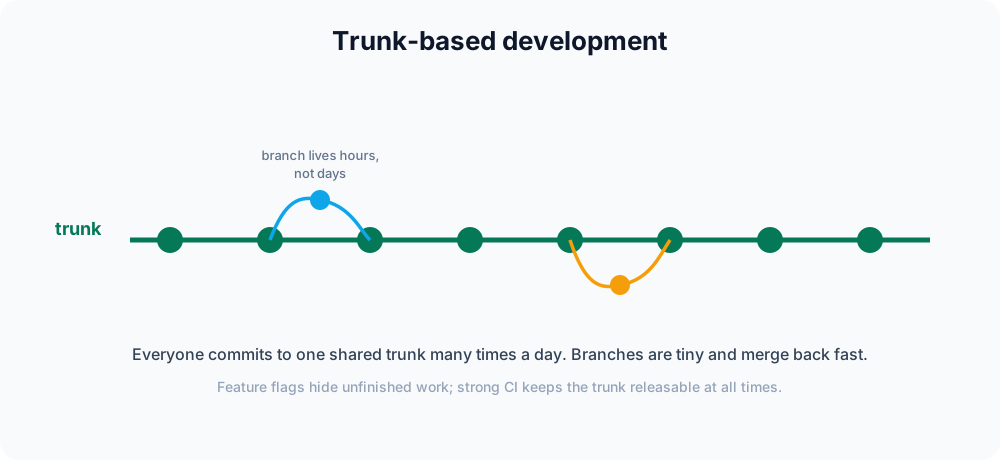
The core idea
The further your code drifts from everyone else's, the harder integration becomes. The cost of a merge grows with the size of the divergence: a branch that has lived for two weeks accumulates more conflicts, and those conflicts are harder to reason about because so much has changed on both sides.
Trunk-based development attacks that problem directly by keeping the gap tiny. You integrate into the trunk constantly — at least once a day — so any conflict is small and caught while the change is still fresh in your head. There is no long-lived develop branch and no big-bang merges. The trunk is always in a releasable state.
There are two common styles:
- Committing straight to the trunk. Small teams commit directly to
main, relying on pre-push checks and pair review. This is the purest form. - Short-lived branches. Larger teams branch for each change, open a pull request, and merge within a day or two. The branch exists only long enough to run CI and get a quick review.
A typical short-lived-branch cycle looks like this:
git switch main          # start from the trunk
git pull                 # get everyone else's latest work
git switch -c quick-fix  # tiny, focused branch
# ...a few hours of work...
git switch main
git pull                 # pull again — others have merged since you branched
git merge quick-fix      # fast, because divergence is small
git push # back on the trunk within the same dayThe repeated git pull is deliberate: pulling before you merge keeps your branch close to the trunk so the merge stays trivial. If you prefer a linear history, some teams rebase the short-lived branch onto main instead of merging. See the feature branch workflow for the branch-and-pull-request mechanics in detail.
Feature flags: shipping unfinished work safely
If everyone merges to the trunk daily, how do you handle a feature that takes two weeks? You can't keep a branch alive that long without defeating the whole point. The answer is a feature flag — a runtime switch that decides whether new code actually runs. You merge the incomplete code, but keep it switched off:
const featureFlags = { newCheckout: false };

function checkout() {
  if (featureFlags.newCheckout) {
    return "new checkout";
  }
  return "old checkout";
}

console.log(checkout()); // old checkout — flag is off in productionThe new code travels to production hidden behind the flag. When it is ready, you flip newCheckout to true — no redeploy required. This decouples deploying code from releasing a feature, which is what lets unfinished work live safely on the trunk.
A few practical rules keep flags from becoming a mess:
- Default to off. New code is dark until you deliberately turn it on, often for internal users first.
- Treat flags as temporary. Once a feature is fully launched, remove the flag and the dead
elsebranch — stale flags accumulate fast and make code hard to read. - Test both paths. CI should exercise the code with the flag on and off, since both ship to production.
What it demands
Trunk-based development is fast, but it is not loose — it only works with strong supporting practices:
- Robust CI: every push runs an automated test suite, because a broken trunk blocks the whole team.
- Small, frequent commits: large changes are broken into safe, incremental steps.
- Feature flags for anything that cannot be finished in a single short-lived branch.
- Fast code review, often via small pull requests that merge within hours.
If review takes days, branches live for days, and you are no longer doing trunk-based development. The supporting practices are not optional extras — they are what make the speed safe.
Releasing from the trunk
Because the trunk is always releasable, releases are simple. Two patterns dominate:
-
Release from the tip. Deploy
maindirectly, as often as you like. Mark each release with a tag so you can identify exactly what shipped:git switch main git pull git tag -a v1.4.0 -m "Release 1.4.0" git push origin v1.4.0 -
Cut a release branch. For products that ship versioned releases, create a short-lived release branch from the trunk, stabilize it, and tag from there. Fixes are made on the trunk first and then cherry-picked back onto the release branch — never the other way around, so the trunk stays the source of truth.
Both keep the trunk healthy: it is always the latest good code, and releases are snapshots taken from it.
Trunk-based vs Gitflow
Gitflow optimizes for controlled, versioned releases with many branch types. Trunk-based development optimizes for speed and continuous delivery with essentially one branch. If you deploy several times a day, trunk-based fits; if you ship versioned releases on a schedule, Gitflow's structure may serve you better.
| Trunk-based | Gitflow | |
|---|---|---|
| Long-lived branches | Only the trunk | main and develop |
| Branch lifetime | Hours to a day | Days to weeks |
| Integration | Continuous, daily | At release time |
| Best for | Continuous delivery | Scheduled, versioned releases |
When to use it
Reach for trunk-based development when you deploy frequently, have reliable automated tests, and can keep code review fast. It rewards teams that value short feedback loops over heavy process. If your tests are flaky, review is slow, or you must batch work into scheduled releases, the feature branch workflow or Gitflow will be less painful. For a tour of all the common models, see the Git workflows overview.