git stash
On this page you will find useful information about git stash command and how to stash your work, as well as learn about multiple and partial stashes.
What git stash does
The git stash command shelves changes you have made to your working copy so you can work on something else, and then come back and re-apply them later. It is the answer to a very common situation: you are halfway through a change when you need to switch branches, pull updates, or fix an urgent bug — but your work is not finished enough to commit. Instead of making a throwaway commit, you stash the changes, get a clean working tree, do the other work, and restore your changes afterwards.
A stash is stored as a special commit-like object on a last-in, first-out (LIFO) stack. Each entry holds a snapshot of your modified tracked files, and (by default) Git leaves your working directory clean once the stash is taken.
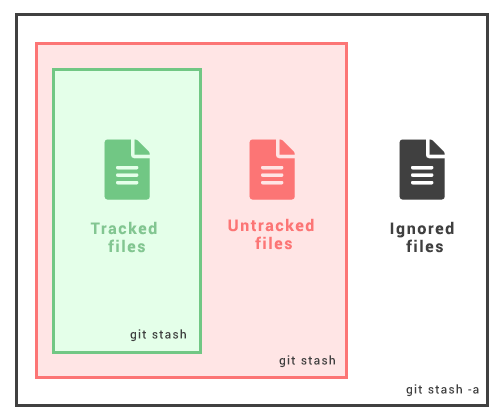
This page covers stashing and restoring changes, including untracked and ignored files, working with multiple stashes, inspecting and partially stashing changes, branching from a stash, and cleaning up. For a refresher on staged versus unstaged changes, see git add and git status.
Stashing your work
The git stash command takes both uncommitted staged and unstaged changes to tracked files, saves them away for further use, and then removes them from your working copy. First, run git status so you can see the dirty state. Then run git stash to stash the changes:
Check the working tree state
git statusOn branch master
Changes to be committed:
new file: style.css
Changes not staged for commit:
modified: index.htmlStash the changes
git stashSaved working directory and index state WIP on master: 5002d47 our new homepage
HEAD is now at 5002d47 our new homepageConfirm the working tree is now clean
git statusOn branch master
nothing to commit, working tree cleanYour changes are safely stored and your working directory matches the last commit, so you can switch branches or pull updates freely.
Re-applying your stashed changes
There are two commands to restore a stash, and the difference matters:
git stash popre-applies the most recent stash to your working copy and removes it from the stash list.git stash applyre-applies the changes but keeps them in the stash list, which is handy when you want to apply the same stash to more than one branch.
Apply the most recent stash and drop it
git stash popOn branch master
Changes to be committed:
new file: style.css
Changes not staged for commit:
modified: index.html
Dropped refs/stash@{0} (32b3aa1d185dfe6d57b3c3cc3b32cbf3e380cc6a)The Dropped refs/stash@{0} line confirms the entry was removed after a successful pop.
If re-applying a stash produces merge conflicts (because the underlying files changed in the meantime), git stash pop will not drop the stash — it leaves the conflict markers for you to resolve and keeps the entry so you do not lose your work. Resolve the conflicts, then remove it manually with git stash drop.
Stashing untracked or ignored files
By default git stash only stores changes that Git is already tracking: staged changes and modifications to tracked files. It will not stash brand-new files that have never been staged, nor ignored files. To include untracked files, use the -u option (or --include-untracked):
Include untracked files
git stash -uTo stash ignored files as well, use the -a option (or --all):
Include untracked and ignored files
git stash -aFiles matched by your .gitignore are only stashed when you pass -a. Use this sparingly — it can sweep up build artifacts and local config you probably did not mean to move.
Keeping staged changes with --keep-index
When you want to test only your staged changes in isolation, git stash --keep-index stashes everything but leaves the contents of the index in your working tree:
Stash everything but keep what is staged
git stash --keep-indexThis is useful before committing: stash the unstaged work, run your tests against exactly what you are about to commit, then git stash pop to bring the rest back.
Multiple stashes
You can run git stash several times to create multiple stashes, then run git stash list to view them. By default each stash is labelled "WIP" — work in progress — together with the branch and commit it was created from. The most recent stash is stash@{0}; older ones have higher indexes.
List the stashes
git stash liststash@{0}: WIP on master: 5002d47 our new homepage
stash@{1}: WIP on master: 049d078 add navigation
stash@{2}: WIP on master: 38e3b29 initial layoutIt is good practice to add a descriptive message instead of the default "WIP" label so you can tell stashes apart later:
Stash with a message
git stash push -m "wip: experimental dark theme"By default git stash pop re-applies the most recent stash, stash@{0}. You can target a specific stash by passing its reference to either pop or apply:
Pop a specific stash
git stash pop stash@{2}On branch master
Changes to be committed:
new file: style.css
Changes not staged for commit:
modified: index.html
Dropped refs/stash@{2} (32b3aa1d185dfe6d57b3c3cc3b32cbf3e380cc6a)Viewing stash diffs
Use git stash show to view a summary of the files a stash changed:
Summary of a stash
git stash show index.html | 1 +
style.css | 3 +++
2 files changed, 4 insertions(+)By default git stash show reports the latest stash. Pass a reference such as git stash show stash@{1} to inspect an older one. Add the -p or --patch option to see the full diff:
Full diff of a stash
git stash show -pdiff --git a/style.css b/style.css
new file mode 100644
index 0000000..d92368b
--- /dev/null
+++ b/style.css
@@ -0,0 +1,3 @@
+* {
+ text-decoration: blink;
+}
diff --git a/index.html b/index.html
index 9daeafb..ebdcbd2 100644
--- a/index.html
+++ b/index.html
@@ -1 +1,2 @@
+<link rel="stylesheet" href="style.css"/>Partial stashes
Git lets you choose whether to stash a single file, a group of files, or individual changes within files. The git stash -p (or --patch) command iterates through each hunk — a contiguous piece of change — in the working copy and asks whether you want to stash it:
Interactively stash selected hunks
git stash -pdiff --git a/style.css b/style.css
new file mode 100644
index 0000000..d92368b
--- /dev/null
+++ b/style.css
@@ -0,0 +1,3 @@
+* {
+ text-decoration: blink;
+}
Stash this hunk [y,n,q,a,d,/,e,?]? y
diff --git a/index.html b/index.html
index 9daeafb..ebdcbd2 100644
--- a/index.html
+++ b/index.html
@@ -1 +1,2 @@
+<link rel="stylesheet" href="style.css"/>
Stash this hunk [y,n,q,a,d,/,e,?]? nHunk Commands
| Command | Description |
|---|---|
| / | Search for a hunk by regex. |
| ? | Print help. |
| n | Do not stash the hunk. |
| a | Stash this hunk and all later hunks in the file. |
| d | Do not stash this hunk or any of the later hunks in the file. |
| e | Manually edit the current hunk |
| q | Quit (selected hunks will be stashed) |
| s | Split the hunk into smaller hunks. |
| y | Stash the hunk. |
Creating a branch from a stash
Sometimes the commit you stashed from has moved on so far that re-applying the stash would conflict. git stash branch solves this by creating a new branch from the commit where the stash was originally created, applying the stash there, and dropping it on success:
Branch from a stash
git stash branch add-stylesheet stash@{1}Switched to a new branch 'add-stylesheet'
On branch add-stylesheet
Changes to be committed:
new file: style.css
Changes not staged for commit:
modified: index.html
Dropped refs/stash@{1} (32b3aa1d185dfe6d57b3c3cc3b32cbf3e380cc6a)Cleaning up the stash
Stashes are not removed automatically, so the list can grow over time. Delete a single stash with git stash drop:
Drop one stash
git stash drop stash@{1}Dropped stash@{1} (17e2697fd8251df6163117cb3d58c1f62a5e7cdb)To delete every stash at once, use git stash clear:
Drop all stashes
git stash cleargit stash clear and git stash drop discard the stashed changes permanently and they are not part of any branch, so a normal git log will not show them. If you delete a stash by mistake, you may still be able to recover the object through git reflog and git stash apply <commit-hash> before garbage collection removes it.
Quick command reference
| Command | What it does |
|---|---|
git stash | Stash staged and unstaged changes to tracked files. |
git stash -u | Also stash untracked files. |
git stash -a | Also stash untracked and ignored files. |
git stash --keep-index | Stash, but leave staged changes in the working tree. |
git stash push -m "message" | Stash with a descriptive label. |
git stash list | List all stashes (newest is stash@{0}). |
git stash show -p | Show the full diff of a stash. |
git stash pop | Re-apply the latest stash and remove it. |
git stash apply | Re-apply the latest stash and keep it. |
git stash branch <name> | Create a branch from a stash and apply it. |
git stash drop / clear | Delete one / all stashes. |
To learn related ways of moving and undoing work, see git reset, git restore, and git checkout.