Version Control System
Read about the importance of version control and the benefits of a version control system, find out the best version control systems and see our infographics
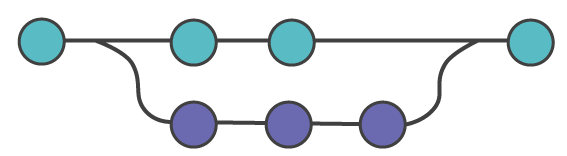
A version control system (VCS) records changes to a set of files over time so you can recall any specific version later. This page explains what version control is, why software teams depend on it, the three families of VCS tools (local, centralized, and distributed), and the concrete benefits each one delivers. It is the conceptual foundation for everything else in this book — once you understand why version control exists, commands like git init, git commit, and git branch make far more sense.
What Is Version Control?
Version control is a system that records changes to source code (or any set of files) so a team can manage how that code evolves over time. Instead of overwriting files and losing the previous state, the system stores each meaningful change as a revision you can return to.
Concretely, version control lets you:
- Travel back in time — restore any earlier version of a file or the whole project.
- See who changed what, and why — every revision carries an author, a date, and a message.
- Work in parallel — separate independent lines of work into branches and combine them later with a merge.
- Compare versions — view the exact differences between any two points in history with a diff.
Why It Matters
Version control is essential the moment more than one person — or more than one machine, or even just you over time — touches a codebase. It lets multiple developers work separately without overwriting each other's work, then integrate those changes in a traceable way. It also turns "I broke something and don't know what" into a question you can answer: you can find the exact change that introduced a bug and undo just that change.
Even on a solo project, version control gives you a safety net. You can experiment freely, knowing every working state is saved and recoverable.
Version Control Systems (VCS)
A Version Control System (VCS) — also called Source Code Management (SCM) or a Revision Control System (RCS) — is the software tool that implements version control: it tracks changes, stores history, and coordinates collaboration.
Three Types of Version Control Systems
Historically, VCS tools fall into three families, each solving a problem the previous one left behind.
1. Local Version Control Systems
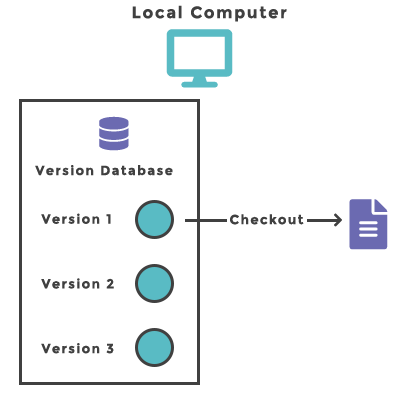
A local VCS keeps the entire history in a simple database on a single machine. It was created to prevent everyday mistakes such as editing the wrong file or losing a previous version when copying directories by hand. One of the most popular local tools is RCS (Revision Control System), still distributed today. RCS stores sets of patches (the differences between versions) so it can recreate any file as it looked at any point in time.
The limitation is obvious: the history lives on one computer, so it offers no real collaboration and no protection if that disk fails.
2. Centralized Version Control Systems
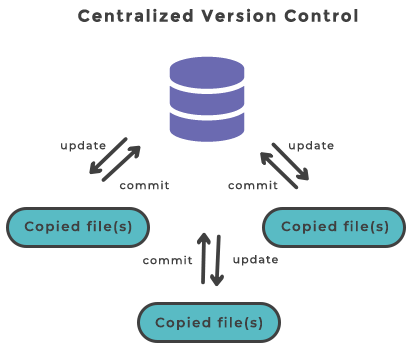
A centralized VCS (CVCS) stores all versioned files on a single central server, and clients "check out" files from that one place. This solved collaboration: everyone could see, to a degree, what others were doing, and administrators had a single point of control. For many years this was the standard. Common examples are CVS, Subversion (SVN), and Perforce.
The trade-off is the single point of failure. If the central server goes down, nobody can commit or collaborate; if its disk is lost without a backup, the entire project history can be lost with it.
3. Distributed Version Control Systems
In a distributed VCS (DVCS), every client doesn't just check out the latest files — it fully mirrors the repository, including the complete history. If the server dies, any client's clone can be pushed back to restore it. This also makes most operations fast and offline-capable, because the full history is local. Examples include Git, Mercurial, Bazaar, and Darcs.
This is the model Git uses, and it is why you can commit, branch, view history, and diff without any network connection. The rest of this book covers Git in depth — start with What Is Git? and installing Git.
Benefits of Version Control Systems
The primary benefits of a VCS are:
- Long-term change history. Every creation, modification, and deletion of a file is recorded over the project's lifetime. This lets you return to a previous version to analyze bugs and fix problems.
- Branching and merging. Branching lets developers work independently without interfering with each other. Merging brings that work back together and surfaces any conflicts so they can be resolved deliberately.
- Traceability. You can trace each change, annotate it with a message describing its purpose, and connect it to project-management and bug-tracking tools.
Version Control in Action
You don't need a server or a team to see version control work — Git tracks history right on your own machine. The commands below run entirely locally: they create a repository, record two versions of a file, and then ask Git for the history of that file. Try them in a terminal after installing Git.
# Create a fresh project and turn it into a Git repository
mkdir vcs-demo && cd vcs-demo
git init -q

# Tell Git who is making the changes (required for a commit)
git config user.email "[email protected]"
git config user.name "You"

# Record the first version
echo "line one" > notes.txt
git add notes.txt
git commit -q -m "Add notes.txt"

# Change the file and record a second version
echo "line two" >> notes.txt
git commit -q -am "Add a second line"

# Ask version control for the history of this file
git log --onelineThe git log --oneline output lists two revisions, newest first — each with a short commit hash and the message you wrote:
3f8a1c2 Add a second line
9b2e4d7 Add notes.txt(Your hashes will differ, since they are computed from the content and timestamp.) That history is the heart of version control: every version is saved, labeled, and recoverable. To go deeper, see git log and git commit.