Introduction
Learn how Git branches work: create and switch branches, merge work back together, resolve merge conflicts, and pick a merge strategy. With examples.
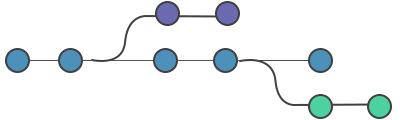
A branch is a lightweight, movable pointer to a commit. It lets you work on a new feature, a bug fix, or an experiment in isolation — without touching the code everyone else relies on. When the work is ready, you merge the branch back so its changes become part of the main line of development.
This page is the overview for the branching part of the book. It introduces the commands you will use to create, switch between, combine, and delete branches, plus how to handle the conflicts that can arise when two lines of work change the same code. Each section links to a dedicated chapter with full details. By the end of the part you should be comfortable with the everyday branching workflow shown in the example below.
git branch
The git branch command creates, lists, and deletes branches. It does not switch between branches or merge a forked history back together — those are the jobs of git checkout and git merge. Creating a branch simply adds a new pointer to the commit you are currently on; it does not copy files or alter history, which is why branching in Git is fast and cheap.
git branch              # list local branches (the current one is marked with *)
git branch new-feature  # create a branch called new-feature
git branch -d old-work # delete a branch that has already been mergedA Git branch is best thought of as a pointer to a snapshot of your changes, not as a separate copy of the project.
git checkout
The git checkout command switches branches or restores working tree files. When you switch, Git updates the files in your working directory to match the version stored in the target branch and moves the HEAD pointer — the reference that tracks "where you are now" — to that branch.
git checkout new-feature      # switch to an existing branch
git checkout -b new-feature # create new-feature AND switch to it in one stepIn modern Git you can also use git switch for the branch-switching half of this job; checkout remains the most widely documented command. The -b shortcut is the form you will reach for most often when starting work.
git merge
The git merge command integrates independent lines of development into a single branch. You first check out the branch that should receive the changes, then merge the other branch into it. Git resolves the merge in one of two ways:
- Fast-forward — if the receiving branch has no commits of its own since the other branch diverged, Git just moves its pointer forward. No new commit is created.
- Three-way merge — if both branches have new commits, Git combines them and records a dedicated merge commit with two parents.
git checkout main        # the branch that will receive the work
git merge new-feature    # bring new-feature's commits into main
git branch -d new-feature # delete the merged branch (now redundant)merge conflicts
A merge conflict happens when Git cannot automatically combine two branches — typically when both branches change the same lines of the same file, or when one branch deletes a file the other modified. Git pauses the merge and marks the clashing regions in the affected files with conflict markers like this:
<<<<<<< HEAD
the change on the current branch
=======
the change coming from the other branch
>>>>>>> new-featureYou resolve a conflict by editing the file to the desired final state, removing the markers, then staging and committing the result. Working in isolated branches keeps conflicts small and infrequent, but they are a normal part of collaboration — not a sign that something went wrong.
git merge strategies
When work is ready to merge into the main line, Git applies a merge strategy — the algorithm it uses to combine the branches. If you do not name one explicitly, Git picks a sensible default (ort in current versions, formerly recursive) based on the branches involved. You usually never need to set a strategy by hand; it is worth knowing they exist for the occasional case where a specific one helps.
A typical branching workflow
Putting the commands together, a single feature usually flows like this:
git checkout -b add-login   # 1. branch off main and switch to it
# ... edit files, then ...
git add .
git commit -m "Add login form"
git checkout main           # 2. switch back to the receiving branch
git merge add-login         # 3. integrate the feature
git branch -d add-login # 4. clean up the merged branchTo go deeper, continue with git branch for the full set of branch operations, or jump straight to the feature branch workflow to see this pattern used on a real team.