Gitflow workflow
Learn the Gitflow workflow — main, develop, feature, release, and hotfix branches — and when its structure helps a versioned product.
Overview
Gitflow is a structured branching model, popularized by Vincent Driessen in 2010, designed for projects with scheduled, versioned releases. Instead of a single integration branch, it uses two long-lived branches plus three kinds of supporting branches, each with a defined purpose. The structure makes release management explicit at the cost of more ceremony.
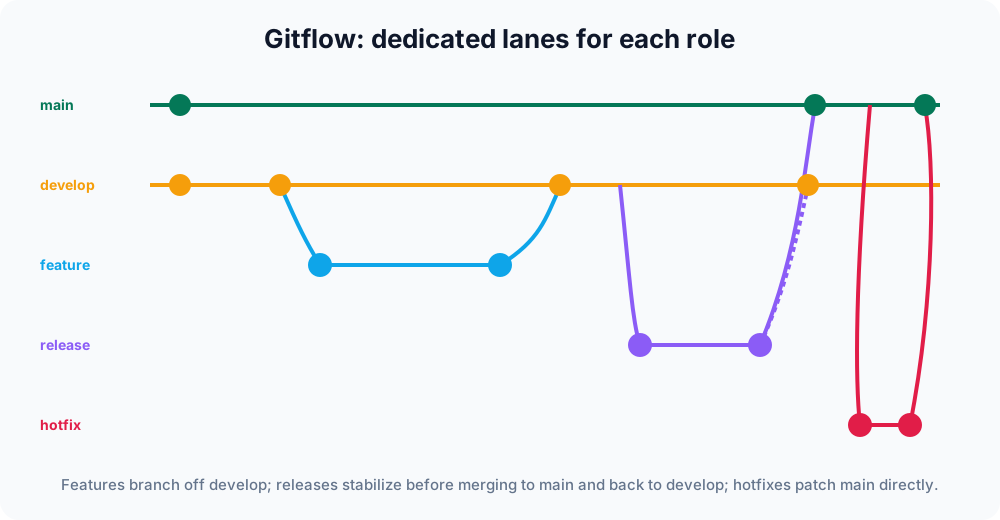
The two long-lived branches
These two branches live for the entire life of the project — you never delete them.
- main holds production-ready code. Every commit on
maincorresponds to a released version and is usually tagged (for examplev1.4.0). If you want to know exactly what is running in production, you check outmain. - develop is the integration branch where completed features accumulate between releases. It always contains the latest delivered changes destined for the next release, but those changes are not necessarily stable yet.
Because both branches are permanent, the relationship between them never resets: develop is always "ahead" of main by whatever has not yet been released.
The three supporting branches
The supporting branches are short-lived. Each is created for one purpose, merged when that purpose is done, and then deleted. Naming conventions (feature/, release/, hotfix/) keep their role obvious in git branch output.
Feature branches
Feature branches branch off develop and merge back into develop. They hold work for upcoming functionality and never interact with main directly — a single feature is never released on its own; it ships as part of the next versioned release.
git switch develop
git switch -c feature/search   # create + check out feature/search
# ...work and commit...
git switch develop
git merge feature/search       # fold the feature into develop
git branch -d feature/search # delete it once mergedA git switch -c <name> creates the branch from the current branch and checks it out in one step — it is the modern equivalent of git checkout -b. See Git switch for the full command. Keeping feature branches short-lived limits how far they drift from develop, which keeps merge conflicts small.
Release branches
Release branches branch off develop when it is feature-complete for a release. They exist for final polish only — version bumps, release notes, and last-minute bug fixes — while develop stays open for the next cycle's features.
When the release is ready, the branch merges into both places:
- into
main, where it is tagged with the version number; and - back into
develop, so any stabilization fixes made on the release branch are not lost.
git switch -c release/1.4.0 develop
# ...bump version, fix last bugs, write release notes...
git switch main
git merge --no-ff release/1.4.0      # record an explicit merge commit
git tag -a v1.4.0 -m "Release 1.4.0"
git switch develop
git merge --no-ff release/1.4.0      # carry fixes back into develop
git branch -d release/1.4.0--no-ff (no fast-forward) forces Git to create a merge commit even when a fast-forward is possible, so the release is preserved as a single, visible point in history rather than being flattened away.
Hotfix branches
Hotfix branches branch off main to patch a production bug urgently — without waiting for the current develop work to be release-ready. Like release branches, they merge into both main (tagged with a bumped patch version) and develop, so the fix is also present in future releases.
git switch -c hotfix/1.4.1 main
# ...fix the bug and commit...
git switch main
git merge --no-ff hotfix/1.4.1
git tag -a v1.4.1 -m "Hotfix 1.4.1"
git switch develop
git merge --no-ff hotfix/1.4.1       # don't reintroduce the bug later
git branch -d hotfix/1.4.1Forgetting the second merge — back into develop — is the classic Gitflow mistake: the bug reappears in the next release because the fix only ever landed on main.
When to use Gitflow
Gitflow shines when you ship distinct, versioned releases — desktop apps, libraries, mobile apps gated by app-store review, or anything with maintained version numbers and the occasional emergency patch. The explicit release and hotfix branches give you a clear place to stabilize and to fix production without disturbing ongoing development. The need to support multiple released versions at once is the strongest signal that Gitflow's structure will pay off.
A full release cycle at a glance
Putting the pieces together, one version moves through the branches like this:
- Developers cut
feature/*branches offdevelop, build, and merge each back intodevelop. - When
develophas enough for a release, arelease/x.y.0branch is cut for final stabilization. - The release branch merges into
main, is taggedvx.y.0, and merges back intodevelop. - If production breaks, a
hotfix/x.y.zbranches offmain, is tagged, and merges into bothmainanddevelop.
main therefore only ever advances through release and hotfix merges, and every commit on it is a shippable, tagged version.
The trade-offs
That structure is also Gitflow's weakness. The many branch types add overhead, and the long-lived develop branch can drift far from main, making merges painful. Long-running branches encourage large, infrequent integrations — the opposite of what continuous delivery wants. Teams shipping many times a day usually find Gitflow too heavy and prefer the simpler feature branch or trunk-based approach, where work integrates into one branch continuously. Choose Gitflow when release cadence and parallel version support, not raw deploy speed, are your priorities.
Compare it with the alternatives before committing: the forking workflow for open-source contributions, and plain feature branches for most web apps that deploy from a single line.