git cherry-pick
Learn the git cherry-pick command to copy individual commits from one branch onto another. See options, conflict handling, and examples.
What git cherry-pick does
The git cherry-pick command takes the change introduced by one or more existing commits and reapplies it on your current branch as a new commit. Where git merge and git rebase move whole lines of history at once, cherry-pick lets you grab a single commit and drop it exactly where you need it.
This page covers how cherry-pick works internally, how to pick one commit or a range, the options you will actually use, how to resolve conflicts, and when to reach for cherry-pick versus a merge or git revert.
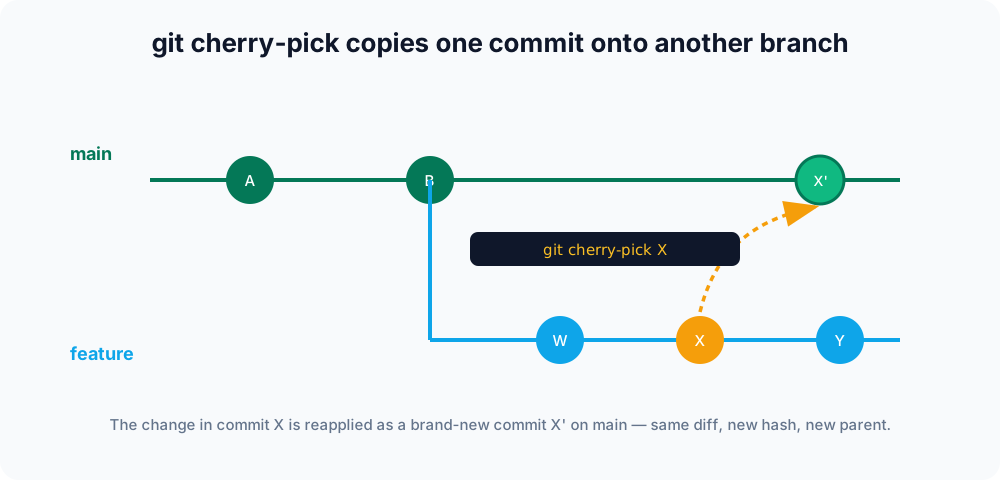
How it works
A commit is a snapshot, but cherry-pick treats it as a patch: it computes the diff between the commit and its parent, then applies that diff to the tip of your current branch and records a new commit. The new commit keeps the original message, author, and date, but gets a new hash and a new parent because it now lives in a different place in history.
That difference is the key mental model: cherry-pick copies a change, it does not move it. The source commit stays exactly where it was on its original branch.
git switch main
git cherry-pick a1b2c3dThe change from commit a1b2c3d is now on main as a fresh commit.
A worked example
Say a hotfix was committed to feature but it really belongs on main. First find the commit hash with git log:
git switch feature
git log --oneline
# d9ae654 fix login redirect
# 7c1a902 work in progress
# fa42ab5 baseNow switch to main and copy just that one commit:
git switch main
git cherry-pick d9ae654[main 02bbf3e] fix login redirect
1 file changed, 1 insertion(+)Notice the new hash 02bbf3e — the fix is now on main as a brand-new commit, while d9ae654 still exists untouched on feature.
Picking a range of commits
You can apply several commits in one go. A range copies every commit after the first up to and including the last:
git cherry-pick a1b2c3d..f4e5d6cThat excludes a1b2c3d itself. To make the range inclusive of the starting commit, add the ^ suffix so the range begins at its parent:
git cherry-pick a1b2c3d^..f4e5d6cThe commits are applied one at a time, in order; if any one conflicts, cherry-pick pauses on that commit so you can fix it before continuing.
Common options
| Command | Description |
|---|---|
git cherry-pick <commit> | Applies the change from <commit> as a new commit on the current branch. |
git cherry-pick -n <commit> | Applies the change but does not commit, leaving it staged so you can review or amend before committing. |
git cherry-pick -x <commit> | Appends a (cherry picked from commit …) line to the message — handy on public branches so others can trace the origin. |
git cherry-pick -e <commit> | Opens your editor so you can change the commit message before it is recorded. |
git cherry-pick --continue | Resumes the operation after you have resolved conflicts. |
git cherry-pick --skip | Skips the current commit (for example, when its change is already present) and moves on. |
git cherry-pick --abort | Cancels the operation and restores the branch to its original state. |
With -x the recorded message looks like this:
fix login redirect

(cherry picked from commit d9ae65426adbde425c3e386a32297e9e833d8816)Handling conflicts
If the change does not apply cleanly, cherry-pick pauses much like a merge does and leaves conflict markers in the affected files. You will see:
CONFLICT (content): Merge conflict in app.js
error: could not apply d9ae654... fix login redirect
hint: ... fix conflicts and then run "git cherry-pick --continue".Resolve the conflicted files by hand, stage them with git add, then continue:
git add app.js
git cherry-pick --continueThree escape hatches are available at this point:
git cherry-pick --continue— finish after resolving conflicts.git cherry-pick --skip— drop the current commit and move to the next one in the range.git cherry-pick --abort— bail out entirely and return the branch to where it started.
Use git status at any time to see which files are still conflicted.
When to use it
Cherry-pick shines when:
- A fix landed on the wrong branch and you need it elsewhere.
- You are backporting a single patch to a release or maintenance branch.
- You want one commit out of a feature branch without merging the whole thing.
Cherry-pick vs. merge, rebase, and revert
| Goal | Use |
|---|---|
| Copy one (or a few) specific commits to another branch | git cherry-pick |
| Integrate an entire branch's history | git merge |
| Move a branch's commits onto a new base | git rebase |
| Undo a commit by recording an opposite commit | git revert |
Gotchas
- Duplicates on shared history. Cherry-picking onto a branch that will later merge back into the source creates two commits with the same change. Git is usually smart enough to skip the duplicate at merge time, but it can complicate history — prefer merge or rebase when you want the whole branch.
- Empty results. If the change is already present on the target, cherry-pick stops with
The previous cherry-pick is now empty. Usegit cherry-pick --skipto move on, or--abortto cancel. - New hash, not the original. Because the commit is recreated, its hash changes. Add
-xso the message records where it came from.