Git workflows
An overview of the most common Git workflows — feature branch, Gitflow, trunk-based, and forking — and how to choose the right one for your team.
What is a Git workflow
A Git workflow is an agreed set of conventions for how a team uses branches, commits, and merges to collaborate without stepping on each other. Git itself is unopinionated — it gives you the tools but does not dictate how to use them. A workflow fills that gap by answering practical questions: where does new work live, how does it get reviewed, and how does it reach production.
Why it matters
Without a shared workflow, a team quickly drifts into chaos: half-finished work on the main branch, merge conflicts nobody expected, and releases that are hard to reproduce. A good workflow keeps the main branch releasable, makes review a natural step, and gives everyone the same mental model of where code is in its journey.
The centralized workflow
The simplest model, and a good baseline for understanding the rest, is the centralized workflow: everyone commits directly to a single shared branch (usually main). There are no feature branches — git pull and git push keep each developer in sync with the central repository.
# Get the latest shared history before you start
git pull origin main

# ...make and commit your changes...
git add .
git commit -m "Add user profile page"

# Share your work; rebase on top of any new commits first
git pull --rebase origin main
git push origin mainThis is easy to grasp but it scales poorly: every commit lands on the one branch teammates depend on, so an unfinished change can break everyone. The workflows below all solve that by isolating work in branches first.
The common workflows
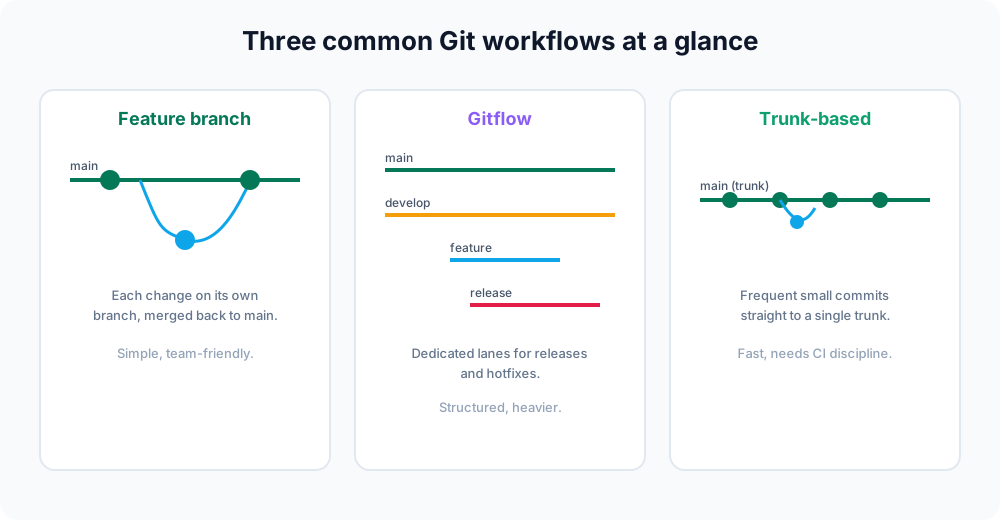
These four approaches build on the centralized idea but add isolation. Each makes different trade-offs between simplicity and structure:
| Workflow | Best for | Trade-off |
|---|---|---|
| Feature branch | Most teams | Simple; the default starting point. |
| Gitflow | Scheduled releases, versioned products | Structured but heavier with many branch types. |
| Trunk-based | Continuous delivery, strong CI | Very fast; demands discipline and feature flags. |
| Forking | Open source, untrusted contributors | No write access needed; extra fork to manage. |
A feature branch in action
In practice, most teams start with feature branches because the commands are familiar and the isolation is immediate. The pattern is always the same: branch off main, do your work, then merge back.
# Create and switch to an isolated branch
git switch -c feature/login

# ...edit files, then stage and commit...
git add .
git commit -m "Add login form"

# Bring the finished work back into main
git switch main
git pull origin main          # make sure main is current
git merge feature/login       # integrate the feature
git push origin mainThe branch keeps main releasable while the feature is half-finished, and it gives reviewers a self-contained set of commits to read.
Pull requests on top of any workflow
On hosted platforms like GitHub, GitLab, or Bitbucket, you usually do not merge locally. Instead you push the branch and open a pull request (a "merge request" on GitLab): a place to review the diff, run CI, and discuss before the code reaches main.
git switch -c feature/login
# ...commit work...
git push -u origin feature/login   # push branch, set upstream
# then open a pull request in the web UIPull requests are not a separate workflow — they are a review gate you can layer on the feature branch, Gitflow, trunk-based, or forking models alike.
How to choose
Start with the simplest workflow that fits your situation and add structure only when you feel the pain of not having it.
- A small team shipping a web app continuously is well served by the feature branch or trunk-based approach.
- A product with versioned, scheduled releases benefits from Gitflow's explicit release and hotfix branches.
- An open-source project taking contributions from strangers needs the forking model, because contributors do not have push access to the main repository.
These workflows are not mutually exclusive. Many teams blend ideas — for example, using short-lived feature branches with a trunk-based mindset, or pull requests on top of any of them.
The common thread
Every workflow here builds on the same primitives you have already learned: git branch, git switch, git merge, git rebase, and git push. The workflow is just a convention layered on top of those commands. Master the commands, agree on the conventions, and collaboration gets dramatically smoother.