Git LFS (Large File Storage)
Learn Git LFS (Large File Storage) to keep big binary assets out of your repository history using lightweight pointers. Setup and commands included.
What is Git LFS
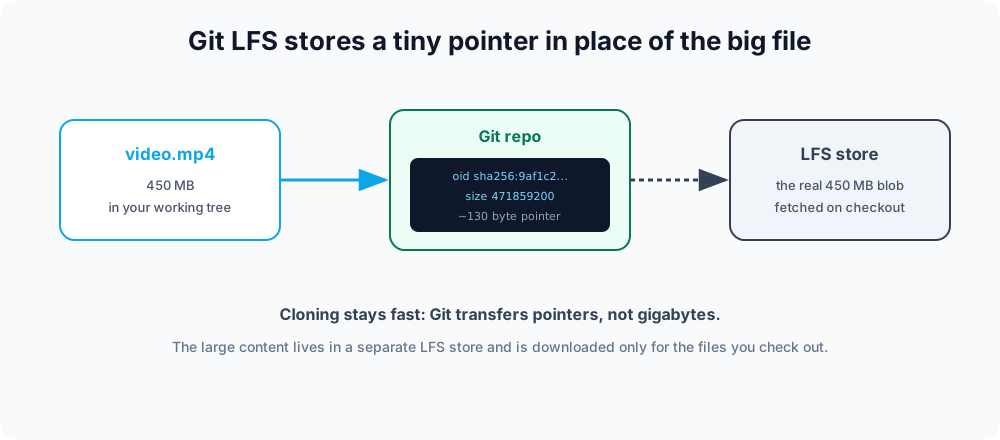
Git LFS (Large File Storage) is an open-source Git extension that keeps large binary files — videos, datasets, design assets, game art — out of your Git history. Instead of storing a 500 MB file in the repository, Git LFS stores a tiny text pointer and keeps the real content in a separate LFS store. The result: clones stay fast and the repository stays small, even when the project ships gigabytes of assets.
This chapter covers when to reach for LFS, how to install and track files, what a pointer actually contains, the everyday commands, file locking for un-mergeable binaries, and the gotchas that trip people up.
Why large files hurt Git
Git is built for text and stores the full history of every file. It also stores files by content: when a binary changes, Git usually keeps the entire new copy rather than a small diff, because binaries don't diff cleanly. Commit a big binary a few times and every clone must download every version of it forever — even versions nobody needs. History balloons, clones crawl, and pushes time out. Git LFS sidesteps this by versioning a small pointer instead of the heavy content.
Reach for LFS when files are large and change over time — design sources, compiled assets, datasets, audio and video. For files that never need versioning at all, keep them out of the repo entirely with .gitignore instead.
Setup
First install Git itself, then install the LFS extension. On most systems Git LFS ships separately (brew install git-lfs, apt install git-lfs, or the installer from git-lfs.com). Enable it once per machine:
git lfs installUpdated Git hooks.
Git LFS initialized.Tell LFS which files to manage by tracking patterns. This writes rules into .gitattributes:
git lfs track "*.psd"
git lfs track "*.mp4"
git add .gitattributes.gitattributes should be committed so every collaborator gets the same rules. From now on, matching files are stored through LFS automatically. Commit and push as usual:
git add design.psd
git commit -m "Add hero design source"
git pushGit uploads the pointer to the repository and the binary content to the LFS store. On a fresh clone, Git LFS hooks in automatically and downloads the real content for the checked-out commit.
What a pointer looks like
In the repository, the tracked file is replaced by a small text pointer that records the content's hash and size:
version https://git-lfs.github.com/spec/v1
oid sha256:9af1c2a3b4d5e6f70819a2b3c4d5e6f70819a2b3c4d5e6f70819a2b3c4d5e6f7
size 471859200The three lines are the spec version, the content's SHA-256 object id (oid), and the byte size. That's the entire footprint in Git history — a few hundred bytes no matter how big the asset is. When someone checks out the file, Git LFS uses this pointer to fetch the real content on demand.
Common commands
| Command | Description |
|---|---|
git lfs install | Enables LFS for your user (run once). |
git lfs track "<pattern>" | Starts managing files matching a pattern via LFS. |
git lfs untrack "<pattern>" | Stops managing a pattern. |
git lfs ls-files | Lists the files currently tracked by LFS. |
git lfs status | Shows which LFS files are staged or modified. |
git lfs pull | Downloads the LFS content for the current checkout. |
git lfs fetch | Downloads LFS objects without updating the working tree. |
git lfs prune | Deletes old, unreferenced LFS files from local storage. |
git lfs migrate | Rewrites existing history to move large files into LFS. |
To confirm what LFS is actually managing, list the tracked files:
git lfs ls-files9af1c2a3b4 * design.psd
1c0ffee5d6 * intro.mp4Each line shows the short object id, a * when the real content is present locally (- if only the pointer is checked out), and the path.
File locking
Binaries like .psd or .fbx cannot be merged — if two people edit the same one, one set of changes is lost. Git LFS adds file locking so a teammate can claim a file before editing it:
git lfs lock images/banner.psd
git lfs locks
git lfs unlock images/banner.psdMark a pattern as lockable in .gitattributes to flag it read-only until locked, which prevents accidental edits:
git lfs track "*.psd" --lockableLocking needs server support (GitHub and GitLab provide it).
Moving existing files into LFS
Tracking only affects files committed after you add the rule. Files already in history stay in Git as full binaries. To move them, rewrite history with git lfs migrate:
git lfs migrate import --include="*.mp4"This rewrites commits, so it changes their hashes — coordinate with your team and force-push afterward, just like any history rewrite.
Things to know
- Server support is required. GitHub, GitLab, and Bitbucket all provide LFS, often with storage and bandwidth quotas that can incur cost. A repository can exceed its LFS quota even while its Git size stays small.
- Everyone needs the extension. Anyone cloning the repository must have Git LFS installed, or they will see the pointer text instead of the real file. If that happens, installing LFS and running
git lfs pullfixes it. - Pointers are normal Git objects. Branching, merging, and diffing the pointer work normally; LFS only swaps in the real content at checkout time.