git switch
Learn the git switch command — the modern, purpose-built way to change and create branches. See how it differs from git checkout, with examples.
Definition
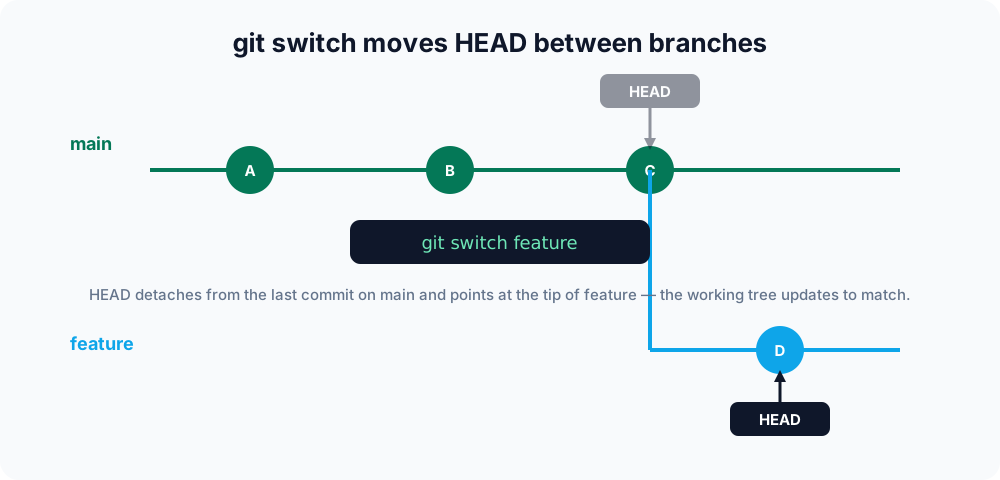
The git switch command changes the branch you are working on. Introduced in Git 2.23, it was carved out of the overloaded git checkout command to do one job clearly: move HEAD to another branch and update your working tree to match. Anything to do with restoring files now lives in git restore, so switch stays focused on branches alone.
This page covers switching to an existing branch, creating a branch on the fly, checking out a remote branch, carrying uncommitted changes across, jumping back with -, and how git switch differs from git checkout.
Why git switch exists
For years, git checkout handled two unrelated tasks: switching branches and restoring files in the working tree. That overloading made it easy to lose work by accident — git checkout <file> silently discarded changes, while git checkout <branch> moved you somewhere new. Git 2.23 split the responsibilities so that each command is predictable: git switch moves between branches, and git restore recovers files. Both were introduced together for exactly this reason. git checkout is not deprecated and still works, but for everyday branch work git switch is clearer and safer.
Switching to an existing branch
To move onto a branch that already exists, name it:
git switch featureHEAD now points at feature, and your working directory reflects that branch's latest commit. If you have uncommitted changes that would be overwritten, Git stops and warns you rather than throwing the work away.
Creating and switching in one step
Use the -c (create) flag to make a new branch and move onto it immediately:
git switch -c new-featureThis is the modern equivalent of git checkout -b new-feature. You can also base the new branch on a specific starting point:
git switch -c hotfix mainHere main is the start point: the new hotfix branch begins at the same commit as main, but the two then diverge independently. The start point can be any branch name, tag, or commit hash.
Checking out a remote branch
A very common case is starting work on a branch that exists on the remote but not yet locally — for example after a teammate pushes a feature branch. If the name is unambiguous, just switch to it:
git fetch
git switch featureGit sees there is no local feature branch, finds a single origin/feature, and automatically creates a local feature that tracks it. This convenience is the --guess behavior, which is on by default. To be explicit, or when several remotes have a branch of the same name, name the tracking branch yourself:
git switch -c feature --track origin/featureRun git fetch first. git switch can only find a remote branch your local repository already knows about; fetching updates that list.
Carrying uncommitted changes to another branch
By default, switching with uncommitted changes is fine as long as those changes do not conflict with the target branch — Git keeps them in your working tree. If they would be overwritten, Git refuses and tells you. To deliberately bring conflicting local changes along and merge them into the new branch, add -m (--merge):
git switch -m other-branchIf you would rather set the changes aside cleanly and reapply them later, use git stash instead of forcing the switch.
Common options
| Command | Description |
|---|---|
git switch <branch> | Switches to an existing branch. |
git switch -c <branch> | Creates a new branch and switches to it. |
git switch -c <branch> <start-point> | Creates a branch from a given commit or branch and switches to it. |
git switch - | Switches back to the previously checked-out branch. |
git switch -c <branch> --track <remote>/<branch> | Creates a local tracking branch from a remote branch. |
git switch --detach <commit> | Checks out a commit directly in a detached HEAD state. |
git switch -m <branch> | Switches, merging conflicting local changes into the target branch. |
git switch -C <branch> | Creates the branch, or resets it if it already exists, then switches. |
git switch --orphan <branch> | Starts a new branch with no history and an empty working tree. |
Going back to where you were
A single dash returns you to the branch you were on before:
git switch -This is handy when you are bouncing between two branches and do not want to type their names repeatedly.
Inspecting a commit without a branch
To look at an old commit without moving any branch, use --detach. This puts you in a detached HEAD state — HEAD points straight at a commit instead of a branch name:
git switch --detach 8f4c2a1You can browse and even build from here, but any new commits are not attached to a branch and can be lost once you switch away. If you decide to keep them, create a branch first with git switch -c <name>.
git switch vs git checkout
Both commands can change branches, so why prefer switch? Because it cannot touch your files by accident. git checkout accepts both branch names and file paths, which means a typo can quietly overwrite your work. git switch only ever deals with branches; if you want to discard changes to a file, you reach for the clearly named git restore instead.
# Old, overloaded way
git checkout main
git checkout -b feature

# Modern, explicit way
git switch main
git switch -c featureNote that one thing git checkout can do that git switch cannot is operate on files (git checkout -- file.txt). That is intentional: file operations belong to git restore now.
Related commands
- git checkout — the older, multi-purpose command that
switchandrestorereplaced. - git restore — discard or recover changes to files in the working tree.
- git branch — list, create, rename, and delete branches.
- git merge — combine work from another branch once you have switched back.
- git stash — shelve uncommitted changes before switching.