
Git gives the opportunities to share branches between repositories instead of sharing a single changeset. In this chapter, we will learn about the set of commands that have their responsibilities in the syncing process. Find detailed information about the commands on our next pages.
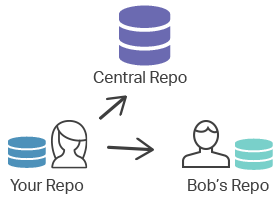
git remote
The git remote command is designed for creating, viewing and removing connections to other repositories. By default, it lists all the remote connections that have previously been stored to other repositories.
git fetch
The git fetch command is used to download commits, files and references from the remote repository into the local repository. It displays what other members of the team have been working on. Both git fetch and git pull are used for downloading the content from the remote repository. The git fetch command just shows the progression of the central history while the git pull command not only downloads the new content but also directly integrates it into the current working copy.
git push
The git push command is used to upload the content of the local repository to the remote repository. If git fetch imports the content to the local branches, git push exports it to the remote branches. After the changes are made in the local repository, you can invoke git push to share the modification with other members of the team. The git push command is one of the commands that are involved in the "syncing" process. These commands work on the remote branches that are configured with the git remote command.
git pull
The git pull command fetches and downloads content from the remote repository and integrates changes into the local repository. The git pull command is called as the combination of git fetch followed by git merge. It is one of the commands taking part in the syncing process.
Practice Your Knowledge


Quiz Time: Test Your Skills!
Ready to challenge what you've learned? Dive into our interactive quizzes for a deeper understanding and a fun way to reinforce your knowledge.