JavaScript IndexedDB
Learn JavaScript IndexedDB: open a database, handle onupgradeneeded, create object stores and indexes, and run transactions.
IndexedDB is a powerful, client-side storage API that is more robust than other local storage solutions available in web browsers. It allows for significant amounts of structured data to be stored and manipulated asynchronously by web applications. IndexedDB is perfect for applications that require offline data storage, high performance, and rich query capabilities without reliance on a network connection.
This chapter covers everything you need to start using IndexedDB: opening a database and handling version upgrades, creating object stores and indexes, running transactions, and performing the full CRUD cycle (add, get, put, delete) including iterating with cursors and querying through indexes.
When to use IndexedDB
IndexedDB stores almost any JavaScript value — objects, arrays, dates, blobs, and files — not just strings, and it can hold hundreds of megabytes, far beyond the ~5 MB limit of localStorage and sessionStorage. It is a transactional NoSQL key/value store with indexes, which makes it the right choice for:
- Offline-first apps that need to work without a network connection.
- Caching large datasets such as API responses, documents, or media files.
- Querying records by indexed fields rather than reading everything into memory.
If you only need to persist a few small string values, reach for the simpler Web Storage APIs instead. See the Storage API chapter for an overview of how the browser manages storage quotas across these mechanisms.
The event-based, asynchronous API
Every IndexedDB operation is asynchronous and event-driven. Calls such as indexedDB.open() or store.get() return a request object immediately; the actual result arrives later through onsuccess / onerror event handlers. Your code never blocks waiting for disk I/O. Because of this, you cannot read a result synchronously right after issuing a request — you must wait for the event to fire. (Modern code often wraps these requests in Promises, but the native API itself is callback-based, which is what the examples below use.)
Setting Up an IndexedDB Database
Step 1: Open a Database
To use IndexedDB, the first step is to open a database with indexedDB.open(name, version). The optional second argument is an integer version number. If the database does not exist, or the version you request is higher than the stored one, the onupgradeneeded event fires — this is the only place where you are allowed to change the database structure (create or delete object stores and indexes).
The call returns a request and can fire three events:
onsuccess— the database opened and is ready to use (event.target.resultis theIDBDatabase).onerror— opening failed.onupgradeneeded— a schema change is needed (see Step 2).
Here is how you can create or open an IndexedDB database. After a successful operation, we close the database to prevent unwanted side effects in other examples. You may skip this step in your own code, or include it if needed.
Warning: Calling deleteDatabase() will wipe all data for this database. This is only for testing purposes and should not be used in production.
Step 2: Creating Object Stores
Once the database is opened, you can proceed to create an object store, which is akin to a table in relational databases. Note that this can only be done during a version upgrade (when opening the database with a higher version number). The event to listen for is onupgradeneeded.
When you create a store you choose how each record's primary key is defined:
{ keyPath: 'id' }— the key is read from theidproperty of every stored object (an in-line key).{ keyPath: 'id', autoIncrement: true }— the store generates a sequential key automatically if you do not supply one.{ autoIncrement: true }— keys are generated and stored separately from the value (an out-of-line key).
You also create indexes inside onupgradeneeded. An index lets you look records up by a property other than the primary key. Pass { unique: true } to reject duplicate values for that property.
Transactions
Once your database and object stores are set up, you'll need to manage data operations using transactions. A transaction in IndexedDB is a mechanism that groups multiple operations into a single unit of work that either completely succeeds or completely fails. It is essential for ensuring data consistency and integrity, especially when multiple operations depend on each other to produce a correct outcome.
How to Use Transactions in IndexedDB
Step 1: Starting a Transaction
To perform any operation in IndexedDB, you start by creating a transaction on a database. A transaction is created by specifying which object stores the transaction will involve and the mode of the transaction, which can be either "readonly" or "readwrite".
Step 2: Accessing an Object Store
Within a transaction, you can access one or more object stores to perform data operations.
Step 3: Performing Operations
Once you have access to an object store, you can execute various operations like adding, retrieving, updating, or deleting data. Each operation returns a request object that you can use to handle success or error events.
Step 4: Completing the Transaction
A transaction will automatically complete once all the operations issued in it have been resolved, either by succeeding or failing. You can also listen for the complete event on the transaction to perform actions after all operations have successfully finished.
Here is an example of a complete transaction:
Reading Data
To retrieve data, use store.get(key) or a cursor for iterating over multiple records. Here are quick examples:
Retrieving a single record:
Iterating with a cursor:
Querying with Indexes
The primary key lets you fetch a record when you already know its key. An index lets you search by another property — for example, finding a book by its title. Access an index with store.index(name), then call get(), getAll(), or openCursor() on it just like on a store.
Looking up a record by an indexed property:
You can also restrict a query to a range of keys with IDBKeyRange (for example IDBKeyRange.bound('A', 'M') to fetch every book whose title starts between A and M), passing the range to getAll() or openCursor().
Updating and Deleting Records
To modify existing data, use store.put() with the same key. To remove data, use store.delete(key).
Updating a record:
Deleting a record:
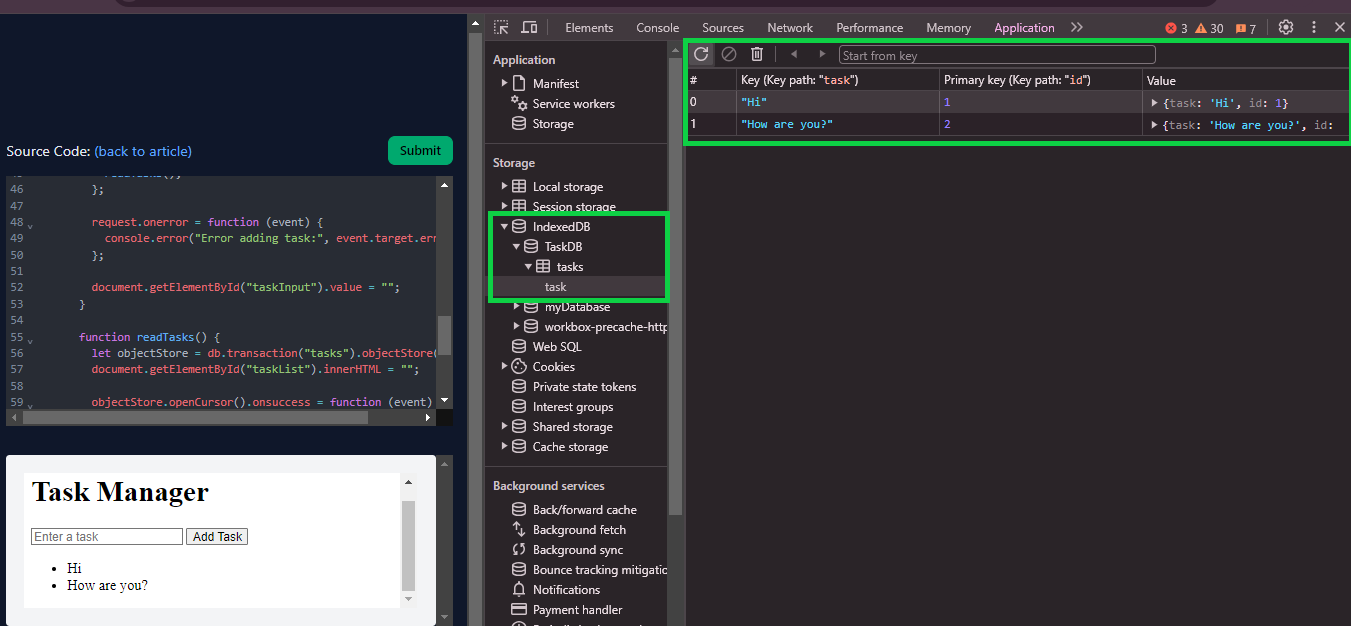
How to view IndexedDB content in your browser
After storing and manipulating data, you may want to inspect what's actually saved in your browser. Most modern browsers show you what is stored in the IndexedDB. Below is the example from Chrome's developer tools:
Best Practices for Using Transactions
To ensure your IndexedDB implementation remains reliable and performant, follow these guidelines:
- Minimize the Scope: Keep transactions as small as possible, both in terms of the number of operations and the duration. This reduces the likelihood of conflicts and improves performance.
- Error Handling: Always implement error handling on both the request and transaction levels. This helps in diagnosing issues and preventing partial updates that could lead to data corruption.
- Concurrency: Understand that while IndexedDB is asynchronous and non-blocking, transactions on the same database are queued and executed serially to prevent data races and inconsistencies.
Conclusion
IndexedDB provides a robust platform for complex data management in web applications, making it an essential tool for modern web developers. Through the proper implementation of its features, developers can efficiently store, retrieve, update, and delete client-side data, enhancing application performance and user experience.
For simpler storage needs and to understand the wider browser-storage picture, see these related chapters:
- localStorage and sessionStorage — lightweight key/value storage for small amounts of string data.
- The Storage API — how the browser manages storage quotas and persistence across mechanisms.
- Working with JSON — serializing data, useful when moving objects in and out of storage.